
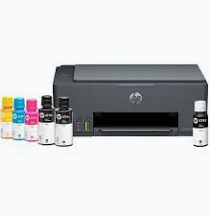
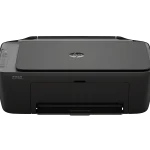
HP Smart Tank 581 Wireless All-in-One Printer – Refillable Ink Tank, Wi-Fi, Colour Printing, Scanning and Copying
KSh 18,500.00
-
Refillable ink tank system for economical printing
-
Colour and black-and-white printing
-
Built-in Wi-Fi and Wi-Fi Direct
-
Print, scan and copy in one device
-
Compatible mobile printing support
HP Smart Tank 581 Wireless All-in-One Printer – Refillable Ink Tank, Wi-Fi, Colour Printing, Scanning and Copying
The HP Smart Tank 581 Wireless All-in-One Printer is an economical printing solution designed for homes, students, small businesses and home offices that need reliable document production with lower ongoing ink costs. Combining printing, scanning and copying with a high-capacity refillable ink tank system, it provides a convenient alternative to traditional cartridge-based inkjet printers.
With built-in Wi-Fi, mobile printing support and the ability to print both colour and black-and-white documents, the HP Smart Tank 581 helps simplify everyday printing tasks. Its refillable ink tanks are designed for users who print regularly and want to reduce the frequency of ink replacements. From school assignments and business documents to forms, reports and colour graphics, this printer offers practical functionality in a compact design.
What Is the HP Smart Tank 581 Wireless All-in-One Printer?
The HP Smart Tank 581 is a colour inkjet multifunction printer that combines three essential functions: printing, scanning and copying. It uses refillable ink tanks supplied with bottled ink rather than conventional disposable ink cartridges.
This design is particularly useful for users who print frequently and want to manage their ongoing printing costs. The printer supports black-and-white and colour output, while its flatbed scanner allows users to digitise documents and reproduce paperwork through the copying function.
Built-in Wi-Fi and Wi-Fi Direct provide flexible wireless connectivity, while USB 2.0 supports a direct connection to a compatible computer. Users can also print from supported smartphones and tablets using compatible HP and mobile printing applications.
HP Smart Tank 581 Technical Specifications
- Printer type: Colour inkjet all-in-one printer
- Functions: Print, scan and copy
- Print technology: HP Thermal Inkjet
- Black print speed: Up to 12 pages per minute (ISO A4)
- Colour print speed: Up to 5 pages per minute (ISO A4)
- Black print quality: Up to 1200 × 1200 rendered dpi
- Colour print quality: Up to 4800 × 1200 optimised dpi on supported paper and settings
- Connectivity: Hi-Speed USB 2.0, Wi-Fi 802.11b/g/n and Wi-Fi Direct
- Mobile printing: HP app, Apple AirPrint, Mopria and supported Android printing services
- Display: 1.2-inch icon LCD
- Paper input capacity: Up to 100 sheets
- Paper output capacity: Up to 30 sheets
- Scanner type: Flatbed
- Optical scan resolution: Up to 1200 dpi
- Duplex printing: Manual, with driver support
- Monthly duty cycle: Up to 3,000 pages
- Recommended monthly page volume: 400–800 pages
- Dimensions: Approximately 434.66 × 361.53 × 157.26 mm
- Weight: Approximately 5.03 kg
Specifications are based on HP’s published product information. Print speeds vary with document complexity and settings. Supplied ink bottles and compatible consumables may differ by region.
Why Choose the HP Smart Tank 581 Wireless Printer?
1. Refillable Ink Tanks for Lower Printing Costs
The HP Smart Tank 581 uses refillable ink tanks that can be replenished using compatible HP ink bottles. This system is designed to provide a high volume of printing from the supplied ink, helping reduce the cost per page compared with many conventional cartridge-based printers.
It is a practical option for students, households and small businesses that regularly produce documents and want to manage recurring printing expenses.
2. Wireless Printing for Greater Convenience
Built-in Wi-Fi allows the printer to connect to a compatible wireless network, reducing dependence on a direct USB connection. Wi-Fi Direct also enables supported devices to connect to the printer without requiring a traditional router-based connection.
Compatible mobile printing services allow users to print from supported smartphones, tablets and computers, making everyday document handling more flexible.
3. Colour and Black-and-White Printing
The printer produces both monochrome and colour documents, supporting a range of personal, academic and business needs. Black printing is useful for letters, forms and reports, while colour output supports charts, school projects, graphics and selected photo-printing tasks.
Its high-quality print modes help produce clear text and detailed colour output when used with suitable paper and settings.
4. Print, Scan and Copy in One Device
The integrated flatbed scanner and copier make it possible to manage everyday documents without purchasing separate equipment. Users can scan paperwork for digital storage, create copies of important records and print documents from a connected device.
This multifunction design is useful for smaller workspaces where simplicity and efficient use of space are priorities.
5. Compact Design for Home and Small Offices
With a weight of approximately 5.03 kg, the HP Smart Tank 581 is relatively easy to position on a desk or office workstation. Its compact footprint makes it suitable for study rooms, reception areas, home offices and small businesses.
The simple control panel provides access to essential printer functions without requiring a large touchscreen interface.
6. Practical Paper Handling and Everyday Reliability
The 100-sheet input tray supports routine document printing, while the 30-sheet output tray collects finished pages. The printer accommodates common paper types, including plain paper, selected photo papers, brochure papers and envelopes.
Its recommended monthly page volume of 400–800 pages makes it suitable for light to moderate printing workloads. For consistently high-volume business printing, a higher-capacity business printer may be more appropriate.
Ideal Applications of the HP Smart Tank 581
Home use: Print personal documents, letters, forms and household records while managing ink costs.
Students: Produce assignments, revision notes, worksheets, research documents and colour projects.
Small businesses: Print invoices, quotations, business forms, reports and customer documents.
Home offices: Handle everyday printing, scanning and copying using a connected computer or compatible mobile device.
Education and training: Produce learning materials, worksheets and instructional documents for regular use.
Why Buy the HP Smart Tank 581 from Avidik Ventures?
Avidik Ventures supplies technology products and office equipment for individuals and businesses seeking practical solutions for everyday operations. When choosing an ink tank printer, it is important to consider print volume, connectivity, colour requirements and the long-term availability of compatible ink.
Visit Avidik Ventures to explore available printers, ink supplies and other technology products. Before purchasing, confirm the exact model, included ink bottles, compatible replacement inks and applicable warranty coverage.
Make Everyday Printing More Economical with HP
The HP Smart Tank 581 Wireless All-in-One Printer combines refillable ink tanks, wireless connectivity, colour printing, scanning and copying in one compact device. It is a suitable choice for users who need flexible everyday printing and want to manage ongoing ink expenses across home, educational and small-business environments.











Reviews
There are no reviews yet.