
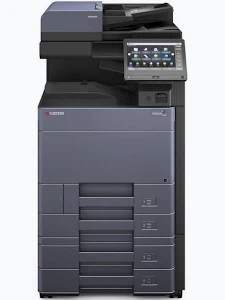

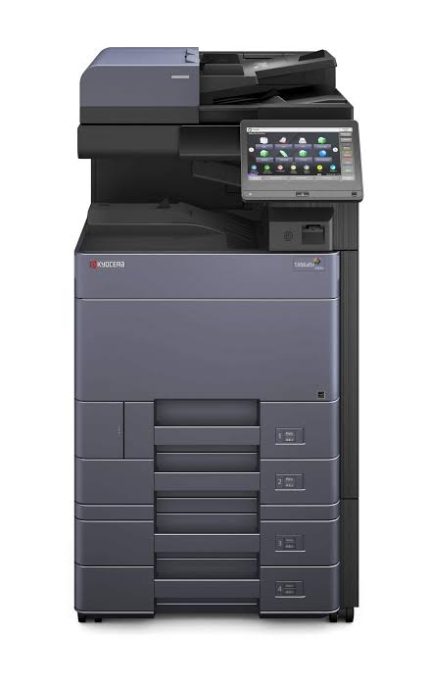
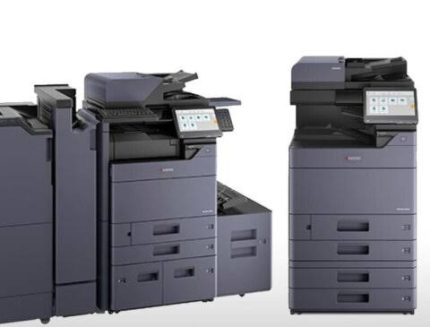
Kyocera TASKalfa 6003i Multifunction Printer
KSh 80,000.00
- Monochrome printing up to 60 A4 pages per minute
- Professional print resolution up to 1,200 × 1,200 dpi
- A3 and SRA3 paper support with compatible feeds
- Network scanning and Gigabit Ethernet connectivity
- 10.1-inch colour touchscreen with expandable finishing options
Kyocera TASKalfa 6003i Multifunction Printer
The Kyocera TASKalfa 6003i Multifunction Printer is a high-performance monochrome office system designed for demanding document workflows. It combines printing, copying, and scanning in one robust A3-capable device. With print speeds of up to 60 pages per minute, it supports busy offices that process substantial document volumes. Its large colour touchscreen simplifies daily operations, while flexible paper handling accommodates different document formats. This multifunction printer suits corporate offices, educational institutions, print departments, and professional service organisations.
What It Is
The Kyocera TASKalfa 6003i is a black-and-white multifunction printer built for productivity, document management, and reliable everyday office operation. It provides standard print, copy, and scan functions, while fax capability is available as an option. Its laser printing technology produces crisp text and detailed monochrome graphics for business documents.
The device supports paper sizes up to SRA3 through compatible paper feeds. It also offers network connectivity, USB interfaces, mobile printing support, and configurable finishing options. These features help businesses streamline document production and integrate printing into existing office workflows. Optional accessories can expand paper capacity, finishing, faxing, and document-processing capabilities.
Technical Specifications
- Brand: Kyocera
- Model: TASKalfa 6003i
- Printer type: Monochrome laser multifunction printer
- Functions: Print, copy, scan; optional fax
- Print speed: Up to 60 pages per minute for A4 monochrome printing
- Print resolution: Up to 1,200 × 1,200 dpi
- Copy resolution: 600 × 600 dpi
- First print time: Approximately 3.8 seconds
- First copy time: Approximately 3.4 seconds from the platen
- Display: 10.1-inch colour touchscreen
- Standard memory: 4GB RAM
- Storage: 32GB SSD in the listed regional specification; optional HDD configurations vary
- Standard paper capacity: 1,150 sheets
- Maximum paper capacity: Up to 7,150 sheets with specified optional feeders
- Paper sizes: Up to SRA3, depending on the feed source
- Duplex printing: Standard automatic duplex
- Network connectivity: Gigabit Ethernet
- USB connectivity: USB interface and multiple USB host ports
- Dimensions: Approximately 602 × 665 × 790mm
- Weight: Approximately 83kg for the main unit
Specifications may vary by region and installed configuration. Document processors, finishers, fax units, and additional paper feeders may be optional.
Why Choose Kyocera TASKalfa 6003i Multifunction Printer
High-Speed Monochrome Printing
The TASKalfa 6003i delivers up to 60 A4 pages per minute in black and white. This speed helps busy departments manage reports, invoices, forms, and internal documentation efficiently. Its laser printing technology supports sharp text and clear business graphics. It is suitable for organisations with frequent printing requirements and tight turnaround times.
Professional Document Quality
Print resolution reaches up to 1,200 × 1,200 dpi for detailed monochrome output. This helps produce readable text, professional reports, and consistent office documents. Copying supports 600 × 600 dpi resolution for everyday reproduction tasks. The system is designed to handle routine business documents across varied office workflows.
Flexible A3 Paper Handling
The printer supports paper sizes up to SRA3 through compatible feed sources. This flexibility helps businesses produce larger documents, diagrams, spreadsheets, and specialised office materials. Automatic duplex printing reduces manual page handling for compatible jobs. Optional paper feeders can increase capacity for longer print runs.
Efficient Scanning and Document Sharing
The TASKalfa 6003i supports scanning to email, network folders, FTP, and USB storage. Scanning speeds depend on the installed document processor and selected settings. Optional dual-scan document processors can improve throughput for large batches of originals. These capabilities help digitise records and distribute documents across business teams.
Intuitive Touchscreen and Network Integration
The 10.1-inch colour touchscreen provides a central interface for common printing, copying, and scanning tasks. Gigabit Ethernet supports integration with compatible office networks. Mobile printing options include AirPrint, Mopria, and Kyocera Mobile Print, subject to configuration and device compatibility. For official technical details, visit the Kyocera TASKalfa 6003i specifications page.
Ideal Uses and Everyday Applications
Corporate Offices and Business Departments
Large offices can use the TASKalfa 6003i for reports, contracts, invoices, and administrative documents. Its high-speed printing supports departments that share a central multifunction device. Network connectivity helps employees access printing and scanning across compatible workstations.
Schools, Colleges, and Universities
Educational institutions can print teaching materials, administrative records, worksheets, and examination documents. A3 support accommodates larger tables, diagrams, and planning sheets. High-speed output is useful during busy academic periods when multiple departments require printed materials.
Professional Service Organisations
Accounting firms, legal practices, consultancies, and logistics companies often manage substantial document workloads. The printer supports everyday monochrome paperwork and digital document distribution. Optional finishing accessories can help organise larger jobs for meetings, filing, or client delivery.
Print Rooms and Document Centres
Internal print rooms can use the device for recurring black-and-white document production. Expandable paper capacity supports longer jobs with fewer interruptions. Optional finishing equipment can add capabilities such as stapling or booklet production, depending on the selected configuration.
Buy Kyocera Office Equipment from Avidikventures
Avidikventures helps businesses find practical technology and office equipment for everyday operations. Explore our product range at Avidikventures. Before purchasing, confirm the machine’s condition, included accessories, meter reading, and installed options. Check that the configuration matches your paper handling, scanning, and finishing requirements.











Reviews
There are no reviews yet.