
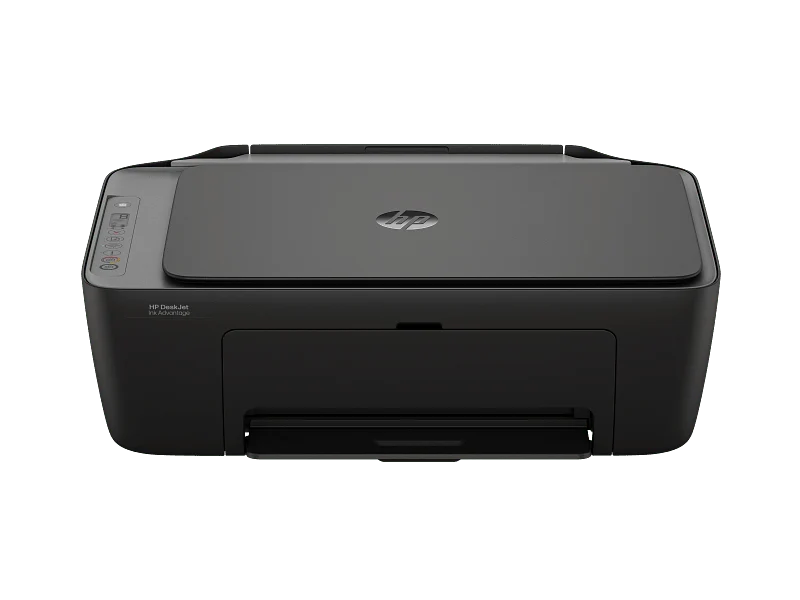
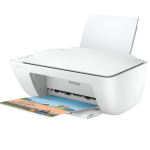
HP DeskJet Ink Advantage 2976 All-in-One Printer – Colour Printing, Wi-Fi, Scanning and Copying
KSh 8,500.00
-
Print, scan and copy with one compact device
-
Colour and black-and-white inkjet printing
-
Built-in dual-band Wi-Fi connectivity
-
Mobile printing from compatible devices
-
Lightweight design for home and small-office use
HP DeskJet Ink Advantage 2976 All-in-One Printer – Colour Printing, Wi-Fi, Scanning and Copying
The HP DeskJet Ink Advantage 2976 All-in-One Printer is a compact, wireless inkjet printing solution designed for homes, students and small offices that need convenient everyday document handling. Combining printing, scanning and copying in one device, it provides essential functionality in a space-saving design that fits easily into a study area, home office or small business workstation.
With colour and black-and-white printing, built-in dual-band Wi-Fi and support for mobile printing, the HP DeskJet Ink Advantage 2976 makes it easier to manage documents from compatible computers, smartphones and tablets. Its straightforward setup and simple controls make it suitable for users who need a practical printer for assignments, business paperwork, forms and everyday personal documents.
What Is the HP DeskJet Ink Advantage 2976 All-in-One Printer?
The HP DeskJet Ink Advantage 2976 is an all-in-one thermal inkjet printer that combines three essential functions: printing, scanning and copying. It uses separate black and tri-colour ink cartridges to produce text documents and colour output for a range of everyday tasks.
The integrated flatbed scanner allows users to digitise paper documents and images, while the copying function makes it convenient to reproduce paperwork without needing a separate photocopier. Built-in Wi-Fi provides flexible connectivity, and USB 2.0 offers a direct connection to a compatible computer.
Designed for relatively light printing workloads, the printer is particularly suitable for students, families, home-based professionals and small businesses that need a versatile device without the size of a larger office printer.
HP DeskJet Ink Advantage 2976 Technical Specifications
- Printer type: Colour inkjet all-in-one printer
- Functions: Print, scan and copy
- Print technology: HP Thermal Inkjet
- Black print speed: Up to 7.5 pages per minute (ISO A4)
- Colour print speed: Up to 5.5 pages per minute (ISO A4)
- Black print quality: Up to 1200 × 1200 rendered dpi
- Colour print quality: Up to 4800 × 1200 optimised dpi on supported photo paper and settings
- Connectivity: Dual-band Wi-Fi and Hi-Speed USB 2.0
- Mobile printing: HP app, Apple AirPrint and supported Android printing services
- Display: Icon LCD display
- Paper input capacity: Up to 60 sheets
- Paper output capacity: Up to 25 sheets
- Duplex printing: Manual, with driver support
- Scanner type: Flatbed
- Optical scan resolution: Up to 1200 dpi
- Supported paper sizes: A4, B5, A6 and DL envelopes
- Compatible cartridges: HP 654 Black and HP 654 Tri-colour in the listed African regional configuration
- Dimensions: Approximately 425 × 304 × 154 mm
- Weight: Approximately 3.42 kg
Specifications and cartridge compatibility may vary by country or product code. Confirm the regional model and consumables before purchasing.
Why Choose the HP DeskJet Ink Advantage 2976 All-in-One Printer?
1. Print, Scan and Copy in One Device
The HP DeskJet Ink Advantage 2976 combines three useful document functions in one compact machine. Users can print assignments and business documents, scan paperwork for digital storage and make copies when needed.
This integrated functionality helps reduce the need for separate devices, making it a practical option for smaller workspaces.
2. Colour and Black-and-White Printing
The printer supports both monochrome and colour output, allowing users to produce letters, forms, reports, school projects and other everyday documents. Colour printing is useful for charts, graphics and learning materials that benefit from visual detail.
For home users and small businesses with moderate printing requirements, this flexibility supports a broad range of routine tasks.
3. Built-in Dual-Band Wi-Fi
With support for 2.4 GHz and 5 GHz Wi-Fi networks, the printer offers flexible wireless connectivity for compatible devices. Users can set it up on a supported wireless network and print without relying exclusively on a direct USB connection.
Compatible mobile printing services also make it convenient to send documents from supported smartphones and tablets. Actual compatibility depends on the device, operating system and network configuration.
4. Compact and Lightweight Design
The printer measures approximately 425 × 304 × 154 mm and weighs around 3.42 kg. Its compact design helps conserve desk space, while its lightweight construction makes it easier to position in a study room, reception area or home office.
This makes it suitable for users who want printing functionality without dedicating substantial space to office equipment.
5. Convenient Flatbed Scanning and Copying
The flatbed scanner supports optical scanning resolutions of up to 1200 dpi, making it useful for digitising letters, forms, receipts and selected images. Users can create digital records for storage or sharing and make copies of everyday paperwork.
These features support basic administrative tasks for households, students and small businesses.
6. Simple Paper Handling and Easy Everyday Use
The 60-sheet input tray accommodates routine printing, while the 25-sheet output tray collects finished documents. The printer supports common paper sizes, including A4, and selected photo and specialty inkjet papers.
Manual duplex printing is available through supported driver settings, allowing users to print on both sides of a sheet by turning the paper themselves.
Ideal Applications of the HP DeskJet Ink Advantage 2976
Home use: Print letters, forms, personal documents and everyday paperwork.
Students: Produce assignments, revision notes, worksheets and school projects.
Small businesses: Print basic invoices, quotations, forms and administrative documents.
Home offices: Print work materials, scan paperwork and make copies using one connected device.
Families: Handle learning materials, household records and occasional colour printing.
Why Buy the HP DeskJet Ink Advantage 2976 from Avidik Ventures?
Avidik Ventures supplies technology products and office equipment for individuals and businesses seeking practical solutions for everyday needs. When choosing a printer, it is important to consider print volume, wireless connectivity, colour requirements and the ongoing cost of replacement ink cartridges.
Visit Avidik Ventures to explore available printers, ink cartridges and other technology products. Before purchasing, confirm the exact model, included cartridges, regional warranty terms and availability of compatible HP replacement ink.
Simplify Everyday Printing with HP
The HP DeskJet Ink Advantage 2976 All-in-One Printer is a practical option for users who need colour printing, scanning and copying in one compact device. With built-in dual-band Wi-Fi, USB connectivity and support for compatible mobile printing services, it offers convenient document handling for homes, students and small offices.











Reviews
There are no reviews yet.