
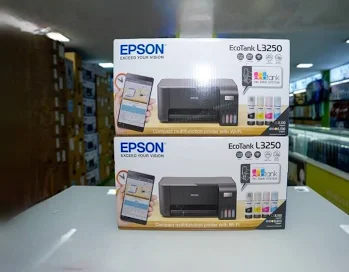
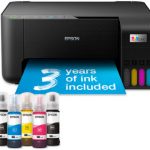
Epson EcoTank L3250 Printer – Wireless All-in-One Ink Tank Printer for Home and Office
KSh 24,500.00
-
Print, scan and copy in one device
-
Wi-Fi and Wi-Fi Direct connectivity
-
Refillable four-colour EcoTank system
-
Supplied ink yield up to 8,100 black and 6,500 colour pages
-
Print resolution up to 5760 × 1440 dpi
Epson EcoTank L3250 Printer – Wireless All-in-One Ink Tank Printer for Home and Office
The Epson L3250 Printer is a versatile multifunction ink tank printer designed for homes, students, small businesses and home offices that need affordable, reliable printing. Combining printing, scanning and copying with built-in Wi-Fi and Wi-Fi Direct, it allows users to manage everyday documents through wired or compatible wireless connections.
Powered by Epson Micro Piezo printhead technology, the L3250 delivers print resolutions of up to 5760 × 1440 dpi, producing sharp text, detailed graphics and vibrant colour documents. Its refillable four-colour ink tank system helps reduce ongoing printing costs, while the high-yield ink supplied with the printer supports extended use before refilling is needed.
Whether you are printing school assignments, business reports, invoices, forms or colour photographs, the Epson EcoTank L3250 offers a compact and economical solution for everyday document management.
What Is the Epson EcoTank L3250 Printer?
The Epson EcoTank L3250 is a three-in-one ink tank printer that combines printing, scanning and copying in a single device. Instead of using conventional disposable ink cartridges, it features refillable tanks that accept compatible Epson ink bottles.
One of its key advantages over the Epson L3210 is wireless connectivity. The L3250 supports Wi-Fi and Wi-Fi Direct, allowing compatible devices to print without requiring a direct USB connection. It also supports Epson Connect mobile and cloud printing services, subject to device and service compatibility.
Its compact design makes it suitable for desks, study rooms, small offices and business counters where space is limited but dependable printing remains essential.
Epson L3250 Technical Specifications
- Model: Epson EcoTank L3250
- Manufacturer product code: C11CJ67418 for the Kenya-listed model
- Functions: Print, scan and copy
- Printing technology: Epson Micro Piezo printhead
- Ink system: Four-colour refillable ink tank
- Ink colours: Black, cyan, magenta and yellow
- Maximum print resolution: 5760 × 1440 dpi
- ISO print speed: Up to 10 pages per minute in monochrome and 5 pages per minute in colour
- Draft colour print speed: Up to 15 pages per minute under specified conditions
- Scanner type: Flatbed colour scanner with CIS sensor
- Optical scanning resolution: Up to 1200 × 2400 dpi
- Connectivity: USB, Wi-Fi and Wi-Fi Direct
- Mobile printing: Epson Connect services, including supported Epson iPrint functions
- Automatic duplex printing: No; manual double-sided printing is supported
- Standard paper input capacity: 100 sheets
- Output tray capacity: 30 sheets
- Borderless printing: Supported up to 10 × 15 cm
- Maximum print resolution: 5760 × 1440 dpi
- Dimensions: Approximately 375 × 347 × 179 mm
- Colour: Black
Specifications are based on Epson Kenya’s product information. Actual performance varies with print settings, paper, document complexity and operating conditions.
Why Choose the Epson EcoTank L3250 Printer?
1. Low-Cost Printing with Refillable Ink Tanks
The EcoTank system replaces conventional disposable cartridges with refillable ink tanks. This can significantly reduce printing costs for users who regularly produce documents, assignments, reports and colour materials.
Epson promotes savings of up to 90% on ink costs compared with selected similarly featured cartridge-based printers. Actual savings depend on usage, ink prices and the comparison model.
2. High-Yield Ink for Extended Printing
The supplied ink is rated for up to 8,100 black pages and 6,500 colour pages under Epson’s stated testing methodology. These yields can help reduce the frequency of ink purchases for everyday home and small-office printing.
Actual page yields vary with document coverage, print settings, paper type and environmental conditions. The initial ink supply also contributes to filling the printhead during setup.
3. Sharp Text and Vibrant Colour Output
With a maximum resolution of 5760 × 1440 dpi, the L3250 is suitable for producing detailed text, colourful graphics, charts and compatible photographs. It can handle school projects, business correspondence, invoices, presentations and general-purpose colour printing.
For the best results, use suitable paper and select the correct print quality settings for the task.
4. Wireless Printing from Compatible Devices
Built-in Wi-Fi and Wi-Fi Direct allow users to print through supported wireless configurations. Wi-Fi Direct can connect compatible devices to the printer without requiring a conventional wireless router.
This is useful for households, small teams and workspaces where several compatible devices may need access to the printer. Wireless setup and mobile printing depend on device compatibility and network configuration.
5. Print, Scan and Copy in One Device
The integrated flatbed scanner and copying function make the L3250 useful for everyday document management. Users can digitise paperwork, reproduce forms and print files without purchasing separate machines.
This multifunction design saves desk space and provides practical value for users who regularly handle both physical and digital documents.
6. Flexible Paper Handling
The printer supports common document sizes, including A4, A5, A6 and Letter, as well as selected envelopes and photo paper. Borderless printing is available for compatible photo sizes up to 10 × 15 cm.
Its standard 100-sheet input tray supports routine home and office jobs. Automatic double-sided printing is not included, but manual duplex printing is possible.
Ideal Applications for the Epson L3250
Home and personal use: Print forms, letters, personal documents and everyday paperwork.
Students and schools: Produce assignments, revision notes, research reports, charts and learning materials.
Small businesses: Print invoices, quotations, business correspondence, stock records and administrative documents.
Home offices: Scan paperwork, copy documents and print work materials from computers or compatible mobile devices.
Retail shops and service providers: Handle customer forms, receipts, internal records and routine office paperwork.
Photography and creative projects: Print compatible photographs and colour graphics on supported photo paper sizes.
Why Buy the Epson L3250 from Avidik Ventures?
Avidik Ventures supplies printers, cartridges, toners, computer accessories and other technology products for homes and businesses. Choosing the right printer means considering running costs, connectivity, print volume, paper handling and scanning requirements.
Visit Avidik Ventures to explore available printing solutions and enquire about the Epson EcoTank L3250. Confirm stock availability, warranty coverage, included ink bottles and the exact regional product code before placing an order.
Enquire About the Epson EcoTank L3250 Today
The Epson L3250 combines economical refillable ink printing, wireless connectivity, scanning and copying in one compact machine. Its high supplied ink yield and mobile printing support make it a practical choice for students, home users and small businesses that want flexible everyday printing.
Contact Avidik Ventures to enquire about availability and find a suitable printing solution for your home or business.











Reviews
There are no reviews yet.