
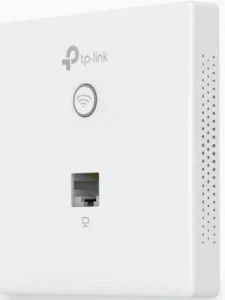
TP-Link Omada AC1200 Wireless MU-MIMO Gigabit Wall-Plate Access Point – TL-EAP235-WALL
KSh 6,400.00
- AC1200 dual-band Wi-Fi with MU-MIMO
- Four Gigabit Ethernet ports
- PoE pass-through up to 13 W with compatible PoE+ input
- Slim wall-plate design for room-level connectivity
- Centralised management through compatible Omada solutions
TP-Link EAP235-Wall Access Point – AC1200 Wireless MU-MIMO Gigabit Wall-Plate
The TP-Link EAP235-Wall Access Point delivers reliable dual-band Wi-Fi and Gigabit wired connectivity in a compact wall-mounted design. Built for hotels, offices, student residences, hospitals, and commercial properties, it provides convenient wireless access while connecting wired devices through its integrated Ethernet ports. With AC1200 wireless performance, MU-MIMO technology, and Omada network management, it is a practical solution for room-by-room connectivity.
The TP-Link EAP235-Wall helps businesses extend network access without installing a separate desktop access point in every room. Its slim profile blends into interior spaces, while Power over Ethernet simplifies installation. Discover the official TP-Link EAP235-Wall product page for manufacturer information.
What Is the TP-Link EAP235-Wall Access Point?
The TP-Link EAP235-Wall is a professional wall-plate wireless access point designed to provide Wi-Fi and wired Ethernet connectivity in individual rooms. It uses Wi-Fi 5 technology, also known as IEEE 802.11ac, to deliver dual-band wireless networking for compatible smartphones, laptops, tablets, and other devices.
Its 2.4 GHz band provides theoretical speeds of up to 300 Mbps, while the 5 GHz band supports up to 867 Mbps. These bands support everyday browsing, online meetings, cloud applications, streaming, and other business activities.
The device features four Gigabit Ethernet ports: one uplink port and three downlink ports. One downlink port supports PoE pass-through when the access point receives suitable PoE+ power. This allows compatible devices, such as selected VoIP phones, to receive power through the network connection.
Technical Specifications of the TP-Link EAP235-Wall Access Point
- Brand: TP-Link
- Product series: Omada
- Model: EAP235-Wall
- Product type: Wall-plate wireless access point
- Wireless technology: Wi-Fi 5 (IEEE 802.11ac)
- Wireless class: AC1200
- Frequency bands: 2.4 GHz and 5 GHz
- Maximum theoretical wireless speeds: 300 Mbps at 2.4 GHz and 867 Mbps at 5 GHz
- Ethernet ports: 1 × Gigabit uplink and 3 × Gigabit downlink
- PoE pass-through: Available on one downlink port with compatible 802.3at PoE+ input; maximum output up to 13 W
- Antennas: Integrated dual-band antennas
- Wireless features: MU-MIMO, beamforming, band steering, airtime fairness, and load balancing
- Power supply: IEEE 802.3af/at PoE
- Maximum power consumption: Approximately 9.8 W without PoE output
- Mounting: Wall-plate installation
- Dimensions: Approximately 143 × 86 × 20 mm
- Management: Omada app and compatible Omada controllers
Specifications may vary by hardware version and regional model. Review the official EAP235-Wall datasheet before purchasing accessories or planning a deployment.
Why Choose the TP-Link EAP235-Wall Access Point?
Fast Dual-Band Wireless Connectivity
The AC1200 wireless class combines the 2.4 GHz and 5 GHz bands to support a range of connectivity requirements. The 2.4 GHz band works with many everyday wireless devices, while 5 GHz offers higher theoretical speeds for compatible clients. MU-MIMO helps the access point serve multiple compatible devices more efficiently.
Four Gigabit Ethernet Ports
The four Gigabit Ethernet ports provide high-speed wired connectivity for devices that benefit from a direct network connection. Connect compatible computers, printers, IP phones, and other Ethernet-enabled equipment through the available downlink ports.
One downlink port supports PoE pass-through, which can power a compatible downstream device when the access point receives suitable 802.3at PoE+ input. The maximum supported PoE output is 13 W, so check the connected device’s power requirements before installation.
Slim Wall-Plate Design
The low-profile wall-mounted design blends into hotels, offices, dormitories, hospitals, and other indoor environments. Instead of placing a separate access point on a desk or shelf, installers can mount the unit at a suitable wall junction.
The design supports room-level network access, helping reduce visible equipment and keep work surfaces clear. Compatibility with wall junction boxes depends on the local box standard and installation requirements.
Centralised Omada Management
The EAP235-Wall integrates with compatible TP-Link Omada management solutions. Administrators can configure wireless settings, monitor connected clients, and manage supported access points through a central interface.
Supported deployments may include guest portals, VLAN mapping, access controls, and roaming features. Availability depends on the controller, firmware, and network configuration. Learn more through the TP-Link Omada networking platform.
Power over Ethernet Installation
The access point receives power through a compatible PoE network connection, helping reduce the need for a separate electrical outlet beside the installation point. It supports IEEE 802.3af/at PoE input. Use a compatible switch or injector and confirm the required power specification before connecting the device.
Where Can You Use This Wall-Plate Access Point?
Hotels and guest accommodation: Provide room-level Wi-Fi and wired connections for guest devices, televisions, and compatible network equipment.
Offices and meeting rooms: Connect employee laptops, wireless devices, printers, and selected wired equipment while keeping the installation discreet.
Student residences and dormitories: Provide individual-room connectivity for studying, online learning, and everyday internet use.
Hospitals and healthcare facilities: Support connectivity for authorised staff devices and compatible network equipment in suitable indoor locations.
Rental apartments and serviced accommodation: Provide dedicated wireless access and wired ports for occupants without placing a separate desktop access point in each room.
Installation and Compatibility
Connect the uplink port to a compatible PoE-enabled network switch or injector. Mount the device using a suitable wall junction box and the manufacturer’s installation instructions. Connect wired devices to the downlink ports as needed.
For PoE pass-through, ensure the input power source supports the required 802.3at PoE+ standard and provides sufficient power for the access point and downstream device. Configure wireless security, guest access, and VLAN settings according to your network requirements.
Visit the official TP-Link EAP235-Wall support page for documentation, firmware, and setup guidance.
Why Buy the TP-Link EAP235-Wall Access Point at Avidik Ventures?
Avidik Ventures helps customers source networking equipment for office, hospitality, educational, and commercial projects. The EAP235-Wall is a practical option for room-level Wi-Fi and wired connectivity in installations that benefit from discreet wall-mounted equipment.
Choose networking products that match your coverage requirements and infrastructure. Contact Avidik Ventures through avidikventures.co.ke for product enquiries and assistance with your networking needs.














Reviews
There are no reviews yet.