
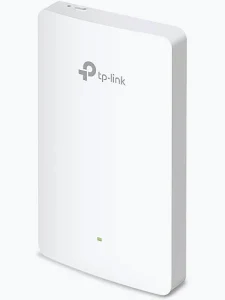
TP-Link AX1800 Wall Plate Wi-Fi 6 Access Point – TL-EAP615-WALL
KSh 11,000.00
- AX1800 dual-band Wi-Fi 6 connectivity
- Four Gigabit Ethernet ports
- PoE pass-through with compatible PoE+ input
- Compact wall-plate installation
- Centralised management through compatible Omada solutions
TP-Link EAP615-Wall Access Point – AX1800 Wall Plate Wi-Fi 6
Upgrade your room-level wireless network with the TP-Link EAP615-Wall Access Point, an AX1800 wall-plate Wi-Fi 6 solution designed for hotels, offices, apartments, and commercial buildings. It combines dual-band wireless connectivity, four Gigabit Ethernet ports, and centralised Omada management in a compact wall-mounted design. This access point provides convenient Wi-Fi and wired connections without requiring a separate desktop access point in every room.
With theoretical wireless speeds of up to 1,775 Mbps, the TP-Link EAP615-Wall supports modern internet usage across compatible devices. Its Power over Ethernet design simplifies installation, while its additional Ethernet ports help connect wired equipment. Explore the official TP-Link EAP615-Wall product page for manufacturer information.
What Is the TP-Link EAP615-Wall Access Point?
The TP-Link EAP615-Wall is a professional wall-plate access point designed to deliver Wi-Fi 6 connectivity to individual rooms and workspaces. It uses IEEE 802.11ax technology to improve wireless efficiency and help compatible devices communicate more effectively.
The 2.4 GHz band supports theoretical speeds of up to 574 Mbps, while the 5 GHz band supports up to 1,201 Mbps. These bands provide flexibility for browsing, video conferencing, cloud applications, streaming, and online collaboration.
Its integrated antennas and slim design make it suitable for discreet indoor installation. The four Gigabit Ethernet ports include one uplink port and three downlink ports. One downlink port supports PoE pass-through when the access point receives compatible PoE+ power, allowing a suitable connected device to receive power through Ethernet.
Technical Specifications of the TP-Link EAP615-Wall Access Point
- Brand: TP-Link
- Product series: Omada
- Model: EAP615-Wall
- Product type: Wall-plate wireless access point
- Wireless generation: Wi-Fi 6
- Wireless class: AX1800
- Frequency bands: 2.4 GHz and 5 GHz
- Maximum theoretical wireless speeds: 574 Mbps at 2.4 GHz and 1,201 Mbps at 5 GHz
- Wireless standards: IEEE 802.11a/b/g/n/ac/ax
- Ethernet interfaces: 1 × Gigabit uplink and 3 × Gigabit downlink
- Antennas: Integrated dual-band antennas
- Wireless features: OFDMA, MU-MIMO, beamforming, band steering, and load balancing
- Power supply: IEEE 802.3af/at Power over Ethernet
- PoE pass-through: One downlink port; requires compatible 802.3at PoE+ input
- Maximum PoE pass-through output: Up to 13 W on the documented EU version or 12 W on the US version
- Management: Omada app and compatible Omada software or hardware controllers
- Mounting: Wall-plate mounting
- Dimensions: Approximately 143 × 86 × 20 mm
- Wireless security: WPA, WPA2, and WPA3 options, depending on configuration
Specifications and PoE output can vary by regional version. Consult the official EAP615-Wall datasheet before choosing power accessories.
Why Choose the TP-Link EAP615-Wall Access Point?
Fast Wi-Fi 6 Dual-Band Performance
Wi-Fi 6 supports efficient wireless communication and helps reduce congestion in suitable multi-device environments. The EAP615-Wall combines OFDMA and MU-MIMO technologies to help compatible clients share wireless resources efficiently. It is suitable for video meetings, cloud software, online learning, and everyday business connectivity.
Four Gigabit Ethernet Ports
The four Gigabit Ethernet ports provide wired connectivity for devices that benefit from a stable network connection. Connect compatible computers, printers, IP phones, smart televisions, and other Ethernet-enabled equipment.
One downlink port supports PoE pass-through when the access point receives sufficient power from a compatible PoE+ source. This can simplify installations involving supported low-power devices. Always verify the connected equipment’s power requirements before using pass-through power.
Compact Wall-Plate Design
The low-profile wall-mounted design suits environments where visible network equipment should be minimised. It can be installed in suitable standard 86 mm, EU, and US wall junction boxes, subject to local box compatibility. This design helps provide room-level connectivity while keeping desks and shelves free of separate networking hardware.
Centralised Omada Management
Integrate the EAP615-Wall with compatible Omada management tools to configure wireless networks and monitor connected clients. Administrators can manage multiple access points through a central interface, making the device useful for larger hospitality and business deployments.
Supported features include guest authentication, VLANs, access controls, and roaming assistance, depending on the controller and firmware. Visit the TP-Link Omada platform to explore management options.
Convenient Power over Ethernet
The access point supports IEEE 802.3af/at PoE input, reducing the need for a separate power outlet at the installation point. A compatible PoE switch or injector supplies power and network data through Ethernet. PoE pass-through requires 802.3at PoE+ input and sufficient available power.
Where Can You Use This Wall-Plate Access Point?
Hotels and guest accommodation: Provide room-level Wi-Fi and wired ports for guest laptops, televisions, and compatible devices.
Corporate offices: Support employee connectivity, meeting-room equipment, printers, and other wired devices while maintaining a discreet installation.
Student residences: Provide wireless internet and wired network access for online learning, research, and entertainment.
Serviced apartments: Deliver dedicated in-room connectivity without placing separate desktop access points throughout the property.
Healthcare facilities: Support authorised staff devices and compatible network equipment in suitable indoor areas.
Commercial buildings: Provide convenient connectivity in individual offices, consultation rooms, and other workspaces.
Installation and Compatibility
Connect the uplink port to a compatible PoE-enabled network switch or injector. Mount the device in a suitable wall junction box and connect wired equipment to the available downlink ports.
For PoE pass-through, use compatible 802.3at PoE+ input and confirm that enough power remains for the downstream device. Configure wireless security, guest access, and VLAN settings according to your network requirements.
Visit the official TP-Link EAP615-Wall support page for firmware, documentation, and setup resources.
Why Buy the TP-Link EAP615-Wall Access Point at Avidik Ventures?
Avidik Ventures helps customers source networking equipment for offices, hospitality properties, educational institutions, and commercial projects. The EAP615-Wall offers a practical option for room-level Wi-Fi 6 connectivity with additional wired network ports.
Choose equipment that matches your network infrastructure, coverage requirements, and power needs. Contact Avidik Ventures through avidikventures.co.ke for product enquiries and assistance with your networking requirements.














Reviews
There are no reviews yet.