
TP-Link AC600 Wireless Dual Band Wi-Fi 5 PCI Express Adapter -TL-ARCHER T2E
KSh 2,300.00
- Dual-band Wi-Fi 5 connectivity
- Speeds up to 433 Mbps on 5 GHz
- Detachable external antenna
- PCI Express installation with low-profile bracket
- MU-MIMO support with compatible routers
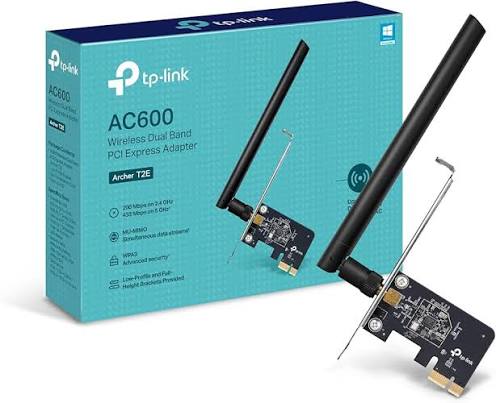
TP-Link AC600 Dual Band Wi-Fi Adapter – Archer T2E
Desktop computers without built-in wireless connectivity often depend on Ethernet cables to access the internet. The TP-Link AC600 Dual Band Wi-Fi Adapter provides a convenient way to add wireless networking through an available PCI Express slot. The Archer T2E supports dual-band Wi-Fi 5, with speeds of up to 433 Mbps on 5 GHz and 200 Mbps on 2.4 GHz. Its detachable external antenna helps improve wireless reception. This adapter is ideal for compatible desktop computers used for browsing, streaming, online meetings, and everyday productivity. Explore the official TP-Link Archer T2E product page.
What It Is
The Archer T2E is an internal wireless network adapter designed for desktop PCs. It installs into a compatible PCI Express slot on the computer’s motherboard. Once configured with the appropriate driver, it allows the computer to connect to supported wireless networks without an Ethernet cable.
The adapter uses the IEEE 802.11ac standard, commonly known as Wi-Fi 5. Its dual-band capability lets users connect through either the 2.4 GHz or 5 GHz frequency band. The detachable antenna can be adjusted to suit the computer’s position and wireless environment.
The package also includes a low-profile bracket for compatible smaller computer cases. This provides more installation flexibility for different desktop configurations. Review the official Archer T2E datasheet.
TP-Link AC600 Dual Band Wi-Fi Specifications
The following specifications highlight the adapter’s main features and installation requirements.
- Brand: TP-Link
- Model: Archer T2E
- Product Type: AC600 Wireless Dual Band PCI Express Adapter
- Wi-Fi Generation: Wi-Fi 5
- Wireless Standard: IEEE 802.11a/b/g/n/ac
- Maximum Combined Class: AC600
- 5 GHz Speed: Up to 433 Mbps
- 2.4 GHz Speed: Up to 200 Mbps
- Interface: PCI Express
- Antenna: One detachable external antenna
- Wireless Technology: MU-MIMO support with a compatible router
- Security: WEP, WPA, WPA2, and WPA3, depending on hardware version and configuration
- Dimensions: Approximately 120.8 × 78.5 × 21.5 mm
- Installation Options: Full-height and low-profile brackets
- Supported Operating Systems: Windows 10 and Windows 11 on supported hardware versions
- Additional Function: Wireless access point mode, subject to supported software and configuration
- Package Contents: Adapter, antenna, low-profile bracket, installation guide, and resource CD; contents may vary by region
The advertised wireless rates are theoretical maximums. Actual performance depends on the router, internet connection, signal strength, interference, and network traffic. MU-MIMO benefits require a compatible router. Check the official TP-Link support and download page.
Why Choose the TP-Link AC600 Dual Band Wi-Fi Adapter
Dual-Band Wireless Connectivity
The Archer T2E supports two wireless frequency bands for different networking needs. The 2.4 GHz band is useful for everyday browsing, email, and social media. The 5 GHz band can provide higher wireless throughput for streaming and other bandwidth-intensive activities.
Having both options allows users to select an available compatible network that suits their environment. Performance still depends on the router and surrounding wireless conditions. Learn more about the Archer T2E’s dual-band features.
Improved Reception with an External Antenna
The detachable external antenna helps receive wireless signals from a compatible router. Its adjustable position provides flexibility when the computer is installed under a desk or beside other equipment.
Unlike compact USB adapters, the internal PCIe design connects directly to the desktop motherboard. This makes it a practical option for users who want to add wireless connectivity as part of a desktop upgrade. Actual coverage varies with walls, distance, interference, and antenna placement. View the official product specifications.
Efficient Networking with MU-MIMO
MU-MIMO support can improve wireless throughput when the Archer T2E works with a compatible router. This technology helps supported network equipment communicate with multiple devices more efficiently.
It can be useful in households and offices where computers, smartphones, smart TVs, and other devices share the same wireless network. Results depend on the router’s capabilities and overall network conditions. Read TP-Link’s official Archer T2E overview.
Flexible Desktop Installation
The Archer T2E connects through a PCI Express slot rather than occupying an external USB port. Its included low-profile bracket provides an installation option for compatible slim desktop cases.
This flexibility makes it suitable for a range of desktop builds. Before installation, users should check their computer’s available PCIe slot, case dimensions, and operating system compatibility. Download the Archer T2E installation resources.
TP-Link AC600 Dual Band Wi-Fi Adapter Use Cases
Home and Office Desktop Computers
The Archer T2E suits desktop computers that need wireless internet access without a direct Ethernet connection. Students can use it for online learning and research. Office employees can connect compatible workstations to wireless networks for email, browsing, and cloud applications.
Home users can also benefit when relocating a desktop away from a router. For demanding applications, a wired Ethernet connection may still offer more consistent performance.
Streaming and Everyday Entertainment
The dual-band connection supports everyday entertainment, including online video streaming and music services. The 5 GHz band can offer higher throughput when the router and signal conditions support it.
Users can also browse websites, download files, and participate in online meetings. Streaming quality depends on the internet plan, network congestion, and the service being used. Explore TP-Link’s official product details.
Desktop Upgrades and Small Businesses
Small businesses can use the adapter to add Wi-Fi to compatible desktop workstations. It is useful for office computers that lack integrated wireless hardware but have an available PCIe slot.
Technicians can also install it when upgrading or refurbishing compatible desktop PCs. Checking the hardware revision and downloading the matching driver helps ensure a smoother installation. Find drivers and documentation from TP-Link.
Why Buy TP-Link AC600 Wi-Fi at Avidik Ventures
Avidik Ventures supplies technology products for home, office, and professional computing needs. The TP-Link Archer T2E provides a practical way to add dual-band wireless connectivity to compatible desktop computers.
Visit Avidik Ventures to explore networking products and computing accessories. Confirm your desktop’s PCIe slot, operating system, and adapter hardware version before ordering.











Reviews
There are no reviews yet.