
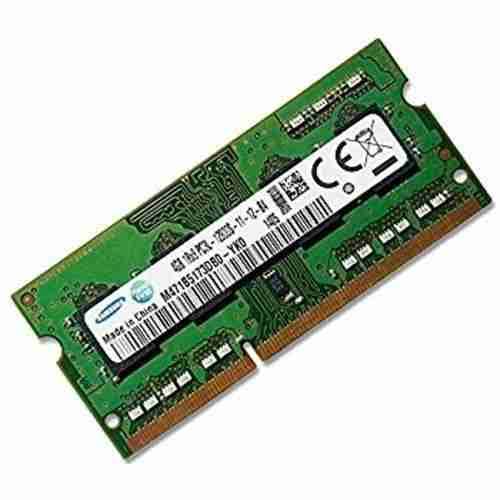
Samsung Laptop RAM DDR3 4GB 1600
KSh 1,600.00
- 1600MHz DDR3 speed
- 4GB capacity in a single module
- Efficient 30nm Samsung design
- 204-pin SO-DIMM laptop format
- 1333MHz fallback for older systems
Samsung Laptop RAM DDR3 4GB 1600
The Samsung Laptop RAM DDR3 module is a proven way to bring an older notebook back to life. This 4GB SO-DIMM runs at 1600MHz and fits standard 204-pin laptop slots. Windows loads faster, and everyday programs respond with less hesitation. Installation takes only minutes and needs no special skills. For laptops that still serve well but feel slow, this upgrade makes sense.
Reliable Legacy Memory
This is a 4GB DDR3 SO-DIMM module made for laptops, mini PCs and compact systems. It uses the 204-pin format found in DDR3 notebooks. The speed class is PC3-12800, also known as DDR3-1600.
Samsung is one of the world’s largest memory manufacturers. Its DDR3 modules are built on advanced 30nm process technology. That design improves efficiency and supports dependable everyday operation. The module is non-ECC and unbuffered, as most consumer laptops require. This keeps it compatible with everyday notebook platforms.
Samsung Laptop RAM DDR3 Specifications
- Brand: Samsung
- Capacity: 4GB single module
- Memory type: DDR3 SDRAM
- Form factor: SO-DIMM, 204 pin
- Speed: 1600MHz (PC3-12800)
- Latency: CL11 (11-11-11)
- Voltage: 1.35V and 1.5V compatible
- Error correction: Non-ECC
- Signal type: Unbuffered
- Fallback speed: 1333MHz (PC3-10600)
- Application: Laptops, notebooks and mini PCs
Why Samsung Laptop RAM DDR3 Stands Out
Trusted Samsung Manufacturing
Samsung has decades of experience in memory production. Its modules are widely used in notebooks from major brands. That heritage shows in consistent build quality. You get a dependable part from a respected maker. Consistent quality means fewer faults over time.
Solid 1600MHz Performance
At 1600MHz, this module offers 12.8 GB per second of bandwidth. That is the top standard speed for mainstream DDR3 laptops. Programs open promptly, and switching between windows feels smooth. Older laptops gain a noticeable lift in everyday response. Web pages, documents and video calls all feel quicker.
Energy-Efficient Design
Samsung’s 30nm technology reduces power consumption compared with older memory. The module also supports lower voltage operation in compatible systems. Less power means less heat inside a compact laptop. Cooler running supports quieter fans and longer battery life. Your laptop stays comfortable during long sessions.
Flexible Speed Compatibility
The module can also run at 1333MHz on older platforms. If your laptop supports a lower speed, the memory adjusts. This makes it a practical choice for many DDR3 notebooks. You can upgrade without changing the whole computer. It is a simple, practical way to extend a trusted machine.
Right-Sized 4GB Capacity
Four gigabytes is a sensible upgrade for older Windows laptops. It handles browsing, documents, email and online classes comfortably. Systems with only 2GB gain the most. The extra room reduces freezing and long waits. Tasks that once dragged now finish promptly.
Wide Laptop Compatibility
This 204-pin SO-DIMM format suits a large range of DDR3 notebooks. It works across many popular laptop brands and models. Mini PCs and compact systems that use DDR3 can also benefit. Always match the memory type to your machine for best results.
Easy Installation
Fitting the module is quick and tidy. Open the memory bay and slide the stick in at an angle. Press it down until the clips lock. Your laptop detects the new capacity automatically at startup.
Use Cases for Samsung Laptop RAM DDR3
Older Office Laptops
Many businesses still rely on DDR3 laptops that work well. Extra memory keeps email, spreadsheets and web tools running smoothly. Staff spend less time waiting and more time working. A small upgrade extends the machine’s useful life. Teams avoid disruption while keeping familiar equipment.
Students and Home Users
Students use older laptops for research, writing and online lessons. Families browse, stream and video call on the same device. Four gigabytes keeps these activities comfortable. Slowdowns fade, and the laptop feels fresh again. Learning and leisure both run more smoothly.
Technicians and Repair Shops
Professionals need parts that match the original specification. Always confirm that the laptop uses DDR3 and not DDR4 before ordering. Check the manual for supported voltage and maximum capacity. Visit Samsung Semiconductor for general memory information. Installing two matching modules enables dual-channel mode on supported laptops. Test the memory after fitting to confirm stable operation. Update the BIOS first if the laptop is very old.
Buy Samsung Laptop RAM DDR3 from Avidik Ventures
Avidik Ventures is a Kenyan technology partner supplying laptops, memory, printers and office equipment. We stock genuine products and guide you toward compatible upgrades. Our team offers professional installation and responsive technical support. Call or WhatsApp us today, or visit our Nairobi shop. We will help you choose the right memory for your laptop.











Reviews
There are no reviews yet.