
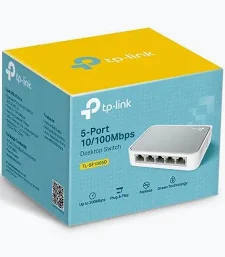
TP-Link 5-Port 10/100Mbps Desktop Network Switch – TL-SF1005D
KSh 2,300.00
- Five 10/100 Mbps RJ45 Ethernet ports
- Plug-and-play installation
- Auto-negotiation and Auto MDI/MDIX
- IEEE 802.3x flow control
- Compact, fanless desktop design
TP-Link TL-SF1005D Network Switch – 5-Port 10/100Mbps Desktop Switch
The TP-Link TL-SF1005D Network Switch provides a simple way to expand wired network connections at home or in the office. This compact 5-port Fast Ethernet switch connects computers, printers, routers, and other Ethernet-enabled devices on a local network. Each port supports speeds of up to 100 Mbps and automatically detects the connected device’s link speed. Its plug-and-play design requires no software configuration, making setup straightforward for everyday users. With energy-efficient technology and a compact desktop design, this switch is a practical choice for small networks. Explore the official TP-Link TL-SF1005D product page.
What It Is
The TP-Link TL-SF1005D is an unmanaged Ethernet switch designed to expand the number of available wired network ports. It features five RJ45 Ethernet ports, allowing multiple network devices to connect through a single local network connection.
The switch automatically negotiates supported connection speeds of 10 Mbps or 100 Mbps. Auto MDI/MDIX eliminates the need to select special uplink ports or use crossover cables for compatible Ethernet connections.
As an unmanaged switch, it does not require a configuration interface or dedicated management software. Connect the power adapter and Ethernet cables to begin using it. For official product information, visit the TP-Link support page.
Technical Specifications
- Brand: TP-Link
- Model: TL-SF1005D
- Product Type: 5-Port Fast Ethernet Desktop Switch
- Ethernet Ports: 5 × 10/100 Mbps RJ45
- Network Standards: IEEE 802.3, IEEE 802.3u, IEEE 802.3x
- Port Negotiation: 10/100 Mbps auto-negotiation
- Auto MDI/MDIX: Supported
- Switching Method: Store and forward
- Flow Control: IEEE 802.3x flow control and backpressure
- Design: Compact desktop plastic case
- Cooling: Fanless
- Maximum Power Consumption: Approximately 1.9 W, depending on hardware revision
- Power Supply: External power adapter; output varies by hardware revision
- Dimensions: Approximately 104 × 70 × 22 mm for listed revisions
- Installation: Plug and play
- Typical Package Contents: Switch, power adapter, and installation guide
Specifications can vary between hardware revisions and regional versions. Check the exact model version before ordering. The 100 Mbps port rating is the maximum Ethernet link speed per port, not a guarantee of internet speed. See the official TP-Link specifications.
TP-Link TL-SF1005D Network Switch Benefits
Five Ethernet Ports for Network Expansion
The five RJ45 ports let you connect several wired devices to the same local network. This is useful when a router has limited available Ethernet ports or when you need additional connections near a workstation.
Connect compatible computers, network printers, smart TVs, and other Ethernet-enabled devices. One port can connect the switch to your existing router or network, leaving the remaining ports available for devices.
Simple Plug-and-Play Installation
The TL-SF1005D is designed for straightforward installation without manual network configuration. Connect the power adapter, link the switch to your router or existing network, and attach your devices using Ethernet cables.
Auto-negotiation detects supported link speeds, while Auto MDI/MDIX simplifies cable connections. These automatic functions make the switch suitable for users who want to expand a network without managing advanced settings.
Energy-Efficient Operation
TP-Link incorporates energy-efficient technology designed to reduce power consumption according to network conditions. This helps make the switch suitable for everyday operation in home offices and small workspaces.
Its low-power design supports basic wired networking without the complexity of larger managed switches. Actual energy savings depend on the hardware revision and operating conditions. Review the official product overview.
Reliable Wired Data Transfer
IEEE 802.3x flow control helps manage traffic between compatible devices. The store-and-forward switching method checks incoming Ethernet frames before forwarding them to their destination.
These features support everyday file sharing, printing, and communication across a local network. Performance depends on the connected devices, Ethernet cables, and network traffic.
Compact, Fanless Desktop Design
The compact plastic case fits easily on a desk, shelf, or workstation. Its fanless design avoids cooling-fan noise, making it convenient for quiet offices and home environments.
The small footprint helps keep network equipment organised without requiring a rack or dedicated equipment cabinet.
TP-Link TL-SF1005D Network Switch Use Cases
Home Networking
Connect a desktop computer, television, gaming console, and other compatible Ethernet devices to a home network. This helps expand wired connectivity in rooms where several devices share one network connection.
Small Offices and Workstations
Add Ethernet ports for computers, printers, and other office equipment. The switch supports basic local network connectivity for everyday business tasks.
Small Business Connectivity
Use the switch to expand wired connections in a small workspace, reception area, or office desk cluster. It is intended for basic networking rather than advanced traffic management or network segmentation.
Network Printers and Shared Devices
Connect compatible Ethernet printers and other network-enabled equipment to a local network. Devices can communicate through the existing network when correctly configured and supported.
Why Buy from Avidik Ventures
Avidik Ventures supplies networking equipment and computer accessories for home, office, and business environments. We aim to provide clear product information to help customers select suitable technology. Choose the TP-Link TL-SF1005D when you need a straightforward way to expand basic wired Ethernet connectivity. Visit Avidik Ventures to explore networking solutions for your setup.
Focus Keyphrase: TP-Link TL-SF1005D Switch
Meta Description: TP-Link TL-SF1005D Switch expands wired networking with five 10/100Mbps Ethernet ports, plug-and-play setup, and energy-efficient operation.












Reviews
There are no reviews yet.