
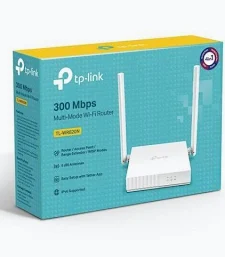
TP-Link 300 Mbps Wireless Multi-Mode Router -TL-WR820N
KSh 2,499.00
- Wireless speeds up to 300 Mbps on 2.4 GHz
- Two external antennas with 2×2 MIMO
- Multiple operating modes
- Guest network and parental controls
- One WAN port and two 10/100 Mbps LAN ports
TP-Link TL-WR820N 300Mbps Wireless Router – Multi-Mode Wi-Fi Router
Enjoy dependable everyday wireless connectivity with the TP-Link TL-WR820N 300Mbps wireless router, designed for homes, small offices, and everyday internet use. It delivers wireless speeds of up to 300 Mbps on the 2.4 GHz band and features two external antennas for improved wireless coverage. With multiple operating modes, guest network support, and parental controls, this router offers a practical way to connect your devices and manage your home network.
What It Is
The TP-Link TL-WR820N is a Wireless N router that creates a Wi-Fi network for compatible phones, laptops, tablets, and other wireless devices. It uses IEEE 802.11b/g/n standards and operates on the 2.4 GHz frequency band.
The router includes one 10/100 Mbps WAN port for connecting to an internet source and two 10/100 Mbps LAN ports for wired devices. Its two external antennas and 2×2 MIMO technology help improve wireless signal coverage and transmission.
The TL-WR820N also supports multiple operating modes, allowing it to serve as a router, access point, range extender, or WISP client, depending on the hardware version. Visit the official TP-Link TL-WR820N product page for manufacturer information.
TP-Link TL-WR820N Wireless Router Specifications
The following specifications are based on TP-Link documentation. Features may vary by hardware revision and region.
- Brand: TP-Link
- Model: TL-WR820N
- Product Type: 300Mbps Multi-Mode Wireless N Router
- Wi-Fi Standard: IEEE 802.11b/g/n (Wi-Fi 4)
- Wireless Frequency: 2.4 GHz
- Maximum Wireless Speed: Up to 300 Mbps
- Antennas: 2 fixed external antennas
- MIMO Technology: 2×2 MIMO
- WAN Port: 1 × 10/100 Mbps Ethernet
- LAN Ports: 2 × 10/100 Mbps Ethernet
- Operating Modes: Router, Access Point, Range Extender, and WISP
- Security Features: Wireless encryption, SPI firewall, and access controls
- Network Features: Guest network, parental controls, QoS, and IPv6 support
- IPTV Support: IGMP Proxy, IGMP Snooping, and VLAN features on supported versions
- Power Supply: 5V DC, 0.6A
- Dimensions: Approximately 115 × 106.7 × 24.3 mm on V2 hardware
- Installation: Desktop placement
The 300 Mbps rating is a theoretical wireless link rate, not a guaranteed internet speed. Ethernet ports are limited to 100 Mbps. Check the official TP-Link support page for documentation matching your hardware revision.
Why Choose the TP-Link TL-WR820N Wireless Router
The TL-WR820N combines essential wireless connectivity with practical features for everyday home and small-office networks.
Reliable Wi-Fi for Everyday Activities
The router provides wireless speeds of up to 300 Mbps on the 2.4 GHz band. This is suitable for browsing, email, online learning, video calls, and everyday streaming, depending on your internet connection and network conditions.
The 2.4 GHz band can provide useful coverage through typical home environments. Actual performance depends on distance, walls, interference, and the wireless capabilities of connected devices.
Two External Antennas and 2×2 MIMO
Two external antennas and 2×2 MIMO technology help the router transmit and receive wireless data efficiently. Correct placement can improve reception in commonly used rooms and reduce weak spots.
For better coverage, place the router in an open, central location away from large obstructions. Performance varies with building layout and interference from nearby wireless networks.
Multiple Operating Modes
The TL-WR820N supports several operating modes to suit different network setups:
- Router Mode: Creates a Wi-Fi network and shares an internet connection.
- Access Point Mode: Adds wireless connectivity to an existing wired network.
- Range Extender Mode: Helps extend an existing wireless network’s coverage.
- WISP Mode: Connects to a compatible upstream wireless network and shares that connection with local devices.
Available modes can vary by hardware revision and firmware. Check the manufacturer’s documentation before selecting a mode for your installation.
Guest Network and Parental Controls
Guest network functionality provides separate Wi-Fi access for visitors, helping you avoid sharing your main network credentials. This is useful for homes, small offices, and other environments where visitors need internet access.
Parental controls help manage when and how supported devices access the internet. Depending on the firmware, settings can include time controls and website filtering.
Simple Setup and Network Management
The router provides a web-based interface for configuring your internet connection, wireless name, password, and other settings. Supported hardware and firmware versions may also work with the TP-Link Tether app.
For setup instructions, firmware, and manuals, visit the official TL-WR820N support page.
TP-Link TL-WR820N Wireless Router Use Cases
Home Internet and Family Connectivity
Connect smartphones, laptops, tablets, and other compatible devices for everyday internet use. It is a practical option for browsing, messaging, online learning, and light streaming.
Small Offices and Home Offices
Create a wireless network for workstations and mobile devices. The two LAN ports also provide wired connections for compatible computers, printers, or other Ethernet equipment.
Extending Existing Wi-Fi Coverage
Use Range Extender Mode on supported hardware to help improve wireless coverage where the existing signal is weak. Access Point Mode is another option when you can connect the router to your main network using Ethernet.
Guest Internet Access
Use the guest network feature to provide visitors with Wi-Fi access while keeping your main wireless credentials private. This can be useful in homes, small businesses, and reception areas.
Why Buy TP-Link TL-WR820N Wireless Router at Avidikventures
Avidikventures helps customers source networking products for home, office, and small-business connectivity. Before ordering, consider your internet speed, required Wi-Fi coverage, number of wired devices, and whether you need Gigabit Ethernet or dual-band Wi-Fi.
Choose the TP-Link TL-WR820N for straightforward 2.4 GHz wireless connectivity and flexible networking modes. Visit Avidik Ventures to explore networking products or enquire about availability.











Reviews
There are no reviews yet.