
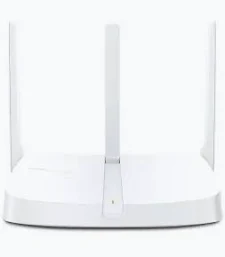
MERCUSYS 300Mbps Wireless Router – MW306R
KSh 2,799.00
- Wireless speeds up to 300 Mbps on 2.4 GHz
- Three fixed external antennas
- Four operating modes
- Guest Wi-Fi and parental controls
- Simple setup with three LAN ports
MERCUSYS MW306R 300Mbps Wireless Router – Multi-Mode Wi-Fi Router
Enjoy reliable everyday wireless connectivity with the MERCUSYS MW306R 300Mbps wireless router, designed for homes, small offices, and everyday internet use. It delivers wireless speeds of up to 300 Mbps on the 2.4 GHz band and features three external antennas for broader Wi-Fi coverage. With four operating modes, parental controls, and a straightforward setup process, the MW306R provides a practical networking solution for connecting your devices.
What It Is
The MERCUSYS MW306R is a Wireless N router that creates a Wi-Fi network for compatible phones, laptops, tablets, and other wireless devices. It uses the IEEE 802.11b/g/n standards and operates on the 2.4 GHz frequency band.
The router includes one 10/100 Mbps WAN port for connecting to a modem or internet source and three 10/100 Mbps LAN ports for wired devices. Its three fixed external antennas help distribute the wireless signal throughout your home or office.
Beyond standard router operation, the MW306R supports access point, range extender, and WISP modes. This flexibility lets you adapt the device to different network setups. Visit the official MERCUSYS MW306R product page for manufacturer details.
MERCUSYS MW306R Wireless Router Specifications
The following specifications are based on MERCUSYS product documentation. Features can vary by hardware revision and region.
- Brand: MERCUSYS
- Model: MW306R
- Product Type: 300Mbps Multi-Mode Wireless N Router
- Wi-Fi Standard: IEEE 802.11b/g/n
- Wireless Frequency: 2.4–2.5 GHz
- Maximum Wireless Speed: Up to 300 Mbps
- Antennas: 3 fixed external antennas
- WAN Port: 1 × 10/100 Mbps Ethernet
- LAN Ports: 3 × 10/100 Mbps Ethernet
- Operating Modes: Router, Access Point, Range Extender, and WISP
- Wireless Security: WPA-PSK/WPA2-PSK on the original specification
- Network Features: Guest network, DHCP, QoS, port forwarding, and parental controls
- IP Protocols: IPv4 and IPv6 support, depending on hardware and firmware version
- Power Supply: 5V DC, 0.6A
- Dimensions: Approximately 147 × 115 × 34 mm
- Installation: Desktop placement
The 300 Mbps rating is a theoretical wireless link rate, not a guaranteed internet speed. The 10/100 Mbps Ethernet ports also limit wired throughput to Fast Ethernet rates. See the official MERCUSYS specifications for details.
Why Choose the MERCUSYS MW306R Wireless Router
The MW306R combines essential wireless networking features with flexible operating modes for everyday connectivity.
Reliable Wi-Fi for Everyday Activities
The router provides wireless speeds of up to 300 Mbps on the 2.4 GHz band. This is suitable for routine activities such as browsing websites, checking email, attending video calls, and streaming content, depending on your internet connection and network conditions.
The 2.4 GHz band can provide useful coverage through typical home environments. Actual performance depends on walls, interference, router placement, and the capabilities of connected devices.
Three External Antennas for Broader Coverage
Three fixed external antennas help distribute the wireless signal around your home or workspace. Correct placement can improve reception in frequently used areas and reduce weak spots.
For better results, position the router in an open, central location away from large obstructions and sources of wireless interference. Coverage will vary with building layout and surrounding networks.
Four Operating Modes for Flexible Setup
The MW306R supports four modes to suit different networking needs:
- Router Mode: Creates a wireless network and shares an internet connection.
- Access Point Mode: Adds Wi-Fi to an existing wired network.
- Range Extender Mode: Helps extend an existing wireless network’s coverage.
- WISP Mode: Connects wirelessly to an upstream internet network and shares that connection with local devices.
These modes allow you to adapt the router to your home or office setup. Explore the official MW306R support page for manuals and setup guidance.
Parental Controls and Guest Wi-Fi
Parental controls help you manage internet access through supported settings, including profiles and time controls on compatible firmware. These options can help families set boundaries for connected devices.
A guest network provides separate Wi-Fi access for visitors without requiring you to share your main wireless credentials. Available controls depend on the router’s hardware revision and software version.
Straightforward Installation and Management
The MW306R offers a web-based setup interface to guide users through the initial configuration. After connecting the WAN cable and powering the router, you can configure the wireless network and internet connection using the supported setup process.
Some hardware and firmware versions also support the MERCUSYS app. Check version compatibility before relying on app-based management.
MERCUSYS MW306R Wireless Router Use Cases
Home Internet and Family Connectivity
Connect phones, laptops, tablets, and other compatible devices for everyday internet use. The router is a practical option for browsing, messaging, online learning, and light streaming.
Small Offices and Home Offices
Create a wireless network for workstations and mobile devices. The three LAN ports also provide wired connections for compatible desktop computers, printers, or other Ethernet equipment.
Extending an Existing Network
Use Range Extender Mode to help improve coverage where the existing wireless signal is weak. Alternatively, Access Point Mode can provide Wi-Fi through a wired network connection.
Wireless Internet Sharing
WISP Mode allows the router to connect to a compatible upstream wireless network and share that connection with devices in your local network. This can be useful where a suitable wireless internet source is available.
Why Buy MERCUSYS MW306R Wireless Router at Avidikventures
Avidikventures helps customers source networking products for homes, offices, and small businesses. Before ordering, consider your internet package speed, required coverage, number of wired devices, and whether you need Gigabit Ethernet or dual-band Wi-Fi.
Choose the MERCUSYS MW306R for straightforward 2.4 GHz wireless connectivity and flexible operating modes. Visit Avidik Ventures to explore networking products or enquire about availability.











Reviews
There are no reviews yet.