
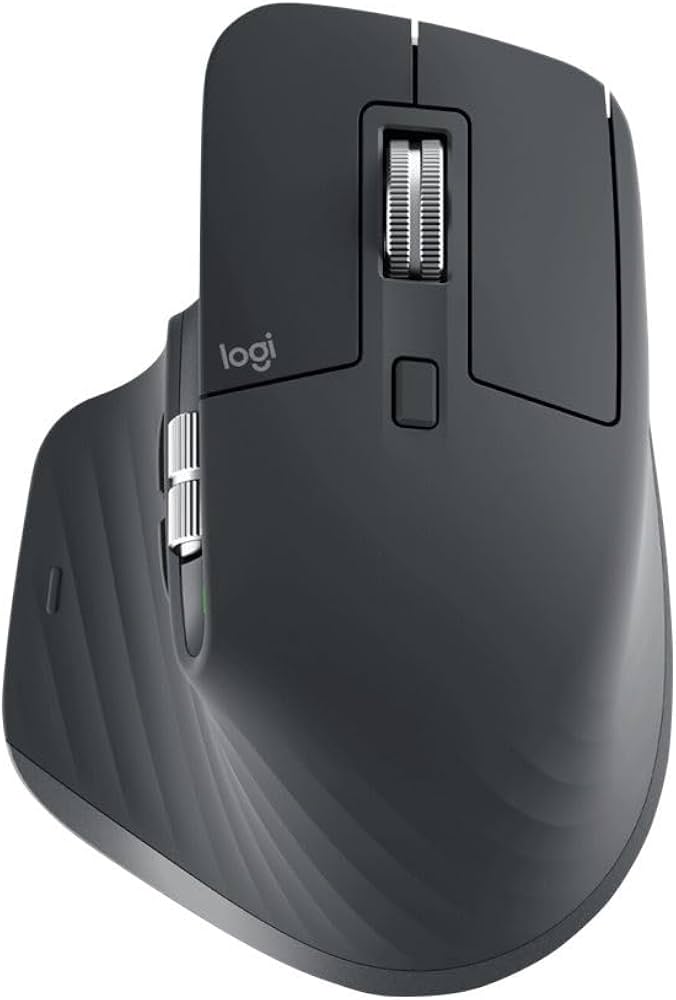

Logitech MX Master 3S Graphite Wireless Mouse – 8K DPI, MagSpeed Scrolling and Quiet Clicks
KSh 15,000.00
- 8K DPI precision tracking: Darkfield technology tracks on virtually any surface, including suitable glass surfaces.
- MagSpeed scrolling: Provides fast and precise navigation through lengthy documents and web pages.
- Quiet Click technology: Reduces clicking noise by approximately 90% compared with the MX Master 3.
- Multi-device connectivity: Supports Bluetooth and Logi Bolt with Easy-Switch for up to three devices.
- Rechargeable battery: Provides up to 70 days of use on a full charge with convenient USB-C charging.
Logitech MX Master 3S Graphite Wireless Mouse – 8K DPI, MagSpeed Scrolling and Quiet Clicks
Experience superior precision, comfort and productivity with the Logitech MX Master 3S Graphite Wireless Mouse, a premium computer accessory designed for professionals, business users, creatives and everyday computer users. Featuring an advanced 8K DPI optical sensor, MagSpeed electromagnetic scrolling, Quiet Click technology and an ergonomic design, this mouse delivers exceptional performance for demanding computing tasks.
The Logitech MX Master 3S combines innovative technology with practical functionality to improve everyday computer navigation. Its Darkfield sensor tracks on virtually any surface, including glass, while its customisable buttons and dedicated thumb wheel make handling documents, spreadsheets and creative applications more convenient.
With Bluetooth and Logi Bolt connectivity, rechargeable USB-C power and multi-device support, the MX Master 3S is an excellent choice for users seeking a reliable and versatile wireless mouse.
What Is the Logitech MX Master 3S Graphite?
The Logitech MX Master 3S is a premium wireless productivity mouse from Logitech’s MX Series. It features a sculpted right-handed design that provides a comfortable grip, integrated thumb rest and strategically positioned controls for efficient navigation.
Its 8,000 DPI Darkfield optical sensor delivers accurate cursor tracking on different surfaces, including glass with a minimum thickness of 4mm. The MagSpeed electromagnetic scroll wheel offers both precise scrolling and rapid movement through lengthy documents and web pages.
The mouse also features Quiet Click technology, which reduces clicking noise by approximately 90% compared with the MX Master 3. Through Logitech Options+, users can customise supported buttons, adjust tracking sensitivity and configure application-specific functions.
Technical Specifications
- Brand: Logitech
- Product Series: MX Master Series
- Model: MX Master 3S
- Colour: Graphite
- Product Type: Premium wireless optical mouse
- Design: Right-handed ergonomic design
- Sensor Technology: Darkfield high-precision optical sensor
- DPI Resolution: 200–8,000 DPI
- Buttons: 7 customisable buttons
- Scrolling Technology: MagSpeed electromagnetic scroll wheel with SmartShift
- Additional Controls: Dedicated thumb wheel and gesture button
- Click Technology: Quiet Click
- Connectivity: Bluetooth Low Energy and Logi Bolt USB receiver
- Wireless Range: Up to 10 metres
- Multi-Device Support: Up to 3 devices with Easy-Switch
- Battery: Rechargeable 500mAh Li-Po battery
- Battery Life: Up to 70 days on a full charge, depending on usage
- Charging Port: USB-C
- Dimensions: Approximately 124.9 × 84.3 × 51 mm
- Weight: Approximately 141g
- Software: Logitech Options+
- Compatibility: Windows, macOS, Linux, ChromeOS, iPadOS and Android, with feature availability depending on the operating system.
Why Choose the Logitech MX Master 3S Graphite?
1. Advanced 8K DPI Precision Tracking
The MX Master 3S features an advanced Darkfield sensor with adjustable sensitivity of up to 8,000 DPI. It tracks on virtually any surface, including glass with a minimum thickness of 4mm. This makes it suitable for high-resolution displays, detailed editing tasks and different workstation environments.
2. MagSpeed Electromagnetic Scrolling
The MagSpeed scroll wheel delivers fast and precise navigation through documents, spreadsheets, websites and lengthy reports. Its SmartShift technology automatically switches between precise line-by-line scrolling and faster free-spinning movement. It can scroll up to 1,000 lines per second, making information navigation more efficient.
3. Quiet Click Technology
Logitech Quiet Click technology reduces clicking noise by approximately 90% compared with the MX Master 3. It maintains satisfying tactile feedback while creating a quieter working environment. This makes the mouse suitable for shared offices, libraries, meeting rooms and home workstations.
4. Ergonomic Design for Comfortable Handling
The MX Master 3S features a sculpted right-handed shape with a comfortable thumb rest and strategically positioned controls. Its ergonomic construction supports natural hand positioning and makes everyday navigation more convenient during extended computer sessions.
5. Customisable Buttons and Multi-Device Connectivity
The mouse features seven customisable buttons, including back and forward controls, a dedicated thumb wheel and a gesture button. Logitech Options+ allows users to configure supported controls for different applications and workflows.
Easy-Switch functionality also allows you to connect and switch between up to three compatible computers or devices, making it convenient for professionals managing multiple workstations.
6. Rechargeable Battery with USB-C Charging
The built-in 500mAh rechargeable battery provides up to 70 days of operation on a full charge under suitable conditions. USB-C charging makes recharging convenient, while fast charging provides approximately three hours of use from a one-minute charge.
Where Can You Use the Logitech MX Master 3S?
The Logitech MX Master 3S Graphite is suitable for various professional and personal computing environments, including:
- Corporate offices: Manage spreadsheets, business reports, presentations and administrative applications.
- Home offices: Enjoy precise and comfortable wireless navigation during remote work.
- Graphic design studios: Use adjustable DPI sensitivity and customisable controls for supported creative applications.
- Video editing workstations: Navigate timelines and editing software using the scroll wheel and thumb controls.
- Business professionals: Manage multiple applications and connected computers efficiently.
- Educational institutions: Support research, online learning and computer-based assignments.
- Programming and development: Navigate code editors, documents and development environments with customisable controls.
Why Buy the Logitech MX Master 3S Graphite from Avidik Ventures?
At Avidik Ventures, we provide technology products and accessories for individuals, businesses, schools and professional workspaces. Our product range includes computer accessories, printers, toner cartridges, ink supplies, networking equipment and other essential technology solutions.
When purchasing the Logitech MX Master 3S Graphite, you get access to a premium productivity accessory designed to improve computer navigation, comfort and workflow efficiency.
We aim to make technology shopping convenient while helping customers identify products that meet their professional and personal computing requirements.
Visit Avidik Ventures to explore our range of computer accessories and technology products.
Choose the Logitech MX Master 3S Graphite Wireless Mouse for advanced precision, intelligent scrolling, quieter clicks and convenient multi-device connectivity.











Reviews
There are no reviews yet.