
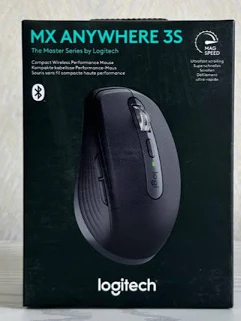

Logitech MX Anywhere 3S Wireless Mouse – Compact Bluetooth Mouse with 8K DPI and MagSpeed Scrolling
KSh 13,000.00
- 8K DPI precision tracking: Darkfield technology tracks on virtually any surface, including suitable glass surfaces.
- MagSpeed scrolling: Delivers fast, precise and convenient navigation through long documents.
- Quiet Click technology: Reduces clicking noise for a quieter working environment.
- Multi-device connectivity: Supports Bluetooth and Logi Bolt compatibility with switching between up to three devices.
- Rechargeable battery: Offers up to 70 days of use on a full charge with convenient USB-C charging.
Logitech MX Anywhere 3S Wireless Mouse – Compact Bluetooth Mouse with 8K DPI and MagSpeed Scrolling
Experience exceptional precision, portability and productivity with the Logitech MX Anywhere 3S Wireless Mouse, a premium compact mouse designed for professionals, business users and individuals who need reliable computer navigation wherever they work. Combining advanced tracking technology, quiet clicks, MagSpeed electromagnetic scrolling and flexible wireless connectivity, this mouse delivers an excellent computing experience in a compact design.
The Logitech MX Anywhere 3S is engineered for productivity across different working environments, including offices, home workstations, business travel and remote working. Its high-precision Darkfield sensor tracks on virtually any surface, even glass, while its rechargeable battery provides extended operation between charges.
With Bluetooth connectivity, Logi Bolt compatibility, customisable buttons and support for up to three connected devices, the MX Anywhere 3S is an excellent choice for users who value performance, convenience and flexibility.
What Is the Logitech MX Anywhere 3S Wireless Mouse?
The Logitech MX Anywhere 3S is a compact wireless performance mouse from Logitech’s premium MX Series. It is designed to provide precise cursor control and efficient navigation while remaining small enough for convenient portability.
One of its standout features is the 8,000 DPI Darkfield sensor, which allows the mouse to track on a wide variety of surfaces, including glass with a minimum thickness of 4mm. This makes it useful for people who frequently work away from a traditional office desk.
The mouse also features MagSpeed electromagnetic scrolling, allowing users to move through long documents and web pages quickly and accurately. Its Quiet Click technology reduces clicking noise, making it suitable for quiet offices, shared workspaces and professional environments.
Technical Specifications
- Brand: Logitech
- Product Series: MX Series
- Model: MX Anywhere 3S
- Product Type: Compact wireless performance mouse
- Design: Right-handed, compact ergonomic design
- Sensor Technology: Darkfield high-precision sensor
- DPI Resolution: 200–8,000 DPI
- Connectivity: Bluetooth Low Energy and Logi Bolt USB receiver compatibility
- Wireless Range: Up to 10 metres
- Number of Buttons: 6 buttons
- Scrolling Technology: MagSpeed electromagnetic scrolling with SmartShift
- Click Technology: Quiet Click
- Multi-Device Support: Up to 3 devices
- Battery: Rechargeable 500mAh Li-Po battery
- Battery Life: Up to 70 days on a full charge
- Charging Port: USB-C
- Full Charging Time: Approximately 2 hours
- Dimensions: 100.5 × 65 × 34.4 mm
- Weight: Approximately 95g with battery
- Software: Logitech Options+
- Compatibility: Windows, macOS, Linux, ChromeOS, iPadOS and Android, depending on device and connection method
Why Choose the Logitech MX Anywhere 3S?
1. Advanced 8K DPI Tracking on Almost Any Surface
The Logitech MX Anywhere 3S features a Darkfield high-precision sensor with adjustable sensitivity of up to 8,000 DPI. It can track on virtually any surface, including glass with a minimum thickness of 4mm. This provides flexibility for professionals who work at different desks, conference tables and locations.
2. MagSpeed Electromagnetic Scrolling
Its MagSpeed scroll wheel combines speed and precision, allowing users to move through long documents, spreadsheets and web pages efficiently. SmartShift technology automatically changes between precise scrolling and faster free-spinning navigation, improving everyday productivity.
3. Quiet Click Technology
The MX Anywhere 3S incorporates Quiet Click technology, reducing clicking noise by approximately 90% compared with the MX Anywhere 3. This makes it an excellent choice for shared offices, libraries, meeting rooms and quiet home workspaces.
4. Compact and Portable Design
Designed for people who work in different locations, the MX Anywhere 3S features a compact shape that fits easily into a laptop bag. Its comfortable contoured body and soft side grips provide convenient handling during extended computer sessions.
5. Flexible Wireless Connectivity
Connect through Bluetooth Low Energy or use a compatible Logi Bolt USB receiver. The Easy-Switch functionality allows you to connect and switch between up to three compatible computers or devices, making it convenient for users who manage multiple workstations.
6. Rechargeable Battery and USB-C Charging
The built-in 500mAh rechargeable battery provides up to 70 days of use on a full charge, depending on usage and operating conditions. USB-C charging makes it convenient to recharge using compatible cables and power sources.
Where Can You Use the Logitech MX Anywhere 3S?
The Logitech MX Anywhere 3S is suitable for various professional and personal computing environments, including:
- Corporate offices: Navigate business applications, reports, presentations and spreadsheets.
- Home offices: Enjoy accurate and quiet mouse operation during remote working.
- Business travel: Carry a compact wireless mouse for convenient laptop navigation.
- Creative workspaces: Use adjustable DPI sensitivity for supported design and editing applications.
- Educational institutions: Support research, online learning and computer-based assignments.
- Meetings and presentations: Navigate documents and presentations with convenient wireless control.
- Shared workstations: Benefit from quiet clicks and flexible connectivity.
Why Buy the Logitech MX Anywhere 3S from Avidik Ventures?
At Avidik Ventures, we provide technology products and accessories for individuals, businesses, schools and professional workspaces. Our product range includes computer accessories, printers, toner cartridges, ink supplies, networking equipment and other essential technology solutions.
When purchasing the Logitech MX Anywhere 3S, you get access to a premium computer accessory designed for precision, portability and everyday productivity. We aim to make technology shopping convenient while helping customers identify products that meet their computing requirements.
Visit Avidik Ventures to explore our range of computer accessories and technology products.
Choose the Logitech MX Anywhere 3S Wireless Mouse for advanced tracking, MagSpeed scrolling, quiet operation and flexible connectivity in a compact design.











Reviews
There are no reviews yet.