
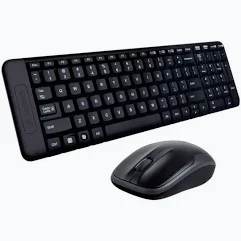
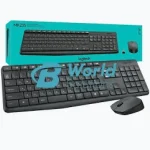
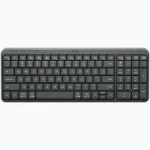
Logitech MK220 Wireless Keyboard and Mouse Combo
KSh 4,400.00
- Compact Keyboard Design: Saves desk space while retaining essential keys and a dedicated numeric keypad.
- Wireless Freedom: Enjoy a reliable 2.4GHz connection with an operating range of up to 10 metres.
- Long Battery Life: Get up to 24 months from the keyboard and up to 12 months from the mouse under specified conditions.
- Comfortable Optical Mouse: Features smooth tracking, a scroll wheel and an ambidextrous design.
- Easy Installation: Uses one shared USB nano receiver for convenient plug-and-play operation.
Logitech MK220 Wireless Keyboard and Mouse Combo
The Logitech MK220 Wireless Keyboard and Mouse Combo is a compact, convenient and reliable desktop accessory set designed to make everyday computing easier. Combining a space-saving wireless keyboard with a comfortable optical mouse, this combo provides a practical solution for home offices, businesses, schools and professional workstations.
Featuring 2.4GHz wireless connectivity, a shared USB nano receiver and an operating range of up to 10 metres, the Logitech MK220 gives you the freedom to work without unnecessary cables. Its compact keyboard retains essential keys, including a dedicated numeric keypad, while its ambidextrous mouse provides smooth and accurate navigation.
Whether you want to reduce desk clutter, improve your workstation setup or equip multiple computers, the Logitech MK220 offers convenience, portability and dependable everyday performance.
What Is the Logitech MK220?
The Logitech MK220 is a wireless keyboard and mouse combination designed for users who prefer a tidy and flexible workspace. It includes a compact keyboard with a numeric keypad and a wireless optical mouse, allowing you to type, navigate applications and manage everyday computer tasks comfortably.
Both devices communicate through one compact USB nano receiver using Logitech’s 2.4GHz wireless technology. This eliminates the need for separate receivers and makes installation simple. The combo is also designed with efficient power consumption to provide extended battery life.
Technical Specifications
- Brand: Logitech
- Model: MK220
- Product Type: Wireless keyboard and mouse combo
- Colour: Black
- Wireless Technology: 2.4GHz wireless connection
- Wireless Range: Up to 10 metres
- Receiver: Shared USB nano receiver
- Keyboard Layout: Compact layout with numeric keypad
- Keyboard Dimensions: 381 × 112 × 17.78 mm
- Keyboard Weight: Approximately 320 g
- Keyboard Battery: 2 AAA alkaline batteries
- Keyboard Battery Life: Up to 24 months
- Keyboard Key Durability: Tested for up to 5 million keystrokes
- Keyboard Design: Deep-profile keys and spill-resistant construction
- Mouse Type: Wireless optical mouse
- Mouse Buttons: 3 buttons, including clickable scroll wheel
- Mouse Dimensions: Approximately 107 × 60 × 40 mm
- Mouse Weight: Approximately 112 g
- Mouse Battery: 2 AA alkaline batteries
- Mouse Battery Life: Up to 12 months
- Compatibility: Windows 10, Windows 11 or later, and ChromeOS
- Installation: Plug and play
- Package Contents: Wireless keyboard, wireless mouse, USB nano receiver, batteries and user documentation
Why Choose the Logitech MK220?
1. Compact Space-Saving Keyboard
The Logitech MK220 features a compact keyboard design that takes up less desk space than a traditional full-size keyboard. Despite its smaller footprint, it retains essential keys, including a dedicated numeric keypad, function keys and directional arrows.
This makes it suitable for users who need a practical typing solution without occupying too much workspace. Its compact layout also allows you to position your mouse closer to the keyboard.
2. Reliable 2.4GHz Wireless Connectivity
Enjoy wireless convenience with Logitech’s 2.4GHz connection technology. The keyboard and mouse communicate through a shared USB nano receiver, providing a wireless operating range of up to 10 metres under suitable conditions.
This gives you flexibility when arranging your workstation while helping eliminate cable clutter. The connection is ideal for everyday office tasks, browsing and general computer use.
3. Long-Lasting Battery Performance
The MK220 is designed for efficient power consumption, helping reduce the frequency of battery replacements. The keyboard provides up to 24 months of battery life, while the mouse can operate for up to 12 months under specified usage conditions.
The keyboard uses two AAA batteries, while the mouse uses two AA batteries. Actual battery life depends on usage and computing conditions.
4. Comfortable Ambidextrous Optical Mouse
The included wireless optical mouse is designed for both left-handed and right-handed users. Its comfortable shape supports everyday navigation, while smooth optical tracking provides dependable cursor movement.
The three-button design includes left-click, right-click and a clickable scroll wheel, making it convenient for browsing websites, opening files and working with applications.
5. Spill-Resistant Keyboard Construction
The keyboard features a spill-resistant design tested under limited conditions to withstand accidental liquid spills of up to 60 ml. This provides additional protection for everyday desk use, although the keyboard is not waterproof and should never be immersed in liquid.
6. Simple Plug-and-Play Installation
Getting started with the Logitech MK220 is straightforward. Insert the supplied USB nano receiver into a compatible computer, install the batteries and begin using the keyboard and mouse. No complicated pairing process or separate wireless receivers are required.
Where Can You Use the Logitech MK220?
The Logitech MK220 is suitable for different environments where comfortable wireless computing is required:
- Corporate offices: Reduce desk clutter while handling emails, reports and business applications.
- Home offices: Create a flexible workstation for remote work, online research and everyday productivity.
- Schools and computer laboratories: Equip compatible computers with convenient wireless input devices.
- Retail businesses: Support administrative work, customer records and general computer operations.
- Small workspaces: Enjoy a compact keyboard that leaves more room for other desk accessories.
- Presentations and entertainment: Control a compatible computer from a comfortable distance within the wireless operating range.
Compatibility and Connectivity
The Logitech MK220 connects through a shared 2.4GHz USB nano receiver. It is designed for compatible Windows and ChromeOS computers with an available USB port.
The wireless receiver handles communication for both the keyboard and mouse, making the setup simple and convenient. The MK220 does not use Bluetooth, so it requires its supplied USB receiver to operate.
Why Buy from Avidik Ventures?
At Avidik Ventures, we provide practical technology solutions for businesses, professionals, students and home users. Our product range includes Logitech accessories, computer peripherals, printers, networking equipment and other essential office technology products.
The Logitech MK220 is a convenient choice for anyone looking to enjoy wireless computing, reduce cable clutter and create a more organised workstation. Whether you need a keyboard and mouse for personal use or several computer setups for your business, we aim to make your shopping experience straightforward.
Visit Avidik Ventures to explore our range of Logitech accessories and computer products. Choose the Logitech MK220 Wireless Keyboard and Mouse Combo for compact design, convenient connectivity and dependable everyday performance.













Reviews
There are no reviews yet.