
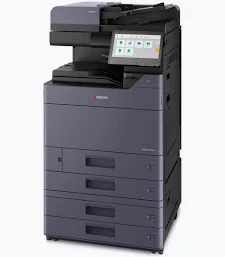

Kyocera TASKalfa 2554ci Colour Multifunction Printer
KSh 125,000.00
- A3 colour and monochrome printing
- Up to 25 pages per minute on A4
- Print, copy, and colour scan functions
- Optional fax functionality
- 10.1-inch colour touchscreen
- Automatic duplex printing
- Standard 4 GB RAM
- 1,150-sheet standard paper capacity
- Expandable paper capacity up to 7,150 sheets
- Gigabit Ethernet and USB connectivity
- HyPAS application platform
- Optional document processors and finishing accessories
Kyocera TASKalfa 2554ci Colour Multifunction Printer
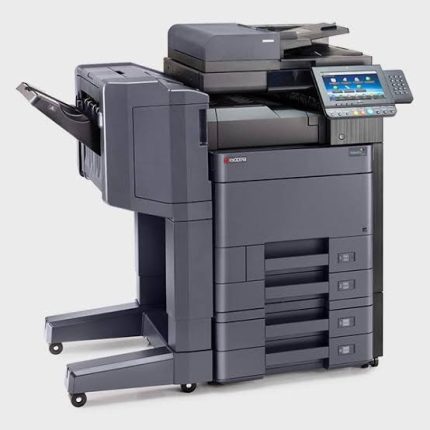
The Kyocera TASKalfa 2554ci colour multifunction printer is a professional A3 document solution for businesses that need dependable colour printing and efficient office workflows. It combines printing, copying, and colour scanning in one versatile system, with optional fax functionality. Its intuitive touchscreen, flexible paper handling, and network connectivity support everyday productivity. It is suitable for offices producing reports, presentations, business forms, and marketing documents.
Designed for shared work environments, the TASKalfa 2554ci supports automatic duplex printing and expandable paper capacity. Its HyPAS application platform supports compatible workflow solutions for businesses with specific document management requirements. Kyocera’s security features also help organisations protect information across supported printing and scanning workflows.
What Is the Kyocera TASKalfa 2554ci?
The Kyocera TASKalfa 2554ci is an A3-capable colour laser multifunction printer. It prints and copies in colour or black and white, while scanning documents in colour. Faxing is available with the appropriate optional equipment.
The device features a 10.1-inch colour touchscreen, built-in network connectivity, and standard duplex printing. It supports various paper sizes and optional accessories for growing document workloads. For manufacturer specifications, visit the official Kyocera TASKalfa 2554ci product page.
Technical Specifications
- Brand: Kyocera
- Product series: TASKalfa
- Model: TASKalfa 2554ci
- Printer technology: Colour laser multifunction system
- Standard functions: Print, copy, and scan
- Fax: Optional
- A4 print speed: Up to 25 pages per minute in colour and black and white
- A3 print speed: Up to 12 pages per minute
- Print resolution: Up to 1,200 × 1,200 dpi, with enhanced resolution modes
- Copy resolution: 600 × 600 dpi
- Control panel: 10.1-inch colour touchscreen
- Processor: ARM Cortex-A53, 1.6 GHz
- Standard memory: 4 GB RAM
- Standard storage: 32 GB SSD and 320 GB HDD in the referenced specification
- Standard paper input: Two 500-sheet trays and a 150-sheet multipurpose tray
- Standard paper capacity: 1,150 sheets
- Maximum paper capacity: Up to 7,150 sheets with optional feeders
- Automatic duplex printing: Standard
- Network connectivity: Gigabit Ethernet
- USB connectivity: USB 3.0 and USB host interfaces
- Wireless connectivity: Supported, with availability depending on configuration
- Maximum monthly duty cycle: Up to 100,000 pages
- Dimensions: Approximately 602 × 665 × 790 mm
- Weight: Approximately 90 kg
Specifications may vary between regional versions and configurations. Confirm the machine’s installed document feeder, storage, voltage, and accessories before purchase.
Why Choose the Kyocera TASKalfa 2554ci Colour Multifunction Printer?
Professional Colour Document Output
The TASKalfa 2554ci prints colour and monochrome documents at up to 25 pages per minute on A4 paper. It supports professional documents requiring clear text, charts, graphics, and colour details. Businesses can produce reports, proposals, presentations, and selected promotional materials from one shared device.
Its A3 capability supports larger documents such as spreadsheets, diagrams, and layouts. This versatility helps organisations manage different printing requirements without separate machines for every paper size.
Flexible A3 Paper Handling
The standard paper supply provides 1,150 sheets across three paper sources. Optional feeders can expand total input capacity to 7,150 sheets. The multipurpose tray supports selected media types, including envelopes, labels, and heavier paper within specified limits.
Automatic duplex printing helps produce double-sided documents with less manual handling. This is useful for lengthy reports, training materials, manuals, and internal communications. Flexible paper handling can also reduce interruptions during busy working periods.
Integrated Copying and Colour Scanning
The built-in copier supports routine office document reproduction. Colour scanning helps staff digitise paperwork for electronic sharing and archiving. Compatible scan destinations include email, network folders, and USB storage, depending on configuration.
Optional document processors provide different capacities and scanning speeds. Higher-capacity dual-scan options can help teams digitise large two-sided document batches. Businesses should select accessories that match their scanning volume and workflow needs.
Intuitive Touchscreen Controls
The 10.1-inch colour touchscreen provides central access to printing, copying, and scanning functions. Its clear interface helps users navigate routine tasks and configured workflows. Shortcuts and compatible applications can simplify repetitive office processes.
The HyPAS platform supports selected business applications and integrations. These can help organisations tailor document handling to their internal procedures. Available functionality depends on the installed software and accessories.
Network Connectivity and Security
Gigabit Ethernet supports shared printing and scanning across compatible office networks. The system supports network protocols and security capabilities designed for managed business environments. Configured authentication, encrypted communication, and data protection features can help safeguard sensitive documents.
Administrators should configure available security features according to organisational policies. Appropriate firmware maintenance and network management also support reliable operation. For official technical details, consult the Kyocera TASKalfa 2554ci specifications sheet.
Expandable Capacity and Finishing Options
The TASKalfa 2554ci supports optional paper feeders and finishing accessories. Depending on the installed options, businesses can expand paper capacity and streamline document preparation. Compatible finishing equipment may support tasks such as stapling and booklet production.
These options are useful for offices producing recurring reports, training packs, and organised business documents. Confirm accessory compatibility before ordering or upgrading the system.
Suitable Applications and Users
The Kyocera TASKalfa 2554ci suits corporate offices, educational institutions, government departments, and professional service providers. Businesses can use it for reports, proposals, presentations, invoices, and administrative records. Schools can produce learning materials, charts, and notices.
Marketing departments can prepare selected colour documents and promotional materials. Technical teams may benefit from A3 output for diagrams, spreadsheets, and layouts. Organisations should assess monthly volume, paper requirements, scanning needs, and available space before selecting a unit.
Why Buy from Avidik Ventures?
Avidik Ventures helps businesses source technology for professional office and document management needs. Our product listings support informed comparisons when selecting equipment for daily operations. Visit avidikventures.co.ke or contact our team to confirm availability, exact configuration, included accessories, and compatibility before ordering.











Reviews
There are no reviews yet.