
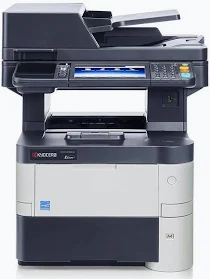
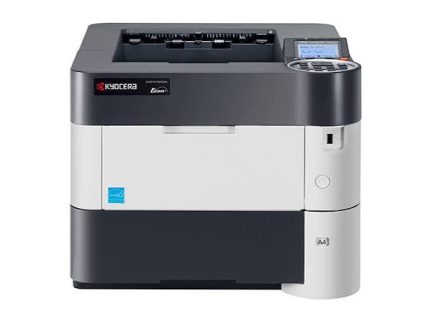
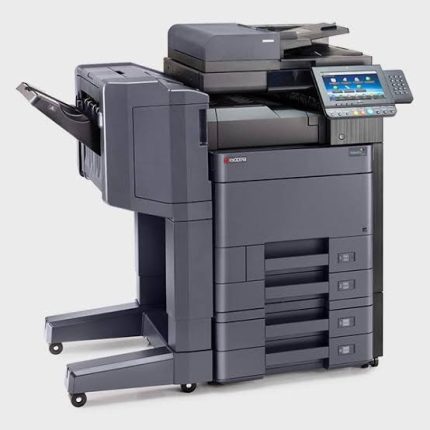
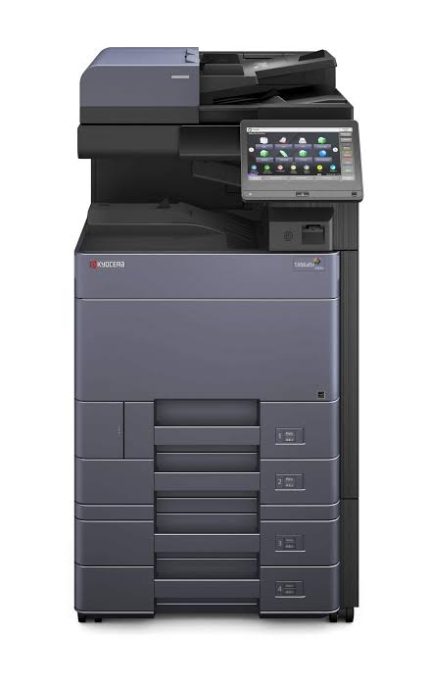
Kyocera M3540IDN A4 mono laser printer
KSh 60,000.00
-
Up to 40 pages per minute in black and white
-
Print, copy, colour scan, and fax functions
-
Automatic double-sided printing
-
75-sheet reversing document processor
-
Expandable paper capacity up to 2,600 sheets
Kyocera ECOSYS M3540idn A4 Mono Laser Printer – Multifunction Office Machine
The Kyocera ECOSYS M3540idn A4 mono laser printer is a high-performance multifunction device designed for businesses that need fast, dependable black-and-white document processing. It combines printing, copying, colour scanning, and faxing in one professional office machine. Its durable design and efficient output make it suitable for corporate offices, schools, financial institutions, and busy administrative departments.
With print speeds of up to 40 pages per minute on A4 paper, the M3540idn helps businesses handle everyday documents and larger print jobs efficiently. Automatic duplex printing reduces paper consumption, while its document processor simplifies multi-page copying and scanning. Kyocera’s ECOSYS technology is designed to support long component life and economical operation.
Key Features of the Kyocera ECOSYS M3540idn
- Fast monochrome printing: Produces up to 40 A4 pages per minute for efficient office workflows.
- Multifunction performance: Combines printing, copying, colour scanning, and faxing in one device.
- Professional print quality: Delivers sharp text and clear business documents with resolutions up to 1,200 dpi-equivalent quality.
- Automatic duplex printing: Prints on both sides of the paper to reduce paper use.
- Colour touchscreen control: Provides an intuitive interface for accessing everyday functions.
- Network connectivity: Supports Ethernet networking for shared printing and document distribution.
- Automatic document processing: Includes a 75-sheet reversing document processor for multi-page originals.
- Expandable paper capacity: Supports optional paper feeders for higher-volume workloads.
Technical Specifications
- Brand: Kyocera
- Model: ECOSYS M3540idn
- Printer type: A4 monochrome laser multifunction printer
- Functions: Print, copy, colour scan, and fax
- Print speed: Up to 40 pages per minute, A4
- Print resolution: 600 dpi and Fast 1200 mode
- Display: 7-inch colour touchscreen on the documented international version
- Memory: 1 GB standard, expandable to 2 GB on supported configurations
- Automatic duplex: Standard
- Document processor: 75-sheet reversing automatic document processor
- Standard paper input: 500-sheet cassette and 100-sheet multipurpose tray
- Maximum paper input: Up to 2,600 sheets with optional feeders
- Connectivity: Gigabit Ethernet and USB 2.0
- First-page print time: Approximately 9 seconds
- Output tray capacity: Up to 250 sheets
- Dimensions: Approximately 475 × 455 × 575 mm
- Compatible toner: TK-3150 or the appropriate regional equivalent; verify the exact cartridge reference before ordering
Why Choose the Kyocera ECOSYS M3540idn?
The Kyocera ECOSYS M3540idn is designed for organisations that prioritise speed, dependable output, and efficient document management. Its 40-page-per-minute print engine helps reduce waiting times when staff need invoices, reports, contracts, statements, and business correspondence.
Its integrated scanning and copying functions reduce the need for separate office equipment. Network connectivity allows multiple users to share the printer, while automatic duplex printing supports more economical paper use.
The ECOSYS design uses a long-life drum separate from the toner container. This helps reduce the need to replace major imaging components every time toner runs out. Actual running costs depend on print volume, toner prices, document coverage, and maintenance.
Toner Compatibility and Maintenance
The M3540idn uses black toner for monochrome printing. The Kyocera TK-3150 toner is listed for this model in several international markets, with an approximate yield of 14,500 A4 pages under ISO/IEC 19752 testing. Other regions may use different cartridge codes, including TK-3101 in certain markets.
Always confirm the toner reference against the printer’s regional model documentation or existing cartridge label before purchasing. Actual yield varies according to document coverage, print settings, and operating conditions.
For official specifications, manuals, and drivers, visit the Kyocera ECOSYS M3540idn support page.
Ideal Applications for Offices and Businesses
The Kyocera ECOSYS M3540idn suits medium-sized businesses, educational institutions, accounting firms, law offices, logistics companies, and administrative departments with regular document workloads.
It handles invoices, contracts, reports, forms, statements, and archived paperwork. Colour scanning supports digital document storage and sharing, while compatible scan-to-email, network-folder, FTP, and USB workflows help streamline office administration.
For organisations that mainly require black-and-white printing, this multifunction machine offers a practical combination of speed, flexible document handling, and network connectivity.
Get Office Printing Solutions from Avidik Ventures
Avidik Ventures supplies business technology products, including printers, toner supplies, cartridges, and computer accessories. Before purchasing the Kyocera ECOSYS M3540idn, confirm the machine’s condition, regional model, included accessories, and compatible toner reference. Choosing the correct supplies helps maintain consistent output and manage operating costs.
Explore Avidik Ventures for office printing equipment and compatible supplies to support your business operations.











Reviews
There are no reviews yet.