
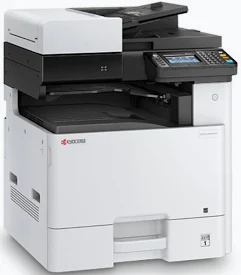

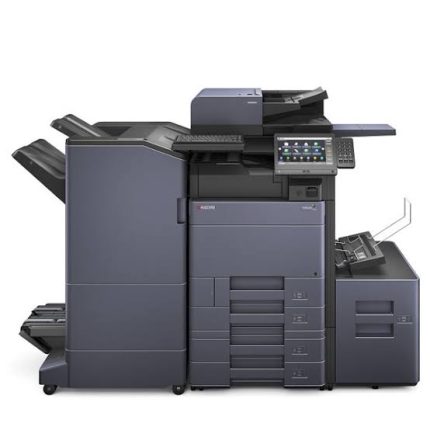
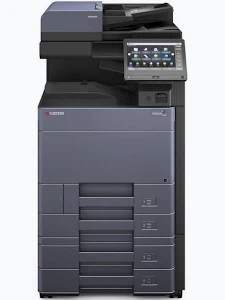
Kyocera ECOSYS M8124cidn A3 Colour Multifunction Printer – Print, Copy and Scan
KSh 380,000.00
- A3 Colour Printing: Print professional documents in both A3 and A4 formats.
- 24 PPM Performance: Produce up to 24 A4 pages per minute in colour and black-and-white.
- Multifunction Capability: Print, copy and scan using one versatile office machine.
- Automatic Duplex Printing: Print on both sides of paper to reduce consumption and waste.
- ECOSYS Long-Life Technology: Benefit from durable components designed for dependable operation and economical printing.
Kyocera ECOSYS M8124cidn A3 Colour Multifunction Printer – Print, Copy and Scan
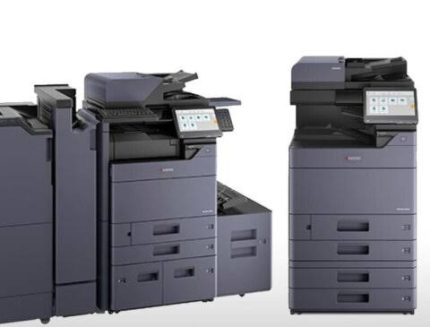
The Kyocera ECOSYS M8124cidn A3 Colour Multifunction Printer is a professional office printing solution designed for businesses, corporate environments and workgroups that require reliable, high-quality colour printing. Combining printing, copying and scanning in one powerful machine, it helps streamline everyday document management while supporting both A4 and A3 paper formats.
With print speeds of up to 24 pages per minute for both colour and black-and-white A4 documents, the Kyocera M8124cidn delivers dependable performance for busy office environments. Its high-quality printing resolution of up to 1200 x 1200 dpi produces sharp text, detailed graphics and professional-looking business documents.
Built around Kyocera’s ECOSYS technology, this multifunction printer features durable long-life components designed to support reliable operation and economical printing. Its network connectivity, automatic duplex printing and document scanning capabilities make it a practical choice for businesses looking to improve productivity and manage printing costs.
What Is the Kyocera ECOSYS M8124cidn?
The Kyocera ECOSYS M8124cidn is an A3/A4 colour laser multifunction printer that combines three essential office functions: printing, copying and scanning. It is designed for small and medium-sized businesses, professional offices and workgroups that need a versatile document management system.
The machine supports colour and monochrome printing, automatic two-sided printing and scanning of documents for digital storage or sharing. Its full-colour touch control panel makes everyday operations easier, while the optional fax functionality and wireless networking provide additional flexibility depending on the installed configuration.
Technical Specifications
- Brand: Kyocera
- Model: ECOSYS M8124cidn
- Product Type: A3 Colour Laser Multifunction Printer
- Functions: Print, Copy and Scan (Optional Fax)
- Print Technology: Colour Laser
- Print Speed (A4): Up to 24 ppm in colour and black-and-white
- Print Speed (A3): Up to 12 ppm in colour and black-and-white
- Print Resolution: Up to 1200 x 1200 dpi
- Copy Resolution: 600 x 600 dpi
- Scan Resolution: Up to 600 dpi
- Scanning Speed: Up to 50 images per minute simplex and 16 images per minute duplex at 300 dpi
- Duplex Printing: Automatic two-sided printing
- Paper Formats: A5 to A3
- Standard Paper Capacity: 600 sheets (500-sheet cassette and 100-sheet multipurpose tray)
- Maximum Paper Capacity: Up to 1,600 sheets with optional paper feeders
- Memory: 1.5GB standard, expandable to 3GB
- Processor: ARM Cortex-A9 Dual Core 1.2GHz
- Display: Full-colour touch control panel
- Connectivity: USB 2.0 and Gigabit Ethernet
- Wireless Connectivity: Optional Wi-Fi
- Mobile Printing: AirPrint, Mopria and KYOCERA Mobile Print
- Warm-Up Time: Approximately 30 seconds or less
- First Print Time: Approximately 7.5 seconds black-and-white and 10.2 seconds colour
Why Choose the Kyocera ECOSYS M8124cidn?
1. Professional A3 Colour Printing
The printer supports both A4 and A3 paper sizes, giving businesses greater flexibility when producing different types of documents. You can print everyday office paperwork, colour reports, business presentations, diagrams, charts and larger-format materials without requiring a separate A3 printer.
2. Reliable 24 PPM Printing Performance
With speeds of up to 24 pages per minute for A4 colour and monochrome printing, the M8124cidn helps offices manage regular printing demands efficiently. Its consistent output makes it suitable for departments that frequently produce reports, correspondence and business documents.
3. High-Quality 1200 x 1200 DPI Output
The printer delivers detailed output at resolutions of up to 1200 x 1200 dpi. This supports sharp text, clear graphics and professional colour reproduction for business documents, presentations and marketing materials.
4. Multifunction Printing, Copying and Scanning
Instead of purchasing separate office machines, the M8124cidn combines printing, copying and scanning in one unit. This helps simplify office workflows, reduce equipment requirements and make document handling more convenient.
5. Automatic Duplex Printing
The automatic duplex function allows users to print on both sides of a sheet without manually turning the paper. This helps reduce paper consumption, minimise waste and produce professional two-sided reports and documents.
6. Network Connectivity and Mobile Printing
With Gigabit Ethernet and USB connectivity, the printer can be integrated into compatible office computer systems and shared across a network. Support for AirPrint, Mopria and Kyocera Mobile Print also provides convenient printing options from compatible mobile devices.
7. Kyocera ECOSYS Long-Life Technology
Kyocera’s ECOSYS technology uses durable long-life components designed to reduce maintenance requirements and the total cost of ownership. This makes the M8124cidn a practical investment for businesses that depend on regular printing.
Where Can You Use the Kyocera M8124cidn?
- Corporate Offices: Handle business reports, correspondence, presentations and everyday office printing.
- Schools and Universities: Produce learning materials, examination documents, charts and administrative paperwork.
- Government Institutions: Support document processing, printing, copying and scanning across departments.
- Marketing Departments: Print colour brochures, presentations, promotional documents and business graphics.
- Professional Firms: Suitable for accounting offices, consultancy firms, legal practices and other document-intensive businesses.
- Print and Copy Centres: Handle compatible A3 and A4 colour printing and copying requirements.
Compatibility and Connectivity
The Kyocera ECOSYS M8124cidn supports USB 2.0 and Gigabit Ethernet connections for integration into office networks. Compatible computers can send print jobs through supported printer drivers, while AirPrint, Mopria and Kyocera Mobile Print provide additional mobile printing options.
Optional wireless networking and fax functionality can extend the printer’s capabilities, depending on the installed accessories and configuration.
Why Buy from Avidik Ventures?
At Avidik Ventures, we provide professional printing equipment, office technology and business solutions designed to support productivity. Our product range includes printers, toner cartridges, computer accessories, networking equipment and other essential technology products.
When purchasing the Kyocera ECOSYS M8124cidn from Avidik Ventures, you can explore a professional multifunction printing solution backed by convenient online shopping and product guidance.
Visit Avidik Ventures today to discover more business printers and technology products for your organisation.











Reviews
There are no reviews yet.