
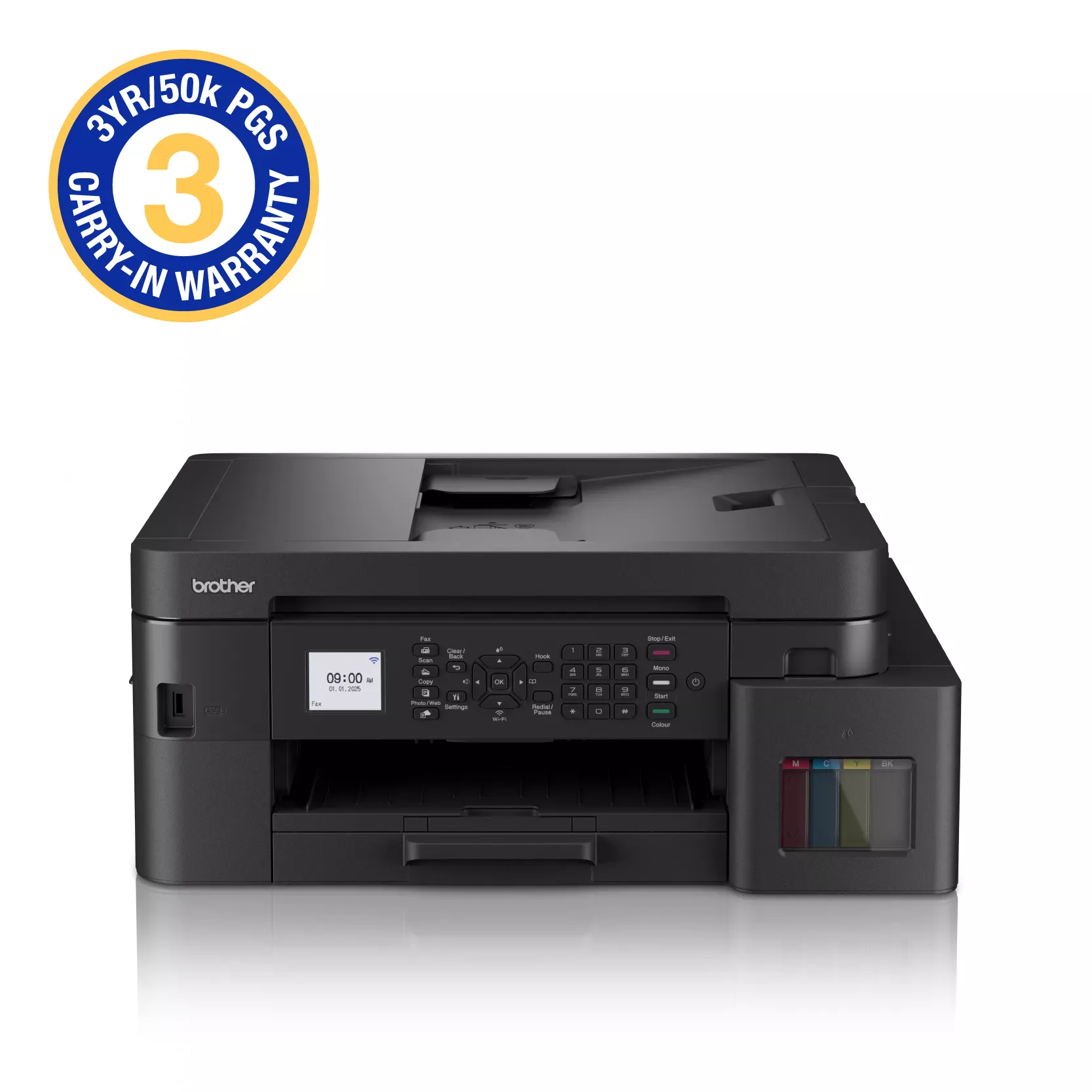
Brother MFC-T930DW Printer – Wireless Ink Tank Printer with Fax, Auto Duplex and 20-Sheet ADF
KSh 42,500.00
-
Print, scan, copy and fax in one device
-
High-yield refillable ink tank system
-
Wi-Fi, Wi-Fi Direct, Ethernet and USB connectivity
-
Automatic double-sided printing
-
20-sheet ADF and up to 230-sheet combined paper capacity
Brother MFC-T930DW Printer – Wireless Ink Tank Printer with Fax, Auto Duplex and 20-Sheet ADF
The Brother MFC-T930DW printer is a multifunction colour ink tank printer designed for businesses, offices, educational institutions and home-office professionals who need reliable printing and efficient document management. Combining printing, scanning, copying and faxing in one device, it offers a comprehensive solution for workplaces that handle regular paperwork.
With built-in Wi-Fi, Ethernet connectivity, automatic double-sided printing and a 20-sheet automatic document feeder, the Brother MFC-T930DW supports flexible working arrangements and helps simplify everyday office tasks. Its refillable ink tank system is designed for high-yield printing, helping reduce the frequency of ink replacement and manage ongoing printing costs.
Whether you need to print invoices, quotations, business reports, school assignments or client documents, this multifunction printer delivers practical features for improving productivity in a shared office or home workspace.
What Is the Brother MFC-T930DW Printer?
The Brother MFC-T930DW is a colour ink tank multifunction printer with four core functions: printing, scanning, copying and faxing. Unlike a basic printer, it combines essential document-handling capabilities in one machine, reducing the need for separate office equipment.
Its refillable ink tank system supports high-volume printing, while wireless and wired network connectivity gives users flexibility when connecting computers and compatible mobile devices. Ethernet is particularly useful for offices that prefer a wired network, while Wi-Fi and Wi-Fi Direct provide convenient wireless printing options.
The printer also features automatic duplex printing and a 20-sheet automatic document feeder (ADF). These features help users manage multipage documents, reduce manual handling and streamline routine office workflows.
Brother MFC-T930DW Printer Specifications
- Model: Brother MFC-T930DW
- Printer type: Colour ink tank inkjet multifunction printer
- Functions: Print, scan, copy and fax
- Print speed: Up to 17 images per minute (monochrome) and 16.5 images per minute (colour)
- Maximum print resolution: Up to 1200 × 6000 dpi under supported conditions
- Scanner glass resolution: Up to 1200 × 2400 dpi
- ADF capacity: Up to 20 sheets of 80 gsm plain paper
- Connectivity: Wi-Fi, Wi-Fi Direct, Ethernet 10/100BASE-TX and Hi-Speed USB 2.0
- Mobile printing: Brother Mobile Connect, Apple AirPrint and Mopria, subject to compatibility
- Automatic duplex printing: Yes
- Main paper tray capacity: Up to 150 sheets of 80 gsm plain paper
- Multipurpose tray capacity: Up to 80 sheets of 80 gsm plain paper
- Combined paper input capacity: Up to 230 sheets
- Display: 1.8-inch colour LCD
- Memory: 128 MB
- Dimensions: Approximately 435 × 418 × 180 mm
- Weight: Approximately 9.7–9.9 kg, depending on regional specifications
- Maximum rated ink yield: Up to 15,000 black pages and 5,000 colour pages with the included ink set in certain regional configurations
Specifications, included ink bottles and warranty terms may vary by market. Confirm the exact regional model before purchasing.
Why Choose the Brother MFC-T930DW Printer?
1. High-Yield Refillable Ink Tank System
The Brother MFC-T930DW uses refillable ink tanks designed to support frequent printing without the repeated replacement of small disposable cartridges. This makes it suitable for offices that produce invoices, reports, correspondence and other documents regularly.
Certain regional packages include ink rated for up to 15,000 black pages and 5,000 colour pages. Actual yields depend on the supplied ink configuration, document coverage, print settings, maintenance and usage.
For businesses with consistent printing needs, a high-yield ink system can help reduce interruptions and make consumable planning more predictable.
2. Four Essential Office Functions
Printing, scanning, copying and faxing are available in one device. This allows users to handle everyday paperwork without maintaining separate machines for each function.
Businesses can print new documents, digitise records, reproduce existing pages and send or receive faxes where required. This combination is especially useful for administrative departments, service businesses and offices that still rely on fax-based communication.
3. Wireless and Ethernet Connectivity
The printer supports Wi-Fi, Wi-Fi Direct, Ethernet and USB 2.0, providing several ways to connect compatible devices.
Wireless connectivity can reduce cable clutter and simplify access for mobile users. Ethernet provides a wired network option for offices that need a stable shared connection, while USB allows direct connection to a computer.
Compatibility with supported mobile printing services also makes it easier to print from smartphones and tablets.
4. Automatic Double-Sided Printing
Automatic duplex printing enables the printer to print on both sides of compatible paper without requiring users to turn each sheet manually.
This feature can reduce paper consumption and help create professional-looking reports, proposals, manuals and multipage documents. It is particularly useful for organisations that regularly produce longer documents.
5. Automatic Document Feeder for Multipage Tasks
The 20-sheet ADF allows users to feed multiple pages for supported scanning and copying operations without placing every page individually on the scanner glass.
This can save time when processing application forms, contracts, invoices and business records. The flatbed scanner remains available for single sheets, books and documents that require individual placement.
6. Flexible Paper Handling
The printer features a 150-sheet main tray and an 80-sheet multipurpose tray, giving it a combined input capacity of up to 230 sheets of standard plain paper.
This arrangement supports routine office printing while allowing users to load compatible media for different tasks. The colour LCD also provides a convenient interface for accessing supported functions and settings.
Ideal Applications for the Brother MFC-T930DW
Small and medium-sized businesses: Print invoices, quotations, reports and business correspondence while using scanning, copying and faxing for administrative workflows.
Corporate and administrative offices: Manage shared printing, multipage documents and wired network connections in a busy office environment.
Schools and educational institutions: Produce assignments, learning materials, administrative paperwork and colour documents while digitising or copying records.
Home offices and freelancers: Combine everyday printing and document management in one multifunction device with wireless connectivity.
Service providers and retail businesses: Process customer forms, business records and routine communications without relying on separate devices for each task.
Why Buy the Brother MFC-T930DW from Avidik Ventures?
Selecting a printer involves more than comparing print speed and purchase cost. It is important to consider your monthly print volume, need for faxing, network setup, multipage scanning requirements and access to compatible ink.
At Avidik Ventures, we provide technology products and computer accessories for business, office and personal use. Visit avidikventures.co.ke to explore our product range and identify equipment suited to your operational needs.
Before purchasing, confirm the exact regional specification, included ink bottles and warranty conditions. These details can affect the printer’s overall value and long-term running costs.
The Brother MFC-T930DW is a practical choice for users seeking high-yield colour printing, scanning, copying, faxing, automatic duplex printing and flexible wired and wireless connectivity in one multifunction device.











Reviews
There are no reviews yet.