
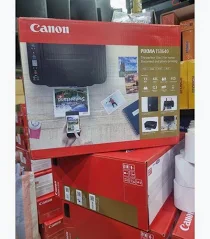

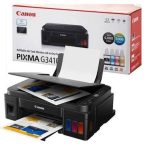
Canon PIXMA TS3640 Printer – Wireless Colour Inkjet with Print, Scan and Copy Functions
KSh 8,000.00
-
Print, scan and copy in one compact device
-
Colour printing up to 4,800 × 1,200 dpi
-
Built-in Wi-Fi and smartphone printing support
-
Borderless photo printing on compatible media
-
Replaceable black and colour FINE cartridges
Canon PIXMA TS3640 Printer – Wireless Colour Inkjet with Print, Scan and Copy Functions
The Canon PIXMA TS3640 Printer is a compact wireless colour inkjet printer designed for home users, students, small offices and individuals who need an affordable solution for everyday document printing and photo projects. Combining printing, scanning and copying in one device, it offers practical functionality without taking up excessive desk space.
With built-in Wi-Fi, smartphone printing support and a maximum print resolution of up to 4,800 × 1,200 dpi, the Canon PIXMA TS3640 is suitable for printing school assignments, business documents, personal paperwork and colourful photographs. Its straightforward controls, compact design and replaceable FINE ink cartridges make it a convenient option for users who need essential printing features at home or in a small workspace.
What Is the Canon PIXMA TS3640 Printer?
The Canon PIXMA TS3640 is a multifunction colour inkjet printer that combines three essential functions: printing, scanning and copying. It uses two FINE ink cartridges—one black and one colour cartridge containing cyan, magenta and yellow inks—to produce text documents, graphics and photographs.
Unlike a laser printer, which uses toner powder, the TS3640 uses liquid ink to produce text and images on compatible paper. This makes it suitable for general home printing and occasional colour photo projects.
The printer includes a flatbed scanner for copying or digitising individual documents. Its wireless connectivity allows users to print from compatible computers, smartphones and tablets using supported Canon software and mobile printing services.
Canon PIXMA TS3640 Technical Specifications
- Brand: Canon
- Model: PIXMA TS3640
- Product number: 6670C007, subject to regional configuration
- Printer type: Colour inkjet multifunction printer
- Functions: Print, scan and copy
- Print technology: Canon FINE inkjet system with two cartridges
- Maximum print resolution: Up to 4,800 × 1,200 dpi
- Black print speed: Approximately 7.7 images per minute
- Colour print speed: Approximately 4.0 images per minute
- Borderless photo printing: Supported for compatible photo sizes up to 5 × 7 inches
- Photo printing speed: Approximately 65 seconds for a borderless 10 × 15 cm photo
- Scanner type: CIS flatbed photo and document scanner
- Optical scan resolution: Up to 600 × 1,200 dpi
- Connectivity: USB and built-in Wi-Fi
- Mobile printing: Canon PRINT app, Apple AirPrint and Mopria, where supported
- Paper input capacity: Up to 60 sheets of plain paper
- Duplex printing: Manual two-sided printing
- Display: Approximately 3.8 cm monochrome LCD
- Standard ink cartridges: PG-445 Black and CL-446 Colour, subject to regional compatibility
- Optional high-yield cartridges: PG-445XL Black and CL-446XL Colour, where available
- Dimensions: Approximately 435 × 327 × 145 mm, with trays retracted
- Weight: Approximately 4.0 kg
Specifications are based on Canon’s TS3640 documentation. Confirm the regional product code and compatible cartridge numbers before purchase, as consumables can vary by market.
Why Choose the Canon PIXMA TS3640 Printer?
1. Print, Scan and Copy in One Device
The Canon PIXMA TS3640 combines three useful functions in one compact machine. Users can print documents, make copies and scan physical paperwork without purchasing separate devices.
This multifunction design is useful for students, households and small businesses that need to manage everyday documents while keeping their workspace organised.
2. High-Resolution Colour Printing
With a maximum print resolution of up to 4,800 × 1,200 dpi, the TS3640 can produce detailed text, colourful graphics and photographs on compatible paper.
It is suitable for school projects, personal documents, charts, invitations and small photo-printing tasks. Borderless printing on supported photo sizes also allows users to create photographs without the usual white margins.
3. Wireless Printing from Compatible Devices
Built-in Wi-Fi allows the printer to connect to a compatible wireless network. Users can print from supported computers, smartphones and tablets using the Canon PRINT app, Apple AirPrint or Mopria.
Wireless connectivity reduces dependence on a direct USB connection and provides greater flexibility when positioning the printer in a home or small office.
4. Compact Design for Smaller Workspaces
The printer’s compact dimensions and approximate 4 kg weight make it suitable for desks, study areas and home offices where space is limited.
Its integrated scanner and copier functions provide additional convenience without requiring multiple pieces of equipment.
5. Convenient Cartridge Replacement
The Canon PIXMA TS3640 uses separate black and colour FINE cartridges. Replacing a cartridge is straightforward, and compatible XL cartridge options may provide higher page yields than standard cartridges.
Actual ink consumption depends on the type of documents printed, image coverage, print settings and frequency of use. Users who print regularly should compare cartridge yields and ongoing ink costs before purchasing.
6. Flexible Paper and Photo Printing
The rear paper feed supports everyday plain paper and compatible photo media. This gives users flexibility to print schoolwork, letters, forms and photographs using the appropriate paper type.
Manual duplex printing is available for users who want to print on both sides of a page. The paper must be turned manually according to the printer driver’s instructions.
Ideal Applications for the Canon PIXMA TS3640
Home users: Print personal documents, forms, letters, recipes and occasional photographs.
Students: Produce assignments, revision materials, project reports and educational resources.
Home offices: Print invoices, quotations, correspondence and routine business documents.
Small businesses: Handle basic administrative paperwork, forms and promotional materials in colour.
Photography and creative projects: Print compatible borderless photographs, invitations and personal creative work on suitable media.
Why Buy the Canon PIXMA TS3640 from Avidik Ventures?
At Avidik Ventures, customers can explore printers, computer accessories and technology products for home and business use. The Canon PIXMA TS3640 is a practical option for users seeking wireless colour printing, scanning and copying in a compact device.
Before purchasing, consider your expected monthly print volume, the types of documents you produce, your preferred connection method and the cost of replacement ink. Confirming cartridge compatibility is particularly important when buying replacement consumables.
Simplify Everyday Printing with the Canon PIXMA TS3640
Choose the Canon PIXMA TS3640 for convenient wireless printing, high-resolution colour output and essential scanning and copying functions in one compact machine. Visit Avidik Ventures to explore printer solutions for your home, studies or small business.











Reviews
There are no reviews yet.