
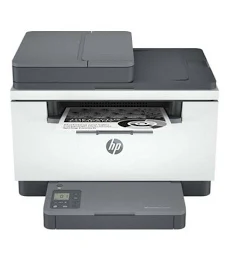
HP LaserJet MFP M236sdw Wireless Monochrome Multifunction Printer
KSh 52,000.00
- Print, scan, and copy in one device
- Up to 29 pages per minute on A4
- Automatic two-sided printing
- Dual-band Wi-Fi, Ethernet, and USB connectivity
- 40-sheet automatic document feeder
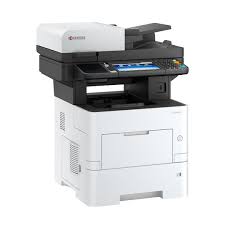
HP LaserJet MFP M236sdw Wireless Monochrome Multifunction Printer
The HP LaserJet MFP M236sdw Printer is a compact monochrome laser printer designed for productive home offices and small businesses. It combines printing, scanning, and copying with wireless connectivity and automatic two-sided printing. Its fast black-and-white output helps users manage reports, invoices, contracts, and everyday business documents efficiently. With an automatic document feeder and mobile printing support, it offers convenient document handling for busy work environments.
What Is the HP LaserJet MFP M236sdw?
The HP LaserJet MFP M236sdw is a multifunction black-and-white laser printer built for users who need reliable document processing in one device. It supports printing, scanning, and copying, while built-in Wi-Fi allows compatible devices to connect without a direct USB connection. Ethernet networking is also available for supported office networks.
The automatic document feeder helps simplify scanning and copying multiple pages. Visit the official HP LaserJet MFP M236sdw product page for manufacturer specifications, support, and setup information.
Technical Specifications
- Brand: HP
- Product Series: HP LaserJet MFP
- Model: M236sdw
- Product Number: 9YG09A
- Product Type: Monochrome multifunction laser printer
- Functions: Print, scan, and copy
- Print Speed: Up to 29 pages per minute on A4 paper
- Print Resolution: Up to 600 × 600 dpi
- Automatic Duplex Printing: Yes
- Scanner Type: Flatbed scanner with automatic document feeder
- Automatic Document Feeder Capacity: 40 sheets
- Optical Scan Resolution: Up to 600 dpi
- Copy Speed: Up to 29 copies per minute on A4 paper
- Connectivity: USB 2.0, Ethernet, dual-band Wi-Fi
- Mobile Printing: HP app, Apple AirPrint, Mopria, and Wi-Fi Direct
- Display: 1.6-inch icon LCD
- Memory: 64 MB
- Standard Paper Input: 150 sheets
- Standard Paper Output: 100 sheets
- Maximum Monthly Duty Cycle: Up to 20,000 pages
- Recommended Monthly Print Volume: 200–2,000 pages
- Compatible Toner: Regional HP 134A/134X, 135A/135X, 136A/136X, or 137A/137X series, depending on market
- Fax Function: No
Specifications and toner compatibility vary by region. Check the product number and local HP documentation before purchasing replacement supplies.
Why Choose the HP LaserJet MFP M236sdw Printer?
Fast Black-and-White Printing
With print speeds of up to 29 A4 pages per minute, the M236sdw helps reduce waiting time for everyday office documents. Its laser printing technology produces clear text for invoices, business correspondence, reports, and administrative records. This makes it suitable for users who prioritise productivity over colour printing.
Automatic Two-Sided Printing
The built-in duplex function prints on both sides of compatible paper automatically. This reduces the need to turn pages manually and can help lower paper consumption. It is useful for longer reports, training materials, and multipage business documents.
Wireless and Network Connectivity
Built-in dual-band Wi-Fi supports flexible printer placement and convenient wireless printing. Ethernet provides another connection option for compatible office networks. USB connectivity is available for direct connection to a computer.
Convenient Scanning and Copying
The flatbed scanner accommodates individual pages and suitable bound materials. Its 40-sheet automatic document feeder makes scanning and copying multipage documents easier. Users can digitise paperwork and prepare copies without purchasing separate equipment.
Mobile Printing Support
Compatible smartphones and tablets can print through supported HP mobile services. Apple AirPrint, Mopria, and Wi-Fi Direct provide additional options, depending on the device and configuration. These features help users print documents without transferring every file to a desktop computer.
For drivers, setup instructions, and troubleshooting, use the official HP support page.
Suitable Applications and Users
The HP LaserJet MFP M236sdw suits organisations and individuals who regularly handle black-and-white documents.
- Small businesses: Print quotations, invoices, reports, and business letters.
- Home offices: Manage contracts, forms, and routine administrative paperwork.
- Schools and training centres: Produce worksheets, revision notes, and training documents.
- Professional offices: Handle correspondence, proposals, and client records.
- Administrative departments: Scan, copy, and print multipage paperwork efficiently.
- Retail and service businesses: Produce receipts, forms, notices, and internal documents.
Its compact multifunction design helps save workspace while combining three essential document tasks. The recommended monthly volume of 200–2,000 pages makes it particularly suitable for light to moderate office workloads.
Toner Compatibility and Printer Maintenance
Choose replacement toner according to the exact regional version of your M236sdw. HP lists different toner families for different markets, so do not assume that every cartridge code is interchangeable. Check the existing cartridge number or the printer’s official supplies documentation before ordering.
Keep the printer on a stable, ventilated surface and follow the manufacturer’s maintenance guidance. Use suitable laser-printer paper and remove paper jams according to the instructions. Regularly clean accessible areas as directed to support consistent operation.
Why Buy from Avidik Ventures?
Avidik Ventures helps customers source printers and office technology for business, education, and home use. The HP LaserJet MFP M236sdw combines fast monochrome printing, automatic duplexing, wireless networking, scanning, and copying in one compact device. Contact Avidik Ventures for assistance confirming the correct regional model, compatible toner, and required accessories.











Reviews
There are no reviews yet.