
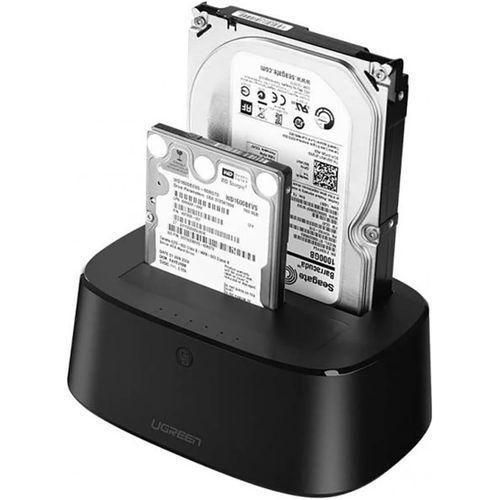
UGREEN USB 3.0 to SATA Dual-Bay Hard Drive Duplicator/Cloner EU – CM198
KSh 4,000.00
- Dual bays support two SATA drives
- Offline cloning without a computer
- USB 3.0 supports fast data transfers
- Tool-free installation simplifies drive swapping
- Ideal for backups and storage upgrades
UGREEN USB 3.0 to SATA Dual-Bay Hard Drive Duplicator/Cloner EU – CM198
Product Overview
The UGREEN CM198 USB 3.0 to SATA Dual-Bay Hard Drive Duplicator/Cloner is a versatile storage accessory designed to simplify hard drive management, data migration, backups, and storage expansion. With two drive bays, it allows you to connect compatible 2.5-inch and 3.5-inch SATA hard disk drives (HDDs) and solid-state drives (SSDs) in one convenient desktop docking station.
Featuring a USB 3.0 interface with theoretical transfer speeds of up to 5Gbps, the CM198 enables efficient file transfers between connected storage devices and compatible computers. Its standout feature is standalone offline cloning, which allows you to copy data from one drive to another without connecting the docking station to a computer.
Whether you are an IT technician upgrading computer storage, a business managing important files, or a home user looking for a convenient backup solution, the UGREEN CM198 provides a practical way to handle compatible SATA drives.
Key Features of the UGREEN CM198
Dual-Bay Drive Support
The UGREEN CM198 features two SATA drive bays, allowing you to connect two compatible drives simultaneously. It supports both 2.5-inch and 3.5-inch SATA HDDs and SSDs, making it suitable for different storage requirements.
This flexibility allows you to access two drives from a connected computer or prepare a source and destination drive for standalone cloning. The tool-free design makes inserting and removing compatible drives straightforward.
Standalone Offline Cloning
One of the main advantages of the CM198 is its one-button offline cloning function. It can copy data from a source drive in Bay A to a destination drive in Bay B without requiring a computer or dedicated cloning software.
This feature is particularly useful when upgrading from a hard drive to an SSD or duplicating a drive for migration purposes. LED indicators help you monitor cloning progress.
Important: The destination drive must have sufficient capacity for the source drive’s data and cloning requirements. Offline cloning may overwrite existing data on the destination drive. Back up important files before starting and follow the product manual’s instructions.
SuperSpeed USB 3.0 Connectivity
The docking station uses a USB 3.0 interface with theoretical transfer speeds of up to 5Gbps. This supports efficient file transfers when connecting compatible SATA storage to a computer through a USB 3.0 port.
The interface is backward compatible with USB 2.0 and USB 1.1, although older connections operate at their respective lower speeds. Actual transfer performance depends on the drives, computer, connection, and data being transferred.
Wide SATA Drive Compatibility
The CM198 supports SATA I, SATA II, and SATA III HDDs and SSDs in compatible 2.5-inch and 3.5-inch form factors. This makes it useful for accessing older drives, reusing storage from upgraded computers, and managing multiple drives.
The docking station is designed for SATA storage, not M.2 NVMe or other incompatible drive interfaces. Confirm your drive type before connecting it.
External Power and Convenient Operation
The included external power adapter supplies the power needed for supported drives, especially 3.5-inch desktop hard drives. The docking station also features a power switch and LED indicators to make operation and drive activity easier to monitor.
Its desktop design allows drives to be inserted without installing them inside a computer case. This is convenient for technicians and users who frequently work with multiple drives.
UASP Support and Efficient Workflow
The CM198 supports the USB Attached SCSI Protocol (UASP) when used with compatible drives, host hardware, and operating systems. UASP can improve data-transfer efficiency compared with conventional USB mass-storage operation in supported conditions.
This can be useful when transferring large files, managing backups, or working with compatible SSDs. Actual performance depends on the complete system configuration.
Technical Specifications
- Brand: UGREEN
- Model: CM198
- Product code: 50857
- Product type: Dual-bay SATA hard drive docking station and cloner
- Colour: Black
- Drive bays: 2
- Supported drive sizes: 2.5-inch and 3.5-inch
- Supported drive types: SATA HDDs and SSDs
- Supported SATA interfaces: SATA I, SATA II, SATA III
- Computer connection: USB 3.0 Type-B
- Maximum theoretical USB transfer speed: Up to 5Gbps
- USB backward compatibility: USB 2.0 and USB 1.1
- Cloning method: Standalone offline cloning from Bay A to Bay B
- Additional protocol: UASP support
- Power supply: External 12V adapter; use the supplied adapter’s specified rating
- Operating systems: Compatible Windows, macOS, and Linux systems
- Installation: Tool-free drive insertion
- Indicators: Power, drive activity, and cloning progress
Drive capacity note: Maximum supported capacity can vary by product revision and drive configuration. Confirm the capacity limit for your specific unit before purchasing or connecting high-capacity drives.
Practical Applications
Hard Drive to SSD Upgrades
Use the CM198 to clone a compatible source drive to a destination SSD during a computer storage upgrade. This can help migrate an existing system and files without manually copying each item, provided the source and destination meet the cloning requirements.
Data Backup and Duplication
Create a duplicate of a compatible drive for backup or migration purposes. The offline cloning function is especially convenient when you want to copy a drive without using a computer.
IT Maintenance and Technical Support
Technicians can use the docking station to access, test, and manage multiple compatible drives during troubleshooting, upgrades, and routine maintenance. Its dual-bay design supports common storage workflows in repair shops and IT departments.
Office and Business Storage
Businesses can use the CM198 to access compatible SATA drives containing archived documents, project files, and other business data. Connecting the docking station to a computer provides a convenient way to manage supported storage devices.
Personal File Management
Home users can repurpose compatible drives from upgraded computers for additional storage or file access. The docking station provides a convenient alternative to installing each drive internally.
Why Choose the UGREEN CM198?
The UGREEN CM198 combines dual-bay SATA connectivity, USB 3.0 data transfer, UASP support, and standalone cloning in one practical storage accessory. Its compatibility with 2.5-inch and 3.5-inch SATA drives makes it useful for both everyday file management and more advanced storage tasks.
The offline cloning function is especially valuable for users who need to migrate drives without relying on a computer. Meanwhile, the USB connection allows compatible drives to be accessed from supported computers for backups and file transfers.
For reliable operation, use compatible SATA drives, connect the correct power adapter, and verify the source and destination drives before cloning. Always back up important data and never disconnect a drive while data is being transferred.
Get the UGREEN CM198 from Avidik Ventures
Simplify your storage management with the UGREEN USB 3.0 to SATA Dual-Bay Hard Drive Duplicator/Cloner CM198 from Avidik Ventures. Visit Avidik Ventures to explore technology accessories and storage solutions for home, office, and professional use.
Choose a practical solution for compatible SATA drive cloning, backups, and data migration, and make your storage workflow more convenient.











Reviews
There are no reviews yet.