
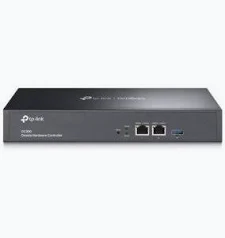
TP-Link Omada Hardware Controller – TL-OC300
KSh 23,499.00
- Centralized Omada network management
- Remote cloud and local access
- Two Gigabit Ethernet ports
- Management for large compatible deployments
- Fanless metal enclosure with USB 3.0 backup support
TP-Link Omada OC300 Hardware Controller – Centralized Network Management
The TP-Link Omada OC300 Hardware Controller is a professional network management solution designed for businesses, hotels, schools, and multi-site organizations. It centralizes the configuration, monitoring, and maintenance of compatible Omada access points, switches, and gateways. With remote cloud access, Gigabit Ethernet ports, and support for large network deployments, it helps IT administrators manage network infrastructure efficiently from one interface.
What It Is: TP-Link Omada OC300 Hardware Controller
The OC300 is a dedicated hardware controller for the TP-Link Omada Software Defined Networking (SDN) platform. It enables centralized management without requiring a separate computer or server to run controller software continuously.
Administrators can discover compatible devices, configure network settings, monitor connected clients, and manage supported equipment through the Omada web interface or mobile app. Cloud access enables remote administration, while local management supports organizations that prefer to manage their networks on-site.
The OC300 is designed for larger deployments than entry-level hardware controllers. Depending on the supported hardware and deployment configuration, it can manage up to 500 Omada access points, 100 Omada routers, and up to 100 compatible Omada switches.
Explore the official TP-Link Omada OC300 product page for manufacturer information.
Technical Specifications: TP-Link Omada OC300 Hardware Controller
- Brand: TP-Link
- Product family: Omada SDN
- Model: OC300
- Product type: Hardware network controller
- Ethernet interfaces: 2× Gigabit Ethernet ports
- USB interface: 1× USB 3.0 port for supported backup functions
- Power supply: 100–240 V AC, 50/60 Hz, 0.6 A
- Management platform: TP-Link Omada SDN
- Management capacity: Up to 500 access points, 100 routers, and 100 compatible switches on applicable specifications
- Cloud access: Supported
- Local management: Supported
- Mobile management: Omada app
- Multi-site management: Supported
- Advanced management: Device discovery, batch configuration, firmware upgrades, network monitoring, and alerts
- Additional tools: Network topology, reports, Wi-Fi heatmap simulation, and captive portal configuration, subject to software support
- Enclosure: Metal casing
- Cooling: Fanless design
- Dimensions: Approximately 294 × 180 × 44 mm
- Installation: Desktop or rackmount installation
Device limits vary with hardware revision, firmware, network conditions, and the types of managed equipment. Consult the official OC300 support page for manuals, firmware, and compatible devices.
Why Choose TP-Link Omada OC300 Hardware Controller?
Centralize Network Administration
Manage compatible Omada access points, switches, and gateways from a single interface. Centralized configuration helps reduce repetitive tasks and maintain consistent settings across a business network.
For organizations with multiple access points or managed switches, this approach makes everyday administration more straightforward. Administrators can monitor device status and manage supported configurations without accessing every device separately.
Manage Your Network Remotely
Cloud access allows authorized administrators to monitor and configure supported network equipment through the Omada app or web interface. This is useful for IT teams responsible for branch offices, hotels, retail locations, and distributed business environments.
Local management is also available for organizations that prefer on-premises administration. Remote access depends on suitable connectivity and the required account and security configuration.
Simplify Network Monitoring and Maintenance
The Omada management platform provides dashboards, device status information, network topology views, and supported alerts. These tools help administrators understand network activity and investigate connectivity issues.
Batch configuration and firmware management can also reduce the time required for routine maintenance. Available functions depend on the controller firmware and the managed devices.
Support Large Network Deployments
The OC300 is designed for professional networks with many access points, switches, and routers. Supported multi-site management helps administrators coordinate compatible infrastructure across different locations.
This makes it suitable for growing businesses and organizations with complex network requirements. Confirm the supported device models and management limits before planning a large deployment.
Install a Dedicated, Quiet Controller
The metal enclosure and fanless design support quiet operation in suitable network installations. Two Gigabit Ethernet ports provide network connectivity, while the USB 3.0 port supports documented backup functions.
The included power supply and rackmount accessories, where provided with the regional package, help integrate the controller into a professional networking environment.
Product Use Cases: TP-Link Omada OC300 Hardware Controller
Corporate Offices
Manage compatible access points, switches, and gateways across workstations, meeting rooms, and shared spaces. Centralized monitoring helps IT teams maintain consistent configurations and simplify troubleshooting.
Hotels and Hospitality
Coordinate supported wireless infrastructure across guest rooms, reception areas, restaurants, and meeting facilities. Compatible captive portal features can help configure guest Wi-Fi access.
Schools and Universities
Manage compatible network equipment across classrooms, libraries, offices, and campus facilities. Centralized administration can simplify routine configuration and maintenance across multiple buildings.
Multi-Branch Businesses
Use supported multi-site management to oversee compatible Omada networks across branches. A centralized management platform can help IT teams monitor equipment and maintain consistent network policies.
Why Buy at Avidikventures?
Avidikventures helps businesses find networking equipment for professional IT infrastructure. The OC300 offers dedicated management, remote access, and monitoring tools for compatible Omada deployments.
Before purchasing, confirm hardware revision, device compatibility, and the required management capacity. Visit Avidikventures to explore networking solutions for your organization.
Choose the OC300 when your network requires centralized management for a larger Omada deployment without maintaining a separate controller server.











Reviews
There are no reviews yet.