
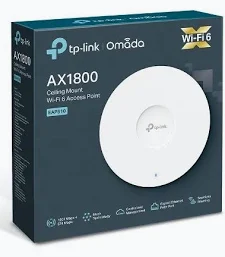
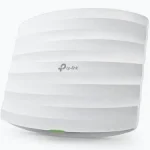
TP-Link AX1800 Ceiling Mount Wi-Fi 6 Access Point – TL-EAP610
KSh 13,499.00
- AX1800 dual-band Wi-Fi 6 connectivity
- Up to 1775Mbps combined theoretical wireless speed
- Gigabit Ethernet connectivity
- Ceiling and wall mounting options
- Omada management support on compatible revisions
TP-Link EAP610 AX1800 Ceiling Mount Wi-Fi 6 Access Point
Upgrade your business wireless network with the TP-Link EAP610 Ceiling Mount Access Point. This Wi-Fi 6 access point delivers fast dual-band connectivity for offices, retail spaces, schools, hotels, and other professional environments. It provides theoretical wireless speeds of up to 1775Mbps across the 2.4GHz and 5GHz bands. Its sleek ceiling-mount design supports discreet installation, while Omada management tools help administrators configure and monitor compatible network deployments. With Gigabit Ethernet connectivity and flexible power options on supported hardware versions, the EAP610 is designed for modern business Wi-Fi requirements.
What Is the TP-Link EAP610 Ceiling Mount Access Point?
The TP-Link EAP610 is a business-grade wireless access point designed to connect wireless devices to an existing wired network. It broadcasts Wi-Fi for laptops, smartphones, tablets, and other compatible devices. Unlike a standalone router, it is intended to operate as part of a broader network infrastructure.
The EAP610 uses Wi-Fi 6 technology, based on IEEE 802.11ax, to improve wireless efficiency and support multiple active devices. Its dual-band design supports both 2.4GHz and 5GHz connectivity. It also integrates with compatible TP-Link Omada management solutions for centralised configuration and monitoring.
Explore the official TP-Link EAP610 product page for manufacturer specifications and supported features.
Technical Specifications
- Brand: TP-Link
- Model: EAP610
- Product type: Ceiling-mount Wi-Fi 6 access point
- Wireless standard: IEEE 802.11a/b/g/n/ac/ax
- Wi-Fi class: AX1800
- 5GHz speed: Up to 1201Mbps
- 2.4GHz speed: Up to 574Mbps
- Combined theoretical wireless rate: Up to 1775Mbps
- Ethernet interface: One Gigabit Ethernet port
- Antennas: Internal omnidirectional antennas
- Antenna gain: 2 × 4dBi at 2.4GHz and 2 × 5dBi at 5GHz on documented versions
- Wireless technologies: OFDMA, MU-MIMO, beamforming, and 1024-QAM
- Power options: 802.3at PoE+, passive PoE, or DC adapter, depending on hardware revision
- Mounting: Ceiling, wall, and compatible junction-box mounting
- Management: Web interface, Omada app, and compatible Omada controllers
- Wireless security: WPA, WPA2, WPA3, and enterprise authentication options, depending on configuration
- Dimensions: Approximately 160 × 160 × 33.6mm on V2 and later documented versions
Hardware revisions differ in power requirements, dimensions, and supported management features. Check the official TP-Link EAP610 support page for the correct documentation and firmware.
Fast Dual-Band Wi-Fi 6 Connectivity
The EAP610 provides theoretical speeds of up to 1201Mbps on 5GHz and 574Mbps on 2.4GHz. The 5GHz band is useful for high-throughput applications when signal conditions are suitable. The 2.4GHz band supports compatible devices that need broader coverage or use older wireless standards.
Wi-Fi 6 improves wireless efficiency through features such as OFDMA and 1024-QAM. These technologies can help compatible devices use available network capacity more effectively. Actual speeds depend on client hardware, interference, network configuration, and internet service.
Efficient Performance in Busy Environments
Offices and commercial spaces often have many devices connected simultaneously. The EAP610 supports OFDMA and MU-MIMO to help manage wireless traffic more efficiently. Airtime Fairness and load-balancing features can also help distribute available wireless resources in supported deployments.
These features are useful in environments such as meeting rooms, classrooms, reception areas, and shared workspaces. Actual performance depends on the number of active devices, application demands, and radio conditions.
Flexible Ceiling and Wall Installation
The EAP610 features a compact design intended for ceiling or wall mounting. Its included mounting hardware supports a tidy installation that keeps equipment away from desks and work surfaces. Compatible versions also support junction-box mounting.
Ceiling placement can help distribute wireless coverage across shared spaces. However, building materials, ceiling height, interference, and access-point placement all affect real-world coverage. A site survey can help determine the number and positioning of access points needed.
Flexible Power over Ethernet Options
The EAP610 can receive power through Ethernet on compatible installations, reducing the need for a separate power outlet near the mounting location. Depending on hardware revision, supported power options may include 802.3at PoE+, 48V passive PoE, or a DC adapter.
Important: Power requirements vary by hardware version. Confirm the exact revision and supported voltage before connecting the access point to a PoE switch or injector. Do not assume that all versions accept the same power source.
Centralised Network Management with Omada
The EAP610 integrates with compatible TP-Link Omada management solutions. Depending on the hardware revision and software, administrators can manage wireless settings, monitor connected clients, configure access policies, and manage multiple access points through a unified interface.
Supported deployments may offer cloud access, guest authentication, seamless roaming, and Omada Mesh. Feature availability depends on the controller, firmware, and access-point revision. Review the official Omada support documentation before planning a multi-access-point installation.
Business Security and Guest Wi-Fi
The EAP610 supports business wireless security features, including WPA3 on compatible versions. Multiple SSIDs can help administrators configure separate wireless networks for different user groups. Guest portal options and enterprise authentication are available in supported configurations.
These tools can help businesses manage visitor access while maintaining appropriate network policies. Proper security still requires strong credentials, suitable VLAN and firewall configuration where needed, and regular firmware maintenance.
Practical Applications for Commercial Networks
The TP-Link EAP610 can provide wireless access in many professional environments:
- Offices: Support cloud applications, video meetings, and everyday business tasks.
- Hotels and guesthouses: Provide Wi-Fi coverage in common areas and selected rooms.
- Schools: Connect compatible laptops, tablets, and learning devices.
- Retail spaces: Support staff devices and properly configured guest access.
- Meeting rooms: Provide wireless connectivity for collaborative work.
- Small businesses: Expand an existing wired network with centrally managed Wi-Fi.
Large buildings or high-density environments may require several access points, a suitable PoE network switch, and an Omada controller.
Why Buy the TP-Link EAP610 at Avidikventures?
At Avidikventures, we help customers find networking products for business and professional connectivity. The EAP610 combines Wi-Fi 6 performance, flexible installation, and management options for compatible Omada networks. Confirm the hardware revision and power requirements before ordering.
Visit Avidikventures to explore networking solutions and contact the team for assistance choosing suitable equipment.











Reviews
There are no reviews yet.