
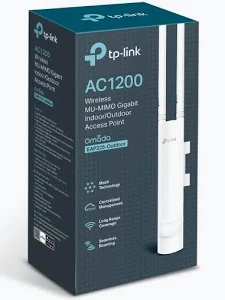

TP-Link AC1200 Wireless MU-MIMO Gigabit Indoor/Outdoor Access Point – TL-EAP225-OUTDOOR
KSh 11,000.00
- AC1200 dual-band Wi-Fi 5 connectivity
- Gigabit Ethernet network interface
- IP65-rated weather-resistant enclosure on documented versions
- MU-MIMO and beamforming support
- PoE-powered installation with compatible equipment
TP-Link EAP225-Outdoor Access Point – AC1200 Wireless MU-MIMO Gigabit Indoor/Outdoor
The TP-Link EAP225-Outdoor Access Point delivers reliable dual-band Wi-Fi for businesses, homes, outdoor workspaces, and commercial premises. Designed for indoor and outdoor installations, this AC1200 wireless access point combines 2.4 GHz and 5 GHz connectivity with MU-MIMO technology. Its weather-resistant enclosure, Gigabit Ethernet connection, and flexible Power over Ethernet options make it suitable for extending wireless coverage beyond a conventional router.
Whether you need Wi-Fi around an office compound, hotel courtyard, school campus, or outdoor customer area, the TP-Link EAP225-Outdoor offers a practical networking solution. Learn more from the official TP-Link EAP225-Outdoor product page.
What Is the TP-Link EAP225-Outdoor Access Point?
The TP-Link EAP225-Outdoor is a dual-band wireless access point designed to expand Wi-Fi coverage in environments where standard indoor equipment may not be suitable. It uses Wi-Fi 5 technology, also known as 802.11ac, to provide wireless connectivity for compatible smartphones, laptops, tablets, and other network devices.
Its AC1200 wireless class supports theoretical speeds of up to 300 Mbps on the 2.4 GHz band and 867 Mbps on the 5 GHz band. The two bands serve different connectivity needs, allowing administrators to balance coverage, compatibility, and performance.
The weather-resistant enclosure is rated IP65 on documented versions, helping protect the unit against dust and water jets. This makes it suitable for appropriately installed outdoor environments. The supplied mounting kit supports wall or pole installation, while the detachable antennas offer additional installation flexibility.
Technical Specifications of the TP-Link EAP225-Outdoor Access Point
- Brand: TP-Link
- Model: EAP225-Outdoor
- Product type: Indoor/outdoor wireless access point
- Wireless generation: Wi-Fi 5 (802.11ac Wave 2)
- Wireless class: AC1200
- Frequency bands: 2.4 GHz and 5 GHz
- Maximum theoretical wireless speeds: 300 Mbps at 2.4 GHz and 867 Mbps at 5 GHz
- Ethernet interface: 1 × Gigabit Ethernet RJ45 port
- Wireless technology: 2×2 MU-MIMO, beamforming, band steering, and airtime fairness
- Antennas: Two detachable dual-band omnidirectional antennas
- Weather protection: IP65-rated enclosure on documented hardware versions
- Power options: 802.3af PoE and 24V passive PoE, depending on hardware revision
- Management: Omada app and compatible Omada controllers
- Mounting: Wall or pole mounting
- Dimensions: Approximately 215 × 46 × 27 mm for the documented original enclosure; dimensions vary by revision and measurement configuration
For precise specifications, consult the official TP-Link EAP225-Outdoor datasheet. Check the hardware revision before selecting a power source or accessories.
Why Choose the TP-Link EAP225-Outdoor Access Point?
Dual-Band AC1200 Wireless Performance
The AC1200 wireless design provides separate 2.4 GHz and 5 GHz bands for compatible devices. The 2.4 GHz band is useful for everyday connectivity, while the 5 GHz band offers higher theoretical throughput for demanding applications. Actual speeds depend on distance, interference, connected devices, and network configuration.
Weather-Resistant Outdoor Design
The IP65-rated enclosure on documented versions helps protect the access point from dust and water jets. This supports installation in suitable outdoor locations, including covered walkways, courtyards, and building exteriors. Correct mounting, cable protection, and installation practices remain important for long-term reliability.
MU-MIMO for Multiple Connected Devices
MU-MIMO technology helps the access point communicate with multiple compatible wireless clients more efficiently. This is useful in workplaces and public areas where several people may access online services simultaneously. Other wireless features, including beamforming and airtime fairness, help manage connectivity in supported configurations.
Flexible Power over Ethernet
Power over Ethernet simplifies installation by carrying network data and electrical power through a compatible Ethernet connection. The EAP225-Outdoor supports specified PoE options, including 802.3af and 24V passive PoE on documented revisions. Confirm compatibility before connecting it to a switch or injector, as PoE standards and voltages are not interchangeable in every configuration.
Centralised Omada Management
Integrate the access point with compatible Omada management tools to configure wireless settings and monitor connected devices. In suitable deployments, Omada mesh and roaming features can help extend coverage across multiple access points. Feature availability depends on firmware, controller configuration, and compatible equipment. Visit the TP-Link Omada platform for more information.
Where Can You Use This Indoor/Outdoor Access Point?
Business premises: Extend wireless access to outdoor work areas, entrances, staff facilities, and other areas beyond the main office.
Hotels and hospitality venues: Provide connectivity around courtyards, patios, outdoor dining areas, and suitable guest spaces.
Schools and training institutions: Support wireless access in courtyards, covered outdoor learning areas, and selected campus locations.
Retail and commercial environments: Extend Wi-Fi to outdoor service areas, customer waiting spaces, and building entrances.
Homes and residential compounds: Improve wireless access in gardens, garages, patios, and other areas where an indoor router may not provide adequate coverage.
Warehouses and workshops: Provide wireless connectivity in suitable indoor or outdoor work areas for mobile devices and compatible business applications.
Installation and Compatibility
Connect the access point to your network using Ethernet and supply power through a supported PoE switch or compatible injector. Install the unit on a suitable wall or pole using the appropriate mounting hardware. Position it to reduce obstructions and improve coverage in the intended service area.
For outdoor deployments, protect cable connections and follow the manufacturer’s installation guidance. Wireless coverage varies with building materials, terrain, interference, antenna placement, and client devices. The access point extends network access but does not independently increase the speed of your internet subscription.
Visit the official TP-Link EAP225-Outdoor support page for available documentation, firmware, and setup guidance.
Why Buy the TP-Link EAP225-Outdoor Access Point at Avidik Ventures?
Avidik Ventures helps customers source networking equipment for home, office, and commercial connectivity projects. The TP-Link EAP225-Outdoor is a practical choice for extending dual-band Wi-Fi to suitable outdoor areas while supporting centralised management options.
Choose equipment that matches your coverage needs, network infrastructure, and power requirements. Contact Avidik Ventures through avidikventures.co.ke for product enquiries and assistance with your networking requirements.













Reviews
There are no reviews yet.