
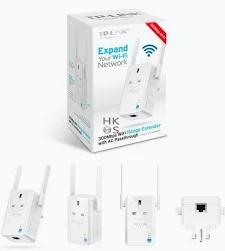
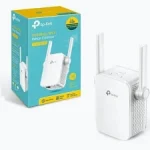
TP-Link 300Mbps Wi-Fi Range Extender with AC Passthrough – TL-WA860RE
KSh 2,850.00
- Up to 300Mbps wireless speed on 2.4GHz
- Integrated AC passthrough socket
- Two external antennas
- 10/100Mbps Ethernet port for compatible wired devices
- Simple Wi-Fi range extension setup
TP-Link TL-WA860RE Wi-Fi Range Extender with AC Passthrough – 300Mbps
Improve wireless coverage at home or in the office with the TP-Link TL-WA860RE Wi-Fi Range Extender. This practical networking device helps extend an existing Wi-Fi signal into areas where reception is weak. Its standout feature is an integrated AC passthrough socket, allowing you to keep using the wall outlet while the extender is plugged in. With wireless speeds of up to 300Mbps on the 2.4GHz band, it supports everyday browsing, email, online learning, and compatible connected devices. Two external antennas and straightforward setup options make it a convenient choice for extending an existing wireless network.
What Is the TP-Link TL-WA860RE Wi-Fi Range Extender?
The TP-Link TL-WA860RE is a wireless range extender designed to receive and rebroadcast your existing router’s signal. It helps improve connectivity in rooms or work areas where the main router struggles to provide reliable coverage. You can expand your network without replacing your router or running additional Ethernet cables to every wireless device.
The device uses 2.4GHz Wireless N technology and supports IEEE 802.11b/g/n standards. Its two external antennas support wireless transmission and reception, while the Ethernet port connects compatible wired equipment through the extender. The integrated AC passthrough socket is particularly useful where electrical outlets are limited.
Explore the official TP-Link TL-WA860RE product page for manufacturer information and available support resources.
Technical Specifications
- Brand: TP-Link
- Model: TL-WA860RE
- Device type: Wi-Fi range extender with AC passthrough
- Wireless speed: Up to 300Mbps
- Frequency band: 2.4GHz
- Wireless standards: IEEE 802.11b/g/n
- Antennas: Two external antennas
- Operating modes: Range Extender and Access Point on supported versions
- Ethernet interface: One 10/100Mbps RJ45 port
- Buttons: Range Extender, Reset, and power control where provided
- Wireless security: WEP, WPA-PSK, and WPA2-PSK support, depending on revision
- Power input: 100–240V AC, 50/60Hz on documented versions
- Maximum power consumption: Approximately 3W on documented versions
- Dimensions: Approximately 110 × 65.8 × 75.2mm on documented versions
- Management: Web-based configuration; app support depends on hardware and firmware
Specifications and available features may vary by hardware revision and regional plug type. Check the device label and the official TP-Link download page for the correct manual and firmware.
Extend Wi-Fi Coverage into Weak-Signal Areas
Wireless signals can weaken when passing through walls, floors, furniture, and other obstacles. This can leave bedrooms, hallways, and home offices with unreliable connectivity. The TL-WA860RE helps extend your existing network into these areas when installed within suitable range of the router.
For better results, place the extender where it can still receive a reasonably strong signal from your main router. Its signal indicators help you identify a suitable position. Avoid placing it at the far end of a dead zone, where the original signal may already be too weak to repeat effectively.
Keep Your Power Outlet Available with AC Passthrough
The integrated AC passthrough socket distinguishes the TL-WA860RE from many basic range extenders. It lets you plug the extender into a wall outlet while retaining a socket for another compatible electrical device. This can be especially helpful in bedrooms, living rooms, and small offices with limited outlets.
The passthrough socket is designed for electrical convenience; it does not increase Wi-Fi speed or network coverage by itself. Always follow the device’s regional safety instructions and electrical ratings when using the socket.
Set Up Your Extended Network with Ease
The TL-WA860RE is designed for straightforward installation. Compatible routers and hardware versions support button-based setup using the Range Extender button and the router’s WPS function. A web-based setup option is also available for configuring the wireless connection manually.
After setup, move the extender to a suitable position between your router and the area needing coverage. For detailed instructions, consult the official TP-Link support page. Choose your exact hardware version before downloading a user guide or firmware update.
Connect Wired Devices Through Ethernet
The built-in 10/100Mbps Ethernet port allows compatible wired equipment to access your network through the extender’s wireless connection. Examples include desktop computers, selected smart TVs, game consoles, and other Ethernet-enabled devices.
This can help connect equipment that lacks convenient Wi-Fi support. However, the port’s maximum link speed is 100Mbps, and actual performance also depends on the wireless link, router, interference, and internet service.
Practical Applications for Home and Office
The TP-Link TL-WA860RE can support everyday connectivity in different environments:
- Bedrooms: Improve wireless access for browsing and messaging.
- Home offices: Support email, cloud documents, and routine online tasks.
- Study areas: Help students access online lessons and research resources.
- Living rooms: Extend coverage for compatible connected devices.
- Small offices: Help reduce wireless dead zones in selected work areas.
- Wired equipment: Connect compatible Ethernet devices through the extender.
The advertised 300Mbps is a theoretical wireless link rate, not a guaranteed internet speed. Results vary with placement, building materials, interference, router capability, and network traffic.
Why Choose the TP-Link TL-WA860RE Wi-Fi Range Extender?
The TL-WA860RE combines basic wireless expansion with two external antennas, an Ethernet port, and a convenient AC passthrough socket. Its wall-mounted design helps reduce clutter, while the passthrough feature preserves access to an electrical outlet. It is suitable for users who want to improve coverage without replacing their existing router.
This model uses older single-band 2.4GHz Wireless N technology. If you need 5GHz Wi-Fi, higher throughput, or newer wireless standards, compare more recent extenders before making your choice.
Why Buy the TP-Link TL-WA860RE at Avidikventures?
At Avidikventures, we help customers find practical networking solutions for home and business connectivity. The TL-WA860RE offers a useful combination of Wi-Fi extension and electrical passthrough. Before ordering, confirm the hardware revision and plug type for your installation.
Visit Avidikventures to explore networking products and contact the team for assistance choosing suitable equipment.











Reviews
There are no reviews yet.