
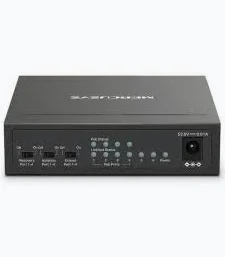
MERCUSYS 6-Port 10/100Mbps Desktop Switch with 4-Port PoE+ -TL-MS106LP
KSh 2,499.00
- Six 10/100 Mbps Ethernet ports
- Four IEEE 802.3af/at PoE+ ports
- 40 W total PoE power budget
- Extend Mode up to 250 metres
- Isolation Mode and PoE Auto Recovery
MERCUSYS MS106LP Network Switch – 6-Port 10/100Mbps Desktop Switch with 4-Port PoE+
The MERCUSYS MS106LP Network Switch expands wired network connectivity while supplying power to compatible network devices. This 6-port Fast Ethernet switch features four PoE+ ports and two non-PoE ports for uplink connections. It delivers data and electrical power over a single Ethernet cable to compatible devices, simplifying installation. With a total PoE power budget of 40 W, it suits small surveillance systems, offices, and business networks. Its plug-and-play operation and durable metal casing make it a practical choice for everyday network installations. Explore the official MERCUSYS MS106LP product page.
What It Is
The MERCUSYS MS106LP is an unmanaged desktop Ethernet switch designed for small wired networks and Power over Ethernet installations. It provides six RJ45 ports, including four PoE+ ports that transmit network data and electrical power through one Ethernet cable.
The remaining two ports provide non-PoE connections for devices such as a router or network video recorder. This layout helps simplify connections in compatible surveillance and office setups.
The switch supports IEEE 802.3af/at-powered devices and requires no advanced configuration. Its metal casing supports heat dissipation, while its fanless design enables quiet operation. Read the official MS106LP datasheet for detailed technical information.
Technical Specifications
- Brand: MERCUSYS
- Model: MS106LP
- Product Type: 6-Port Fast Ethernet Desktop Switch with 4-Port PoE+
- Ethernet Ports: 6 × 10/100 Mbps RJ45
- PoE+ Ports: 4 ports, numbered 1–4
- Non-PoE Ports: 2 ports
- PoE Standards: IEEE 802.3af/at
- Maximum PoE Power per Port: 30 W
- Total PoE Power Budget: 40 W
- Switching Capacity: 1.2 Gbps
- Forwarding Method: Store and forward
- Auto-Negotiation: Supported
- Auto MDI/MDIX: Supported
- Additional Modes: Extend, Isolation, and PoE Auto Recovery
- Housing: Metal casing
- Cooling: Fanless operation
- Installation: Desktop or wall mounting
- Dimensions: 99.8 × 98 × 25 mm
- Power Supply: External adapter, 53.5 V / 0.81 A
- Package Contents: Switch, power adapter, and quick installation guide
Specifications are based on the manufacturer’s listed MS106LP V1 information. Confirm the hardware revision before purchase. The PoE budget is shared across the four PoE+ ports, so the switch cannot supply 30 W to every port simultaneously when total demand exceeds 40 W.
MERCUSYS MS106LP Network Switch Benefits
Four PoE+ Ports for Powered Devices
The four PoE+ ports provide network data and power over a single Ethernet cable. This reduces the need for separate power adapters near compatible devices.
Connect supported IP cameras, access points, or IP phones that comply with IEEE 802.3af/at. Check each device’s power requirements to ensure they fit within the switch’s 40 W total PoE budget.
Extend Mode for Longer Cable Runs
Extend Mode increases the supported PoE transmission distance to up to 250 metres on ports 1–4 under suitable conditions. This can help when installing compatible surveillance cameras across larger properties.
However, the port speed drops to 10 Mbps in Extend Mode. Actual distance and performance depend on cable quality, power requirements, and the connected device. See the manufacturer’s product overview for the mode’s limitations.
Isolation Mode for Network Separation
Isolation Mode helps separate traffic between selected ports, reducing unwanted communication between connected devices. This can be useful in surveillance installations where camera traffic should remain isolated from other connected equipment.
When enabled, the two non-PoE ports can serve as separate uplinks for an internet connection and a network video recorder. Follow the manufacturer’s instructions when configuring the mode.
PoE Auto Recovery
PoE Auto Recovery monitors connected powered devices and can automatically restart a device that stops responding under the supported detection conditions. This feature may help restore connectivity to an unresponsive compatible IP camera without requiring a manual power cycle.
It is particularly useful in installations where cameras are mounted in difficult-to-reach locations.
Plug-and-Play Setup and Durable Construction
The MS106LP supports automatic speed negotiation and Auto MDI/MDIX. These features simplify Ethernet connections without requiring manual port configuration.
Its metal casing helps dissipate heat and provides a sturdy enclosure. Fanless operation also reduces mechanical noise in home offices and business environments.
MERCUSYS MS106LP Network Switch Use Cases
CCTV and IP Camera Systems
Connect up to four compatible PoE-powered IP cameras through the switch’s PoE+ ports. The switch carries network data and power over each camera’s Ethernet cable, subject to the total power budget.
Small Offices and Business Networks
Use the switch to connect compatible network devices, such as access points and IP phones. The two non-PoE ports provide additional flexibility for connecting network equipment.
Wireless Access Point Installation
Power compatible PoE access points while connecting them to the wired network. Check the access point’s PoE standard and power requirements before installation.
Retail Shops and Small Premises
Deploy the switch in small shops, reception areas, and other premises requiring a straightforward wired network. Extend Mode can support longer compatible camera cable runs when reduced Ethernet speed is acceptable.
Why Buy from Avidik Ventures
Avidik Ventures supplies networking equipment and computer accessories for home, office, and business environments. We aim to provide clear product information to help customers choose suitable equipment. The MERCUSYS MS106LP is a practical option for installations needing Fast Ethernet connectivity and PoE+ power for compatible devices. Visit Avidik Ventures to explore networking solutions for your setup.














Reviews
There are no reviews yet.