
Logitech MK345 Comfort Wireless Keyboard and Mouse Combo
KSh 7,000.00
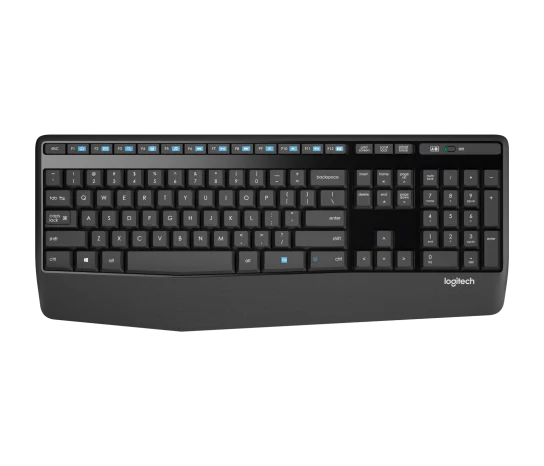
- Full-Size Keyboard: Includes a numeric keypad and familiar QWERTY layout for everyday productivity.
- Enhanced Comfort: Features an integrated palm rest and adjustable keyboard height.
- Multimedia Controls: Provides 12 dedicated function keys for convenient media access.
- Ergonomic Wireless Mouse: Includes a contoured right-handed optical mouse for comfortable navigation.
- Extended Battery Life: Offers up to 36 months for the keyboard and 18 months for the mouse, depending on usage.
Logitech MK345 Comfort Wireless Keyboard and Mouse Combo
The Logitech MK345 Comfort Wireless Keyboard and Mouse Combo is designed to provide a comfortable, reliable and convenient computing experience for home and office users. Combining a full-size wireless keyboard with an ergonomically contoured right-handed mouse, this practical desktop accessory delivers everyday productivity without the clutter of traditional wired peripherals.
Featuring a generous palm rest, quiet low-profile keys, dedicated multimedia controls and a full numeric keypad, the Logitech MK345 supports comfortable typing during extended working sessions. Its 2.4GHz wireless connection provides dependable communication between the keyboard, mouse and computer, giving users greater flexibility when arranging their workstations.
Whether you are preparing business documents, managing spreadsheets, responding to emails or browsing the internet, the Logitech MK345 offers the comfort and functionality needed for everyday computer use.
What Is the Logitech MK345?
The Logitech MK345 is a wireless keyboard and mouse combination developed for users who value comfort, convenience and long-lasting performance. The keyboard features a full-size layout with a dedicated numeric keypad, adjustable typing height and an integrated palm rest.
The accompanying wireless optical mouse features a contoured right-handed design that supports comfortable everyday navigation. Both devices connect through one compact USB nano receiver, making setup straightforward while keeping your desk free from unnecessary cables.
Designed for office productivity and home computing, the MK345 combines practical controls with an ergonomic design suitable for regular use.
Technical Specifications
- Brand: Logitech
- Model: MK345 Comfort Wireless Combo
- Product type: Wireless keyboard and mouse combination
- Colour: Black
- Wireless technology: 2.4GHz RF wireless
- Wireless range: Up to 10 metres
- Receiver: USB nano receiver
- Keyboard layout: Full-size QWERTY
- Numeric keypad: Yes
- Multimedia controls: 12 enhanced function keys
- Palm rest: Integrated textured palm rest
- Keyboard height: Adjustable
- Spill resistance: Tested against spills of up to 60ml under limited conditions
- Keyboard power: 2 AAA batteries
- Keyboard battery life: Up to 36 months
- Mouse design: Contoured right-handed ergonomic design
- Mouse sensor: Optical tracking
- Mouse buttons: 3 buttons with scroll wheel
- Mouse power: 1 AA battery
- Mouse battery life: Up to 18 months
- Keyboard dimensions: 447.2 × 186.7 × 21.4mm
- Mouse dimensions: 105.4 × 67.9 × 38.4mm
- Compatibility: Windows and ChromeOS systems with an available USB port
Why Choose the Logitech MK345?
1. Full-Size Keyboard for Comfortable Productivity
The MK345 features a familiar full-size keyboard layout with a dedicated numeric keypad, making it convenient for typing documents, entering figures and managing spreadsheets. Its spacious arrangement provides easy access to frequently used keys, supporting efficient everyday computer operations.
2. Integrated Palm Rest for Improved Comfort
One of the standout features of the MK345 is its generous textured palm rest. It provides a comfortable resting area for your hands while typing, making the keyboard suitable for extended work sessions. The adjustable keyboard height also allows users to choose a more comfortable typing position.
3. Twelve Dedicated Multimedia Function Keys
The keyboard includes 12 enhanced function keys that provide quick access to commonly used multimedia controls. You can conveniently adjust volume, mute audio, pause videos and skip music tracks without navigating through multiple menus.
These shortcuts help streamline everyday computer use, particularly for professionals who regularly work with multimedia applications.
4. Ergonomic Right-Handed Wireless Mouse
The included optical mouse features a contoured shape designed to fit comfortably in the right hand. Its smooth tracking and convenient scroll wheel support easy navigation through documents, spreadsheets and websites.
The comfortable grip makes it a practical option for users who spend considerable time working on a computer.
5. Reliable 2.4GHz Wireless Connectivity
The Logitech MK345 uses advanced 2.4GHz wireless technology to connect the keyboard and mouse through a single USB nano receiver. With a wireless range of up to 10 metres under suitable conditions, users can enjoy greater flexibility without dealing with separate cables.
The receiver is compact and can be stored conveniently, making the combo suitable for organised workstations.
6. Long-Lasting Battery Performance
The keyboard offers up to 36 months of battery life, while the mouse provides up to 18 months, depending on usage and operating conditions. This reduces the need for frequent battery replacements and supports uninterrupted everyday productivity.
Where Can You Use the Logitech MK345?
The Logitech MK345 Wireless Combo is suitable for different professional and personal environments:
- Corporate offices: Prepare reports, manage emails and complete administrative tasks comfortably.
- Home offices: Create an organised wireless workstation for remote working.
- Accounting departments: Use the full numeric keypad for financial records, calculations and spreadsheet entry.
- Schools and institutions: Support computer-based learning, assignments and research.
- Reception desks: Handle customer information and daily office communication.
- Business workstations: Improve everyday computer operations with comfortable wireless peripherals.
Compatibility and Connectivity
The Logitech MK345 connects through its included USB nano receiver using 2.4GHz wireless technology. Simply plug the receiver into an available USB port, insert the batteries and switch on the keyboard and mouse.
It is designed for compatible Windows and ChromeOS computers. The standard package does not use Bluetooth, so a compatible USB-A port or suitable adapter is required for computers without a traditional USB-A connection.
Why Buy from Avidik Ventures?
At Avidik Ventures, we provide practical technology products for individuals, businesses, schools and professional workspaces. Our product range includes computer accessories, printers, networking equipment, printing supplies and other essential business technology solutions.
The Logitech MK345 Comfort Wireless Keyboard and Mouse Combo is a dependable choice for users looking for a comfortable full-size keyboard, ergonomic mouse and reliable wireless connectivity. Whether you are upgrading your office workstation or setting up a home computer, this combo offers useful features for everyday productivity.
Shop with Avidik Ventures and find technology products that support your computing needs. Visit Avidik Ventures to explore available products and place your order.

















Reviews
There are no reviews yet.