
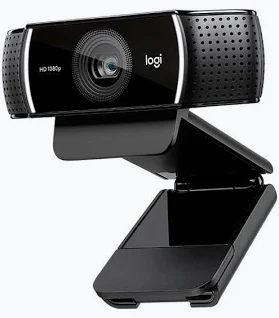
Logitech C922 HD Pro Webcam – 960-001088
KSh 13,200.00
- Full HD 1080p video at 30fps
- HD 720p video at 60fps
- Autofocus glass lens
- Dual omnidirectional stereo microphones
- Automatic low-light correction
Logitech C922 Pro Stream Webcam – 960-001088
The Logitech C922 HD Pro Webcam – 960-001088 delivers professional-quality video for streaming, meetings, recording, and online content. Logitech C922 Pro Stream provides Full HD 1080p video at 30fps and smooth 720p video at 60fps. Its glass autofocus lens, automatic light correction, and dual stereo microphones support clear and natural communication. The webcam also includes a versatile mounting clip for laptops, monitors, and compatible tripods.
Product Details
Logitech C922 Pro Stream – Full HD Webcam Performance
The C922 uses a Full HD glass lens with autofocus for sharp and detailed video. Its maximum resolution reaches 1080p at 30 frames per second. Users can also select 720p at 60 frames per second for smoother motion.
The 78-degree diagonal field of view provides a balanced framing option for individual users. It captures the presenter while maintaining useful background context. The webcam also supports automatic low-light correction for changing indoor lighting conditions.
Dual omnidirectional microphones capture stereo audio from multiple directions. This arrangement helps provide natural voice reproduction during calls and recordings. The built-in microphones have a stated range of up to one metre.
View the official Logitech C922 HD Pro Webcam product page
Technical Specifications
Logitech C922 Pro Stream – Key Specifications
- Product: Logitech C922 HD Pro Webcam
- Part number: 960-001088
- Colour: Black
- Maximum video resolution: 1080p at 30fps
- HD video: 720p at 60fps
- Camera megapixels: 3 MP
- Lens: Full HD glass
- Focus: Autofocus
- Diagonal field of view: 78 degrees
- Horizontal field of view: 70.42 degrees
- Vertical field of view: 43.3 degrees
- Digital zoom: 1.2x
- Microphones: Dual omnidirectional stereo
- Microphone range: Up to 1 metre
- Connection: USB 2.0
- Cable length: 1.5 metres
- Webcam weight: 162 g
- Mounting: Universal clip and tripod-ready
- Operating systems: Windows 8 or later, macOS 10.10 or later, ChromeOS
- USB requirement: USB-A port
- Warranty: Two-year limited hardware warranty
The webcam uses native operating system drivers for straightforward setup. Additional software can provide greater control over supported camera settings.
Check the official Logitech technical specifications
Why It Stands Out
Logitech C922 Pro Stream – Smooth Streaming and Recording
The C922 is designed for users who demand dependable video quality during live broadcasts. Full HD 1080p provides detailed images for professional-looking streams and recordings.
The 720p 60fps mode is particularly useful for fast-moving content. Higher frame rates produce smoother motion during gaming, demonstrations, and other dynamic broadcasts.
Automatic light correction helps compensate for changing lighting conditions. This feature can improve image consistency when ambient light varies throughout the day.
The glass autofocus lens maintains sharp focus as users move within the frame. This makes the webcam useful for presentations, tutorials, demonstrations, and video conferences.
The universal mounting clip provides flexible placement on laptops and monitors. The tripod-ready design also supports more controlled camera positioning for professional setups.
Explore the official C922 product features
Use Cases and Regular Users
Logitech C922 Pro Stream – Streaming and Content Creation
The C922 is well suited to professional streamers broadcasting through platforms such as YouTube and Twitch. Its 1080p resolution provides detailed footage for live audiences and recorded content.
Gamers can use 720p at 60fps when smooth motion is more important than maximum resolution. This setting works well for gameplay broadcasts and fast visual content.
Content creators can use the webcam for tutorials, product demonstrations, interviews, and educational videos. Autofocus helps maintain subject clarity while creators move naturally.
Remote professionals can use the C922 for online meetings and virtual presentations. The 78-degree field of view provides a practical composition for individual presenters.
Educators and trainers can use the webcam for online classes and instructional sessions. The stereo microphones provide integrated audio without requiring a separate microphone for basic communication.
See Logitech guidance for using the C922 with OBS Studio
Compatibility and Software
Logitech C922 Pro Stream – Flexible Computer Compatibility
The webcam supports Windows 8 or later, macOS 10.10 or later, and ChromeOS. It connects through USB 2.0 and uses a USB-A connection.
The C922 works with popular video calling and streaming applications. Logitech specifically documents compatibility with applications such as OBS and XSplit for live streaming.
Users can also adjust supported camera settings through compatible Logitech software. Available controls can include image adjustments and other camera configuration options.
The webcam supports background replacement through compatible third-party software. This can help creators produce cleaner presentations without physical backgrounds.
The universal clip makes installation straightforward on compatible laptop displays and monitors. Users can also mount the webcam on a tripod when a more controlled setup is required.
Read Logitech’s official C922 setup and usage guide
Professional Video Meetings
Logitech C922 Pro Stream – Clear Communication for Work
The C922 provides a practical upgrade for computers with basic integrated webcams. Its Full HD glass lens can deliver sharper video during professional meetings and presentations.
Automatic light correction helps maintain image quality when room lighting changes. Autofocus also keeps the subject sharp during normal movement.
The dual stereo microphones capture voice from multiple directions. Their one-metre microphone range suits typical desk-based meetings and presentations.
The webcam can be positioned directly above a laptop display or external monitor. A tripod provides another option for users requiring specific camera height or positioning.
Its 1.5-metre cable provides useful flexibility around standard workstations. The plug-and-play USB connection also reduces setup complexity for everyday users.
Review Logitech’s official C922 support resources
Why Buy from Avidik Ventures?
Avidik Ventures supplies technology products for professional, creative, and digital communication environments. The C922 is a strong choice for streaming, meetings, online teaching, and content production. Avidik Ventures provides dependable product guidance and customer support for technology purchases. Choose Avidik Ventures when you need reliable Logitech equipment for your digital workspace.












Reviews
There are no reviews yet.