
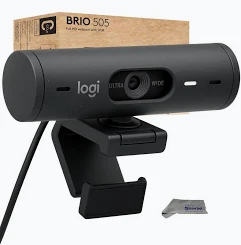
Logitech Brio 505 Business Webcam – Full HD 1080p USB-C Camera
KSh 16,000.00
- Full HD 1080p Video: Delivers clear video at 30fps for professional meetings and presentations.
- RightLight 4 with HDR: Automatically improves image quality in different lighting environments.
- RightSight Automatic Framing: Helps keep you centred during virtual meetings and presentations.
- Dual Beamforming Microphones: Captures your voice while reducing distracting background noise.
- Show Mode and Privacy Shutter: Supports physical document demonstrations and provides an integrated camera cover.
Logitech Brio 505 Business Webcam – Full HD 1080p USB-C Camera
Upgrade your professional video communication with the Logitech Brio 505 Business Webcam, a modern Full HD webcam designed for business meetings, remote working, online learning, video conferencing and professional presentations. Featuring 1080p video resolution, advanced autofocus, RightLight 4 with HDR and dual noise-reducing microphones, the Brio 505 delivers clear images and quality audio for everyday professional communication.
Designed for modern offices and home workstations, this Logitech webcam combines automatic framing, adjustable camera angles, an integrated privacy shutter and convenient USB-C connectivity. Its Show Mode feature also makes it easy to present physical documents, sketches and objects during virtual meetings.
What Is the Logitech Brio 505 Business Webcam?
The Logitech Brio 505 is a Full HD business webcam equipped with a 4-megapixel image sensor and a glass lens. It captures video at 1920 × 1080 pixels at 30 frames per second and supports HD 720p at up to 60fps for smoother video movement.
The webcam features Logitech RightLight 4 with HDR technology, which automatically adjusts image quality in different lighting conditions. Its adjustable field of view offers 65°, 78° and 90° framing options, while 4x digital zoom allows users to adjust the camera view.
Another important feature is RightSight automatic framing, which helps keep participants centred during meetings. The webcam also includes Show Mode, allowing users to tilt the camera downwards to display physical work materials.
Technical Specifications
- Brand: Logitech
- Model: Brio 505 Business Webcam
- Image Sensor: 4MP
- Maximum Video Resolution: Full HD 1080p (1920 × 1080) at 30fps
- Additional Resolution: HD 720p (1280 × 720) at 60fps
- Lens Type: Glass lens
- Focus Type: Autofocus
- Diagonal Field of View: Adjustable 65°, 78° or 90°
- Digital Zoom: 4x
- Light Correction: RightLight 4 with HDR
- Automatic Framing: RightSight technology
- Presentation Feature: Show Mode
- Microphones: Dual noise-reducing beamforming microphones
- Microphone Pickup Range: Up to 1.22 metres
- Connectivity: USB-C plug-and-play
- Cable Length: 1.5 metres
- Privacy: Integrated rotating privacy shutter
- Mounting: Detachable universal mounting clip
- Tripod Support: Yes
- Software Support: Logi Tune and Logitech Sync
- Dimensions: 110 × 31.5 × 31.5mm (camera only)
- Weight: Approximately 121g, including mounting clip and cable
- Compatibility: Windows, macOS and ChromeOS
Why Choose the Logitech Brio 505 Business Webcam?
1. Full HD 1080p Video Quality
Enjoy clear and detailed video during business meetings, virtual presentations and online consultations. The Brio 505 captures Full HD video at 30fps, helping you maintain a professional appearance when communicating with clients, colleagues and business partners.
2. RightLight 4 with HDR Technology
Poor lighting can affect how you appear during video calls. RightLight 4 with HDR automatically adjusts image settings to improve visibility in different lighting environments, including low-light rooms and bright backgrounds.
3. RightSight Automatic Framing
The automatic framing feature helps keep you centred within the camera view during meetings. It is particularly useful when you move around while presenting or collaborating with colleagues, helping maintain a consistent video experience.
4. Dual Noise-Reducing Microphones
The two built-in beamforming microphones capture your voice while filtering distracting background sounds. This provides convenient audio for online meetings, remote working and virtual consultations without requiring a separate microphone for basic communication.
5. Adjustable Field of View and 4x Zoom
Choose between 65°, 78° and 90° diagonal viewing angles depending on your meeting environment. The 4x digital zoom provides additional control over framing, making it easier to focus on yourself or include more of your surroundings.
6. Show Mode for Professional Presentations
The Brio 505 features Show Mode, which allows you to tilt the webcam downwards to display documents, sketches, physical objects and work in progress. This is useful for demonstrations, collaborative discussions and remote presentations.
7. Integrated Privacy Shutter
Protect your privacy with the built-in rotating camera cover. You can easily close the shutter whenever the webcam is not in use, physically blocking the camera lens.
Where Can You Use the Logitech Brio 505?
The Logitech Brio 505 is suitable for a variety of professional and personal applications, including:
- Business video conferencing: Participate in meetings with clients, colleagues and business partners.
- Remote working: Improve virtual communication from your home office.
- Online education: Attend virtual classes, lectures and professional training sessions.
- Virtual interviews: Maintain a professional appearance during online recruitment.
- Product demonstrations: Use Show Mode to display physical products and work materials.
- Professional presentations: Share sketches, documents and demonstrations during virtual meetings.
- Content creation: Record tutorials, presentations and educational videos.
- Office collaboration: Equip employees with dependable webcams for everyday communication.
Compatibility and Connectivity
The Logitech Brio 505 connects through its attached USB-C cable and supports plug-and-play operation on compatible computers. Logitech also provides USB-A connectivity through compatible adapters.
It works with Windows, macOS and ChromeOS devices and is certified for Microsoft Teams, Zoom, Google Meet and Works With Chromebook.
Logi Tune software provides additional camera controls, including supported zoom, framing and image adjustments. Logitech Sync also supports remote device management in compatible business environments.
Why Buy the Logitech Brio 505 from Avidik Ventures?
At Avidik Ventures, we provide technology products and accessories designed to support businesses, professionals, students and everyday computer users. Our product range includes webcams, printers, computer accessories, networking equipment, toners, cartridges and other essential technology solutions.
When purchasing the Logitech Brio 505 Business Webcam from Avidik Ventures, you benefit from convenient online shopping, product guidance and access to technology products suited to your professional and personal needs.
Whether you are upgrading your office conferencing equipment, equipping a meeting room or improving your remote working setup, the Brio 505 offers advanced video and audio features for professional communication.
Visit Avidik Ventures to explore our range of computer accessories and technology products. Choose the Logitech Brio 505 Business Webcam for clear Full HD video, intelligent framing and convenient presentation features.











Reviews
There are no reviews yet.