
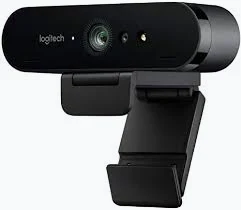
Logitech Brio 4K Ultra HD Webcam – Professional 4K Video Conferencing Camera
KSh 4,200.00
- 4K Ultra HD Video: Captures detailed video at up to 4096 × 2160 resolution at 30fps.
- RightLight 3 with HDR: Automatically adjusts image quality in different lighting conditions.
- Autofocus and 5x Digital Zoom: Helps maintain sharp images and flexible camera framing.
- Dual Omnidirectional Microphones: Captures clear audio while helping reduce background noise.
- Windows Hello Support: Enables convenient facial recognition sign-in on compatible Windows computers.
Logitech Brio 4K Ultra HD Webcam – Professional 4K Video Conferencing Camera
Experience exceptional video clarity with the Logitech Brio 4K Ultra HD Webcam, a premium webcam designed for professional video conferencing, live streaming, remote working, online presentations and content creation. Featuring a 4K Ultra HD image sensor, advanced autofocus, RightLight 3 technology and dual omnidirectional microphones, the Brio delivers impressive video and audio quality for demanding communication environments.
Whether you are conducting business meetings, recording professional videos or attending virtual consultations, the Logitech Brio provides advanced imaging capabilities that help you maintain a professional appearance. Its adjustable field of view, digital zoom and Windows Hello support make it a versatile webcam for modern workstations.
What Is the Logitech Brio 4K Ultra HD Webcam?
The Logitech Brio is a professional USB webcam capable of capturing video at up to 4K Ultra HD resolution. It features a 13-megapixel image sensor and a premium glass lens designed to produce detailed images with natural colours.
The webcam supports 4K video at 30 frames per second, Full HD 1080p at up to 60fps and HD 720p at up to 90fps when supported by the application. This flexibility makes it suitable for different video conferencing, recording and streaming requirements.
It also incorporates Logitech RightLight 3 with HDR technology, which automatically adjusts image quality in challenging lighting conditions. Its adjustable field of view allows users to choose between 65°, 78° and 90° framing options.
Technical Specifications
- Brand: Logitech
- Model: Brio 4K Ultra HD Webcam
- Model Number: V-U0040
- Image Sensor: 13MP
- Maximum Video Resolution: 4K Ultra HD up to 4096 × 2160 at 30fps
- Full HD Resolution: 1920 × 1080 at up to 60fps
- HD Resolution: 1280 × 720 at up to 90fps
- Focus Type: Automatic autofocus
- Lens: Premium glass lens
- Field of View: Adjustable 65°, 78° or 90° diagonal
- Digital Zoom: Up to 5x
- Light Correction: RightLight 3 with HDR
- Microphones: Dual omnidirectional microphones with noise cancellation
- Microphone Pickup Range: Up to approximately 1.2 metres
- Connectivity: USB 3.0, USB 2.0 and compatible USB-C connections
- Video Compression: MJPEG and other supported USB video formats
- Privacy: Attachable privacy shutter
- Mounting: Adjustable universal clip and tripod mounting thread
- Windows Hello: Supported on compatible Windows computers
- Cable Length: Approximately 1.5 metres for current retail variants
- Dimensions: 102 × 27 × 26.5mm
- Weight: Approximately 65g for the webcam itself
Why Choose the Logitech Brio 4K Webcam?
1. Exceptional 4K Ultra HD Video Quality
The Brio captures highly detailed video at up to 4K resolution, making it suitable for professional presentations, high-quality recordings and video conferencing. Its 13MP image sensor helps deliver sharp images with impressive detail.
2. Advanced RightLight 3 with HDR
Lighting conditions can significantly affect video quality. Logitech RightLight 3 with HDR automatically adjusts the image to improve visibility in environments ranging from low light to bright sunlight and high-contrast backgrounds.
3. Adjustable Field of View and 5x Zoom
Choose between 65°, 78° and 90° diagonal viewing angles to achieve the framing you need. The 5x digital zoom also allows you to adjust how closely the camera focuses on the subject, making it useful for different presentation and meeting environments.
4. Dual Noise-Cancelling Microphones
The two built-in omnidirectional microphones capture your voice while helping reduce distracting background noise. This provides convenient audio for meetings, virtual consultations and professional communication without requiring a separate microphone for basic use.
5. Windows Hello Facial Recognition
On compatible Windows computers, the Brio supports Windows Hello facial recognition. This allows supported devices to use the webcam for convenient and secure sign-in without repeatedly entering a password.
6. Flexible Mounting and Privacy
The adjustable mounting clip makes it easy to position the webcam on compatible monitors and laptop screens. It also supports tripod mounting. The attachable privacy shutter provides an additional layer of privacy by covering the lens when the camera is not being used.
Where Can You Use the Logitech Brio Webcam?
The Logitech Brio 4K is suitable for a variety of professional and personal applications, including:
- Business video conferencing: Conduct professional meetings with clients, colleagues and business partners.
- Remote working: Improve the quality of virtual communication from your home office.
- Live streaming: Produce high-resolution video content for supported streaming platforms.
- Content creation: Record tutorials, product demonstrations, educational videos and presentations.
- Online education: Participate in virtual classes, lectures and professional training.
- Virtual interviews: Present yourself professionally during online recruitment sessions.
- Professional presentations: Deliver clear video demonstrations and virtual consultations.
- Secure computer access: Use supported Windows Hello facial recognition for compatible computer sign-in.
Compatibility and Connectivity
The Logitech Brio connects through USB and supports USB Video Class functionality for convenient operation with compatible computers.
It works with supported Windows, macOS and ChromeOS devices and popular video communication applications, including Microsoft Teams, Zoom and Google Meet.
For 4K video capture, a compatible USB 3.0 connection is required on the original model. USB 2.0 operation is limited to lower video resolutions. Windows Hello requires a compatible Windows computer and supported operating system.
Why Buy the Logitech Brio 4K Webcam from Avidik Ventures?
At Avidik Ventures, we provide reliable technology products and accessories for businesses, professionals, students and everyday computer users. Our product range includes webcams, printers, computer accessories, networking equipment, toners, cartridges and other essential technology solutions.
When purchasing the Logitech Brio 4K Webcam from Avidik Ventures, you benefit from convenient online shopping, product guidance and access to technology products that support productivity and professional communication.
Whether you are upgrading your office equipment, creating a professional streaming setup or improving your virtual meetings, the Logitech Brio is an excellent choice for high-quality video communication.
Visit Avidik Ventures to explore our range of computer accessories and technology products. Choose the Logitech Brio 4K Ultra HD Webcam for exceptional video clarity, advanced imaging and professional communication.












Reviews
There are no reviews yet.