
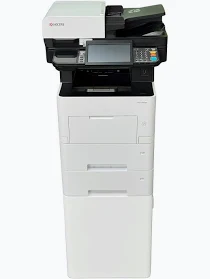
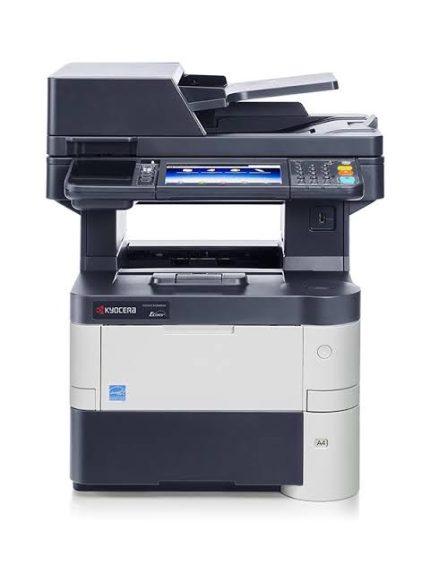
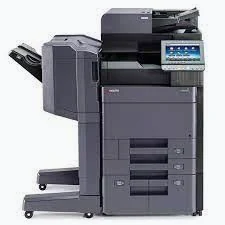
Kyocera ECOSYS M3655idn Printer
KSh 55,000.00
-
Monochrome laser printing up to 55 A4 pages per minute
-
Printing, copying, colour scanning, and faxing
-
Automatic duplex printing and scanning
-
Expandable paper capacity up to 2,600 sheets
-
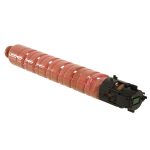
Compatible with Kyocera TK-3190 black toner
Kyocera ECOSYS M3655idn Printer – High-Speed Monochrome Multifunction Printing
The Kyocera ECOSYS M3655idn printer is a high-performance monochrome multifunction printer designed for businesses with demanding document-processing requirements. It combines printing, copying, colour scanning, and faxing in one efficient office device. Its fast output and durable components make it suitable for corporate offices, educational institutions, government departments, and medium to large workgroups.
With print speeds of up to 55 pages per minute for A4 documents, the M3655idn helps organisations process large volumes of paperwork efficiently. Its automatic duplex printing and scanning capabilities support productive workflows while helping reduce paper consumption.
Key Features of the Kyocera ECOSYS M3655idn Printer
High-Speed Printing Performance
The printer delivers speeds of up to 55 A4 pages per minute. This makes it suitable for workplaces that regularly produce reports, invoices, contracts, forms, and other business documents. Its first-page print time is approximately 4.9 seconds under specified conditions.
Multifunction Office Capabilities
The M3655idn combines printing, copying, colour scanning, and faxing. These functions help employees manage everyday document tasks without requiring separate machines for each operation.
Automatic Duplex Printing and Scanning
Built-in duplex printing produces double-sided documents automatically. The 100-sheet single-pass duplex document processor can scan both sides of originals efficiently, making it useful for digitising multi-page records and reports.
Professional Black-and-White Output
The monochrome laser printing system produces sharp text and clear graphics for professional documents. It is suitable for financial statements, business correspondence, examination papers, contracts, and administrative paperwork.
Expandable Paper Capacity
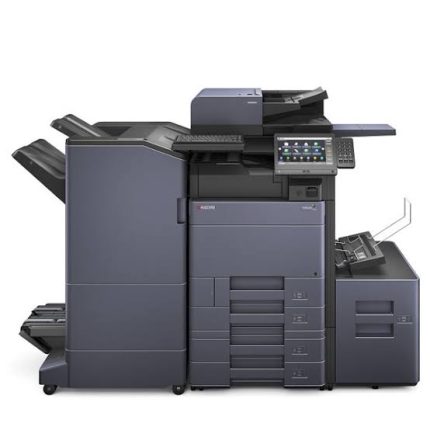
The printer includes a 500-sheet paper drawer and a 100-sheet multipurpose tray. Optional paper feeders can increase total input capacity to approximately 2,600 sheets, supporting longer printing runs and reducing the need for frequent paper replenishment.
Durable ECOSYS Technology
Kyocera’s ECOSYS design uses long-life imaging components and a separate toner cartridge. This approach helps reduce consumable waste and supports lower operating costs over the printer’s service life.
Technical Specifications of Kyocera ECOSYS M3655idn
- Product name: Kyocera ECOSYS M3655idn
- Brand: Kyocera
- Printer type: Monochrome laser multifunction printer
- Functions: Print, copy, colour scan, and fax
- Print speed: Up to 55 pages per minute (A4)
- Print resolution: Up to 1200 dpi equivalent, depending on mode
- First-page print time: Approximately 4.9 seconds
- Standard paper input: 600 sheets
- Maximum paper input: Up to 2,600 sheets with optional feeders
- Document feeder: 100-sheet single-pass duplex document processor
- Duplex printing: Standard
- Display: 7-inch colour touchscreen
- Connectivity: Gigabit Ethernet and USB
- Memory: 1 GB standard, expandable to 3 GB
- Recommended environment: Medium and large workgroups
Specifications can vary by regional version and installed accessories.
Compatible Toner for Kyocera ECOSYS M3655idn
The printer uses the Kyocera TK-3190 black toner cartridge, with an estimated yield of up to 25,000 A4 pages at 5% coverage. The starter toner supplied with a new machine may have a lower yield.
Using the correct toner helps maintain print quality and reliable operation. Confirm the cartridge reference before ordering, particularly when purchasing replacement or compatible consumables.
For verified information, visit the official Kyocera ECOSYS M3655idn product page or the official product support and downloads page.
Why Choose the Kyocera ECOSYS M3655idn?
The M3655idn is designed for organisations that need fast, dependable monochrome printing. Its high output speed, duplex capabilities, and expandable paper handling help reduce delays during busy printing periods.
The large touchscreen simplifies access to common functions, while network connectivity supports shared office printing. Its long-life components also make it an option for businesses looking to manage maintenance requirements and printing costs over time.
Ideal Applications for Kyocera ECOSYS M3655idn
This multifunction printer is suitable for corporate offices, schools, hospitals, government departments, logistics companies, and professional service providers.
Typical applications include printing invoices, examination papers, financial statements, contracts, reports, forms, and internal correspondence. Its document feeder and scanning functions are useful for digitising paper archives and sharing documents electronically.
For departments with several employees, the M3655idn can serve as a central printing and document-processing device. Businesses should assess monthly print volume, network requirements, and optional accessories before selecting a configuration.
Installation, Connectivity, and Maintenance
The printer supports network printing through Gigabit Ethernet and direct connections through USB. Install the appropriate Kyocera driver for your operating system and configure scanning destinations according to your office workflow.
Routine maintenance includes replacing toner when required, keeping paper trays clean, and following Kyocera’s service instructions. Proper handling and suitable consumables help maintain dependable operation.
Get the Kyocera ECOSYS M3655idn from Avidik Ventures
Avidik Ventures supplies printers, toner cartridges, and technology products for business and office use. The Kyocera ECOSYS M3655idn is suited to organisations seeking fast monochrome printing and versatile document management. Confirm the machine’s condition, included accessories, and configuration before purchase to ensure it meets your operational requirements.











Reviews
There are no reviews yet.