
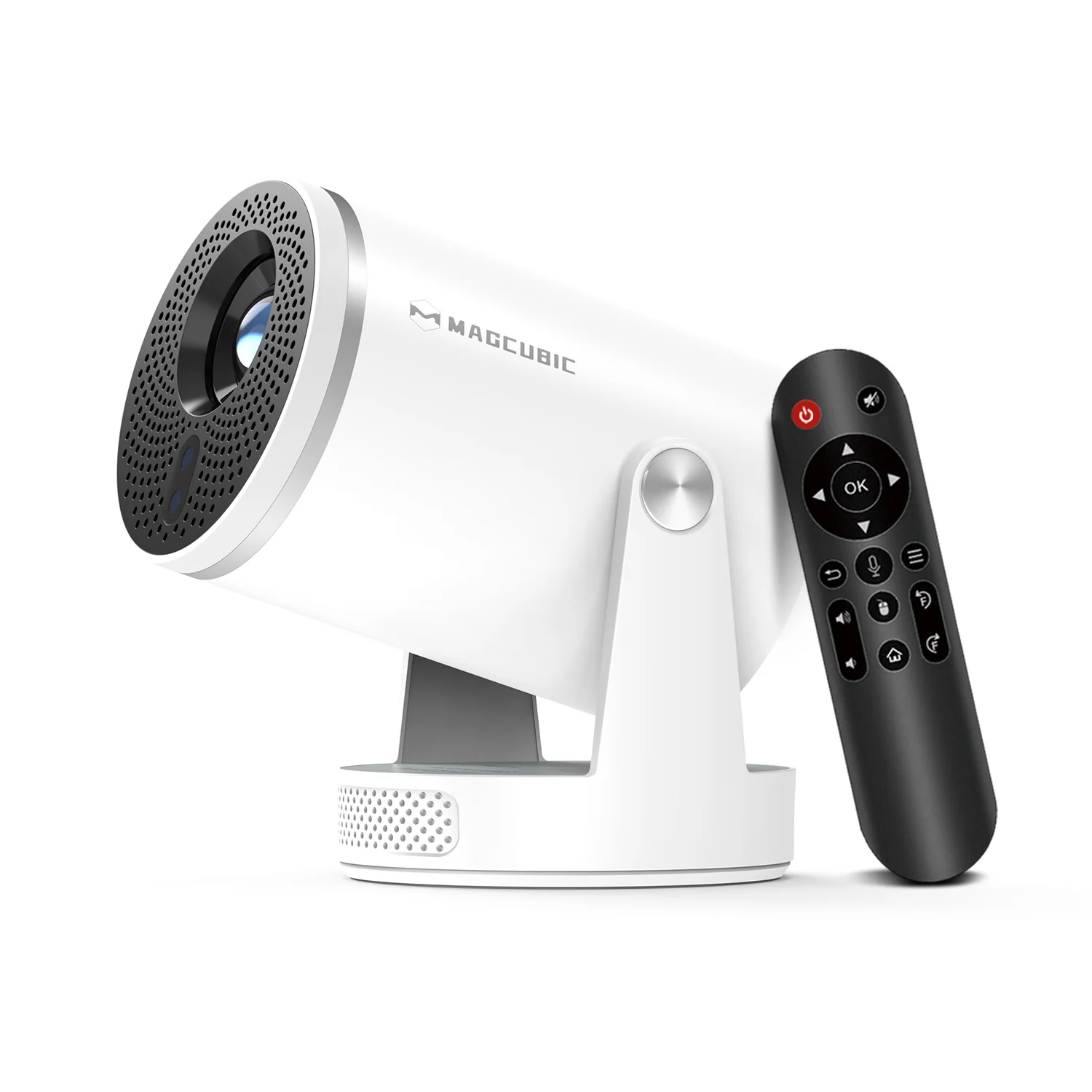
HY320 Android Projector – Portable Smart Projector
KSh 9,999.00
- Compact portable design
- Native resolution varies by version
- Android-based features on supported models
- Wi-Fi and screen mirroring on compatible versions
- Large-screen entertainment for dim environments
HY320 Android Projector – Portable Smart Projector
The HY320 Android Projector is a compact smart projector designed for home entertainment, casual gaming, and everyday presentations. It brings movies, videos, photos, and compatible apps onto a larger screen without requiring a traditional television. With wireless connectivity, built-in audio, and a portable design, it suits bedrooms, living rooms, small offices, and entertainment spaces.
The standard HY320 is commonly listed with native Full HD resolution, Android-based smart features, and wireless screen mirroring. However, specifications differ between manufacturers and versions. Check the exact model supplied before confirming resolution, operating system, and brightness.
What Is the HY320 Android Projector?
The HY320 is a compact LED projector that displays compatible video and other visual content on a wall or projection screen. Many standard versions offer native 1920 × 1080 resolution, while the smaller HY320 Mini commonly uses native 1280 × 720 resolution. Both versions may advertise support for higher-resolution video decoding, which does not necessarily mean they project at that resolution.
The projector is designed for flexible placement and everyday viewing. Depending on the version, it may include Android, Wi-Fi, Bluetooth, automatic keystone correction, and screen-mirroring features. You can review the manufacturer’s HY320 projector specifications to compare the standard model with available alternatives.
Technical Specifications
- Brand: Varies by supplier; commonly sold under Magcubic and other labels
- Model: HY320
- Product Type: Portable Android Smart Projector
- Display Technology: LED LCD
- Native Resolution: Commonly 1920 × 1080 on the standard HY320
- Video Decoding: Higher-resolution decoding advertised on selected versions
- Operating System: Android-based system; version varies by configuration
- Memory: Common configurations include 1GB RAM and 8GB storage
- Brightness: Approximately 300–320 ANSI lumens on some standard versions
- Projection Size: Commonly advertised from approximately 30 to 150 inches
- Projection Distance: Around 1–4 metres, depending on desired image size
- Focus Adjustment: Manual or electronic, depending on version
- Keystone Correction: Automatic or electronic correction on selected models
- Wireless Connectivity: Wi-Fi; supported bands depend on configuration
- Bluetooth: Available on supported versions
- Screen Mirroring: Miracast or AirPlay compatibility may vary
- Audio: Built-in speaker
- External Connections: HDMI, USB, and audio output, depending on model
- Power Supply: Mains-powered adapter
- Installation: Tabletop placement or compatible mounting arrangement
- Package Contents: Projector, remote control, power adapter or cable, and documentation, subject to supplier packaging
These are typical specifications, not a guarantee for every HY320 listing. Confirm the supplied unit’s label and documentation, particularly native resolution, brightness, wireless features, ports, and power requirements.
Why Choose the HY320 Android Projector?
HY320 Android Projector for Home Entertainment
Enjoy movies, series, online videos, and family photos on a larger display. The projector offers a flexible alternative to a conventional television in rooms where space is limited. For better picture quality, use a smooth projection surface and reduce ambient lighting. A darker room helps the image appear clearer because this projector category is intended mainly for dim environments.
HY320 Android Projector with Wireless Connectivity
Supported versions offer Wi-Fi connectivity for compatible online services and wireless screen mirroring. This makes it easier to share content from compatible smartphones, tablets, or other devices. Bluetooth-equipped versions can also connect to supported speakers or headphones. App availability and streaming performance depend on the projector’s software, network connection, and service compatibility.
For setup guidance, consult the HY320 user manual and operating instructions. Check whether your particular version supports the streaming apps you need before relying on built-in Android functionality.
HY320 Android Projector with a Portable Design
Its compact form makes the projector convenient to move between suitable rooms. You can set it up for a movie night, a family gathering, or occasional workplace use. Projection size depends on the distance from the screen, available space, and focus adjustment. Position the projector securely and leave its ventilation openings unobstructed.
HY320 Android Projector for Flexible Viewing
Selected versions include keystone correction to help adjust a skewed image when the projector is not perfectly aligned. Focus controls help sharpen the displayed picture. These features simplify setup, although placing the lens directly toward the screen generally produces the best results. Check the model’s actual adjustment options because controls vary across HY320 versions.
Recommended Uses
The HY320 can support several everyday activities when used in a suitably dark environment:
- Home cinema: Watch movies and online videos on a larger screen.
- Bedroom entertainment: Enjoy personal viewing without installing a large television.
- Casual gaming: Connect a compatible console through HDMI where supported.
- Presentations: Display slides and documents in small meetings or informal settings.
- Family sharing: Show photographs, videos, and other compatible media.
- Travel and temporary setups: Move the unit between locations where a suitable power supply is available.
For business presentations, use clear text, large fonts, and simple visuals. A brighter room can make projected content difficult to see. The projector should not be treated as a replacement for a high-brightness office projector in well-lit meeting rooms.
Important Buying Considerations
Before purchasing, confirm whether the listing is for the standard HY320, HY320 Mini, or another variant. The Mini version may have lower native resolution and brightness than the standard model. Also check the included power adapter, plug type, remote control, connection ports, warranty, and software version.
Do not assume that advertised 4K support means native 4K projection. Many models decode higher-resolution video but display it at their own native resolution. Streaming apps may also require updates, external devices, or separate subscriptions. Verify compatibility with your preferred services and devices before purchase.
Why Buy from Avidikventures?
Avidikventures helps customers explore practical technology for home, business, and entertainment use. When choosing a projector, confirm the exact model and included accessories with the team before ordering. This helps ensure the product matches your resolution, connectivity, and installation requirements. Visit Avidik Ventures to explore available technology products and request assistance with product selection.












Reviews
There are no reviews yet.