
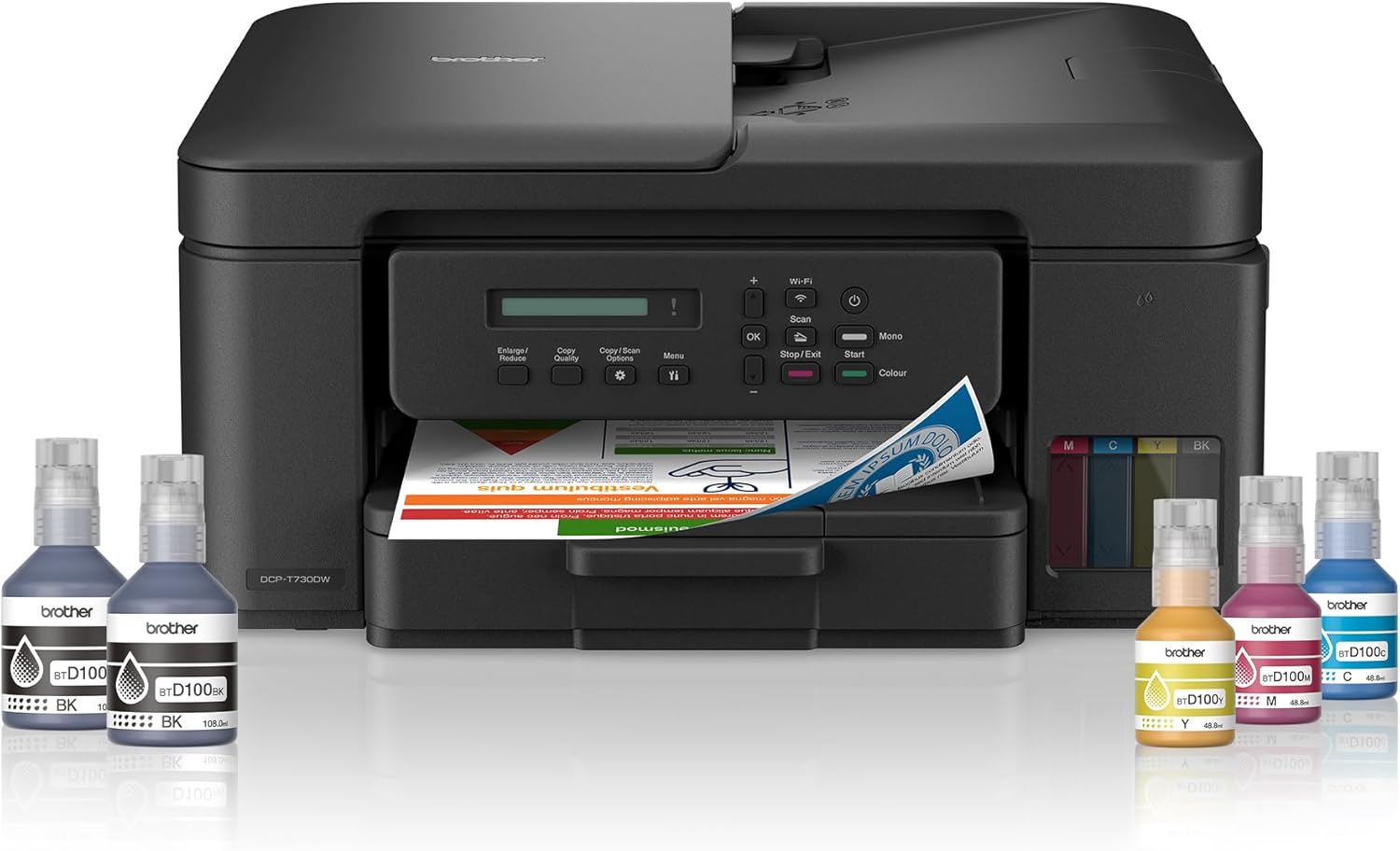
Brother DCP-T730DW Printer – Wireless Ink Tank Printer with Automatic Duplex and 20-Sheet ADF
KSh 35,000.00
-
Print, scan and copy in one device
-
Refillable ink tank system for high-yield printing
-
Automatic double-sided printing
-
20-sheet automatic document feeder
-
Wi-Fi, Wi-Fi Direct and USB 2.0 connectivity
Brother DCP-T730DW Printer – Wireless Ink Tank Printer with Automatic Duplex and 20-Sheet ADF
The Brother DCP-T730DW printer is a multifunction colour ink tank printer designed for small businesses, home offices, schools and professionals who need efficient document handling and economical everyday printing. Combining printing, scanning and copying with wireless connectivity, automatic double-sided printing and an automatic document feeder, it offers practical features for users managing regular paperwork.
Its refillable ink tank system helps reduce the need for frequent ink replacements, while built-in Wi-Fi allows compatible devices to print without a direct cable connection. The automatic document feeder (ADF) can handle up to 20 sheets, making it easier to scan or copy multiple pages without placing each sheet individually on the scanner glass.
Whether you are producing invoices, business reports, school assignments, quotations or administrative documents, the Brother DCP-T730DW provides a flexible solution for everyday productivity.
What Is the Brother DCP-T730DW Printer?
The Brother DCP-T730DW is a colour ink tank multifunction printer with three essential functions: printing, scanning and copying. It is designed for users who want the convenience of an all-in-one device alongside features that improve efficiency in a busy workspace.
Unlike conventional cartridge-based printers, its refillable ink tank system supports high-volume printing with fewer consumable replacements. Wireless connectivity enables printing from compatible computers and mobile devices, while USB 2.0 offers a wired connection option.
Two particularly useful features distinguish this model: automatic duplex printing and a 20-sheet automatic document feeder. Duplex printing produces double-sided documents without manually turning the paper, while the ADF helps process multipage documents more conveniently.
Brother DCP-T730DW Printer Specifications
- Model: Brother DCP-T730DW
- Printer type: Colour ink tank inkjet multifunction printer
- Functions: Print, scan and copy
- Print speed: Up to 16 images per minute (monochrome) and 15.5 images per minute (colour)
- Maximum print resolution: Up to 1200 × 6000 dpi under supported Windows conditions
- Scanner glass resolution: Up to 1200 × 2400 dpi
- Automatic document feeder: Up to 20 sheets of 80 gsm plain paper
- Connectivity: Wi-Fi, Wi-Fi Direct and Hi-Speed USB 2.0
- Automatic duplex printing: Yes
- Paper tray capacity: Up to 150 sheets of 80 gsm plain paper
- Manual feed slot: One sheet
- Memory: 128 MB
- Display: One-line LCD
- Dimensions: Approximately 390 × 343 × 182.5 mm
- Weight: Approximately 7.8 kg on the Brother Gulf specification
- Maximum stated ink yield: Up to 15,000 black pages and 5,000 colour pages with the included ink set in certain regional configurations
Ink yield and included bottles vary by market and package. Confirm the exact regional specification before purchase.
Why Choose the Brother DCP-T730DW Printer?
1. High-Yield Refillable Ink Tank System
The Brother DCP-T730DW uses refillable ink tanks designed to support regular printing while reducing the frequency of ink replacement. This can be particularly useful for businesses that print invoices, reports, letters and other documents throughout the working week.
Brother lists an included ink yield of up to 15,000 black pages and 5,000 colour pages for certain regional configurations. Other markets list different included yields, so buyers should verify the ink package supplied with their specific unit. Actual results depend on page coverage, print settings, maintenance and usage.
2. Automatic Double-Sided Printing
Automatic duplex printing allows the printer to print on both sides of compatible paper without requiring manual intervention. This can reduce paper consumption and help produce compact, professional-looking documents.
For offices preparing reports, proposals, manuals and multipage correspondence, this feature can improve convenience while supporting more efficient paper use.
3. 20-Sheet Automatic Document Feeder
The integrated ADF accommodates up to 20 sheets of standard 80 gsm plain paper. Instead of positioning every page separately on the scanner glass, users can feed a compatible multipage document through the feeder for supported scanning and copying tasks.
This is particularly valuable for businesses handling contracts, application forms, receipts and administrative paperwork. The scanner glass remains useful for single sheets, identification documents and materials that should not be fed through the ADF.
4. Wireless and Mobile Printing
Built-in Wi-Fi and Wi-Fi Direct provide flexible connectivity options for compatible computers, smartphones and tablets. USB 2.0 is available for users who prefer a direct wired connection.
Support for the Brother Mobile Connect app, Apple AirPrint and Mopria can make printing from supported mobile devices more convenient. Availability depends on the device, operating system, network configuration and regional model.
5. Print, Scan and Copy in One Device
The printer combines three essential office functions in a single machine, reducing the need for separate devices. Users can produce colour or monochrome documents, digitise paperwork and make copies using the same unit.
Its 150-sheet paper tray is suitable for routine office workloads, while support for different compatible paper sizes and media types provides flexibility for everyday business and personal printing.
Ideal Applications for the Brother DCP-T730DW
Small businesses and offices: Print invoices, quotations, reports and correspondence. The ADF and duplex features are useful for handling multipage paperwork.
Schools and educational institutions: Produce assignments, revision notes, learning materials and administrative documents while scanning and copying relevant records.
Home offices and remote professionals: Connect compatible devices wirelessly and manage printing tasks without maintaining separate scanning and copying equipment.
Shops and service businesses: Handle daily paperwork, customer forms and business records with a multifunction printer designed for routine document workflows.
Why Buy the Brother DCP-T730DW from Avidik Ventures?
Selecting a printer involves more than comparing print speed and purchase cost. Consider your monthly print volume, the need to scan multipage documents, wireless connectivity requirements and the availability of compatible ink.
At Avidik Ventures, we provide technology products and computer accessories for business, office and personal use. Visit avidikventures.co.ke to explore our product range and identify equipment suited to your working environment.
Before purchasing, confirm the regional model, included ink bottles and applicable warranty terms. These details can differ between markets and are important when evaluating the printer’s long-term value.
The Brother DCP-T730DW is a practical choice for users seeking economical ink tank printing, wireless convenience, automatic double-sided printing and multipage document handling in one compact multifunction device.











Reviews
There are no reviews yet.