
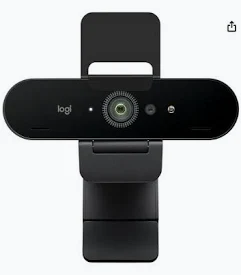

Logitech Brio 4K Ultra HD Webcam – HDR, Autofocus and Noise-Cancelling Microphones
KSh 20,000.00
- 4K Ultra HD Video: Capture detailed video at up to 4096 x 2160 resolution and 30fps.
- RightLight 3 with HDR: Automatically adjusts lighting for improved image quality.
- Adjustable Field of View: Choose between 65°, 78° and 90° viewing angles.
- Dual Built-In Microphones: Enjoy convenient audio capture with noise-cancelling technology.
- Windows Hello Support: Use facial recognition to sign in on compatible Windows computers.
Logitech Brio 4K Ultra HD Webcam – HDR, Autofocus and Noise-Cancelling Microphones
The Logitech Brio 4K Ultra HD Webcam is a premium video conferencing and streaming camera designed for professionals, businesses, content creators and remote workers who want exceptional video quality. Featuring a 13-megapixel image sensor and advanced 4K Ultra HD recording, it captures sharp images, natural colours and impressive detail for professional video calls, online meetings and content creation.
With support for 4K video at 30 frames per second and Full HD 1080p at up to 60 frames per second, the Logitech Brio delivers clear and smooth video across different applications. Its RightLight 3 technology with HDR automatically adjusts image exposure to help maintain a balanced appearance in challenging lighting conditions.
The webcam also features dual omnidirectional microphones with noise-cancelling technology, adjustable fields of view and Windows Hello facial recognition support. Whether you are attending virtual meetings, recording presentations or streaming content, the Logitech Brio 4K provides a professional communication solution.
What Is the Logitech Brio 4K Webcam?
The Logitech Brio 4K is a high-performance USB webcam designed to improve video communication and digital content creation. It connects to compatible computers through USB and supports multiple video resolutions, including 4K Ultra HD, Quad HD, Full HD and HD.
Its glass lens and autofocus technology help maintain clear images, while the adjustable field of view allows users to select how much of their surroundings appears on camera. The built-in microphones capture voice audio, reducing the need for a separate microphone during everyday video calls.
Technical Specifications
- Brand: Logitech
- Product Name: Brio 4K Ultra HD Webcam
- Model: Brio 4K
- Image Sensor: 13-megapixel
- Maximum Video Resolution: 4K Ultra HD (4096 x 2160)
- Maximum 4K Frame Rate: 30fps
- Full HD Recording: 1080p at up to 60fps
- HD Recording: 720p at up to 90fps
- Lens Type: Premium glass lens
- Focus Technology: Autofocus
- Field of View: Adjustable 65°, 78° or 90° diagonal
- Digital Zoom: 5x
- Image Enhancement: RightLight 3 with HDR
- Microphones: Dual omnidirectional microphones with noise cancellation
- Connectivity: USB-A to USB-C cable
- Privacy Feature: Attachable privacy shutter
- Security: Windows Hello facial recognition support
- Mounting: Universal adjustable clip and tripod mounting support
- Dimensions: 102 x 27 x 26.5 mm
- Weight: Approximately 85g
Why Choose the Logitech Brio 4K Webcam?
1. Exceptional 4K Ultra HD Video Quality
The 4K resolution captures detailed video with impressive clarity, making the Brio suitable for professional meetings, presentations, video recording and streaming. Its 13-megapixel sensor helps produce sharp images that present you professionally during online interactions.
2. RightLight 3 Technology with HDR
RightLight 3 automatically adjusts lighting and exposure to help improve image quality in different environments. Whether you are working in a dimly lit office, sitting near a bright window or dealing with changing lighting conditions, HDR technology helps maintain balanced image details.
3. Adjustable Field of View
The webcam offers three diagonal field-of-view settings: 65°, 78° and 90°. This flexibility allows you to choose a tighter view for individual meetings or a wider view when presenting to a group or showing more of your workspace.
4. Autofocus for Clear Video
The integrated autofocus system helps maintain sharp images as you move or adjust your position. This is particularly useful during presentations, demonstrations and video calls where consistent image clarity is important.
5. Dual Noise-Cancelling Microphones
The two omnidirectional microphones capture your voice while helping reduce distracting background noise. They provide convenient audio for virtual meetings, online interviews, video calls and everyday communication without requiring a separate microphone.
6. Windows Hello Facial Recognition
The Logitech Brio includes infrared sensor technology that supports Windows Hello on compatible Windows computers. This allows users to sign in using facial recognition, providing a convenient alternative to entering passwords.
7. Flexible USB Connectivity and Mounting
The webcam connects through USB and includes a USB-A to USB-C cable. Its adjustable mounting clip fits compatible monitors and laptop displays, while the standard tripod thread provides another mounting option for recording and streaming setups.
Where Can You Use the Logitech Brio 4K?
- Corporate Offices: Improve video conferencing and professional communication during virtual meetings.
- Remote Working: Participate in online meetings with clear video and convenient built-in audio.
- Content Creation: Record high-quality videos, tutorials, demonstrations and presentations.
- Live Streaming: Produce detailed webcam footage for compatible streaming platforms.
- Education: Support online teaching, virtual classrooms and remote learning.
- Business Presentations: Deliver professional video presentations and communicate clearly with clients.
- Home Offices: Upgrade your computer setup with a premium webcam for everyday communication.
Compatibility and Connectivity
The Logitech Brio 4K connects to compatible desktop computers and laptops through USB. It supports Windows, macOS and ChromeOS, with exact software and feature availability depending on the operating system.
The webcam works with popular video conferencing and recording applications, including Microsoft Teams, Zoom and Google Meet. Logitech software such as Logi Tune can also be used to adjust supported camera settings, including field of view and image controls.
For the best 4K experience, use a compatible USB connection and an application that supports 4K video. Actual recording quality and frame rates depend on the computer, USB connection and software being used.
Why Buy from Avidik Ventures?
At Avidik Ventures, we provide technology products and business equipment designed to support modern workplaces, professional communication and everyday computing. Our product range includes webcams, computer accessories, printers, monitors, networking equipment and other essential technology solutions.
When purchasing the Logitech Brio 4K Webcam from Avidik Ventures, you can explore a professional video communication solution backed by convenient online shopping and product guidance.
Visit Avidik Ventures today to discover more computer accessories and technology products for your home or business.













Reviews
There are no reviews yet.