
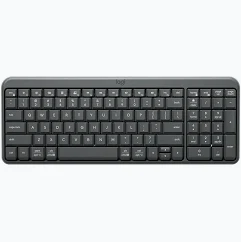
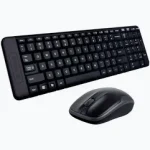
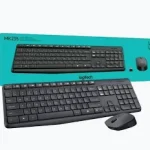
Logitech K250 Bluetooth Wireless Keyboard – Compact Full-Size Keyboard with Numeric Keypad
KSh 4,000.00
- Bluetooth Wireless Connectivity: Connect directly to compatible devices without requiring a USB receiver.
- Compact Full-Function Layout: Enjoy a space-saving keyboard with a dedicated numeric keypad and essential navigation keys.
- Long Battery Life: Get up to 12 months of battery performance using two AAA batteries under specified conditions.
- Comfortable Typing Experience: Features responsive deep-profile keys and adjustable tilt legs.
- Spill-Resistant Design: Provides additional protection against accidental spills of up to 60 ml under limited testing conditions.
Logitech K250 Bluetooth Wireless Keyboard – Compact Full-Size Keyboard with Numeric Keypad
The Logitech K250 Bluetooth Wireless Keyboard is a practical, comfortable and space-saving keyboard designed for modern workspaces. Combining reliable Bluetooth connectivity with a compact layout, it offers an excellent typing solution for professionals, students, businesses and home users who want a clean, cable-free desk setup.
Despite its compact design, the Logitech K250 retains essential full-size keyboard functionality, including a dedicated numeric keypad, function keys and convenient shortcuts. Its built-in Bluetooth technology allows you to connect directly to compatible computers and mobile devices without using a USB receiver.
With responsive deep-profile keys, spill-resistant construction and long-lasting battery performance, the Logitech K250 provides dependable everyday typing for work, study and general computing.
What Is the Logitech K250?
The Logitech K250 is a compact Bluetooth wireless keyboard designed to deliver convenient typing without the restrictions of a wired connection. It combines a space-efficient design with a familiar key layout, making it suitable for users who need essential keyboard functionality without occupying too much desk space.
Unlike traditional wireless keyboards that require a USB nano receiver, the K250 connects directly through Bluetooth Low Energy. This leaves your computer’s USB ports available for other accessories and makes it convenient for compatible laptops, tablets and desktop computers.
Its deep-profile keys provide a familiar typing experience, while the dedicated numeric keypad supports data entry, calculations and everyday office work.
Technical Specifications
- Brand: Logitech
- Model: K250
- Product Type: Compact Bluetooth wireless keyboard
- Colour: Graphite / Black
- Connectivity: Bluetooth Low Energy (BLE)
- Wireless Range: Up to 10 metres
- USB Receiver: Not required
- Keyboard Layout: Compact layout with numeric keypad
- Key Design: Deep-profile keys
- Function Keys: F1–F12 with additional shortcuts
- Typing Angle: Adjustable tilt legs
- Spill Resistance: Tested to withstand spills of up to 60 ml under limited conditions
- Battery Type: 2 AAA alkaline batteries
- Battery Life: Up to 12 months, depending on usage
- Dimensions: Approximately 369.9 × 136.9 × 22.8 mm
- Weight: Approximately 380 g
- Sustainability: At least 64% post-consumer recycled plastic in plastic parts, depending on regional specification
- Compatibility: Windows, macOS, ChromeOS and selected iOS, iPadOS and Android devices
Why Choose the Logitech K250?
1. Convenient Bluetooth Wireless Connectivity
Enjoy a cable-free workspace with the Logitech K250’s built-in Bluetooth technology. It connects directly to compatible devices without requiring a separate USB receiver or wireless dongle.
With a wireless operating range of up to 10 metres, you can type comfortably while keeping your desk organised. This makes it especially useful for laptops and devices with limited USB ports.
2. Compact Design with a Numeric Keypad
The K250 offers a space-saving design without sacrificing important keyboard functionality. It includes a dedicated numeric keypad, function keys and essential navigation controls.
This combination makes it suitable for office professionals who regularly work with spreadsheets, financial information, reports and other documents requiring frequent number entry.
3. Comfortable and Responsive Typing
The deep-profile keys provide a familiar typing feel with responsive feedback. Their traditional design supports accurate typing during everyday tasks such as writing emails, preparing assignments, creating reports and working with office applications.
The adjustable tilt legs also allow you to raise the keyboard to a more convenient typing angle.
4. Long-Lasting Battery Performance
The Logitech K250 is designed for efficient power consumption, offering up to 12 months of battery life under specified usage conditions. It operates using two AAA alkaline batteries, reducing the need for frequent battery replacements.
Actual battery performance depends on usage patterns and operating conditions.
5. Spill-Resistant Construction
Everyday desk accidents can expose computer accessories to accidental liquid spills. The K250 features a spill-resistant design tested under limited conditions to withstand spills of up to 60 ml.
This provides additional protection for everyday use, although the keyboard is not waterproof and should never be immersed in liquid.
6. Useful Function Keys and Shortcuts
The keyboard includes convenient function keys and shortcuts that help users access common computer controls. Depending on the operating system, these include media controls, screen capture, brightness adjustment and other productivity functions.
This makes everyday computer interaction more convenient without relying entirely on mouse navigation.
7. More Sustainable Material Choices
The Logitech K250 incorporates post-consumer recycled plastic in its construction. Logitech specifies at least 64% recycled plastic in the keyboard’s plastic parts, helping reduce reliance on virgin plastic materials.
Where Can You Use the Logitech K250?
The Logitech K250 is suitable for a variety of professional and personal environments:
- Corporate offices: Type reports, emails, proposals and business correspondence without cable clutter.
- Home offices: Create an organised wireless workstation for remote work and everyday productivity.
- Schools and universities: Support assignments, research, online learning and administrative tasks.
- Accounting departments: Use the dedicated numeric keypad for entering figures and managing spreadsheets.
- Retail businesses: Handle customer records, inventory information and general computer operations.
- Mobile workstations: Connect to compatible laptops and tablets for convenient typing wherever you work.
Compatibility and Connectivity
The Logitech K250 connects through Bluetooth Low Energy and does not require a USB receiver. It is designed to work with compatible Windows, macOS and ChromeOS devices, as well as selected iOS, iPadOS and Android devices.
On supported Windows computers, Swift Pair may provide a quicker connection process. Other devices can connect through their standard Bluetooth settings by selecting the Logitech K250 from the available devices.
The keyboard is designed for one active paired device at a time rather than convenient multi-device switching. Check your device’s Bluetooth compatibility before purchasing.
Why Buy from Avidik Ventures?
At Avidik Ventures, we provide practical technology solutions for businesses, professionals, students and home users. Our product range includes Logitech keyboards, computer accessories, printers, networking equipment and other essential office technology products.
The Logitech K250 is an excellent choice for anyone looking for a compact Bluetooth keyboard that combines comfortable typing, convenient wireless connectivity and essential full-size functionality.
Visit Avidik Ventures to explore our range of Logitech accessories and computer products. Upgrade your workstation with the Logitech K250 Bluetooth Wireless Keyboard and enjoy a more organised and convenient computing experience.














Reviews
There are no reviews yet.