
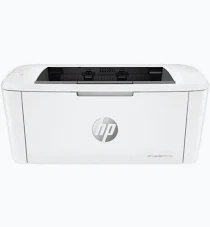
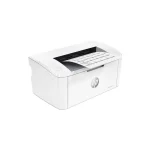
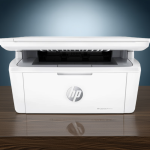
HP LaserJet M111w Mono Laser Printer – 20ppm, Wireless Printing and Compact Design
KSh 19,000.00
-
Monochrome laser printing up to 20 pages per minute
-
Built-in 2.4 GHz Wi-Fi and Wi-Fi Direct
-
Wireless printing from compatible mobile devices
-
150-sheet input tray and 100-sheet output bin
-
Compact design for home and small-office use
HP LaserJet M111w Mono Laser Printer – 20ppm, Wireless Printing and Compact Design
The HP LaserJet M111w Mono Laser Printer is a compact black-and-white laser printer designed for home users, students and small businesses that need fast, reliable document printing with wireless convenience. Its space-saving design and straightforward operation make it suitable for individual workstations, home offices and small commercial environments.
With print speeds of up to 20 pages per minute on A4 paper, built-in Wi-Fi and support for compatible mobile printing services, the HP LaserJet M111w helps users produce professional-looking documents without relying exclusively on a wired computer connection. Its laser printing technology delivers clear black text for invoices, letters, reports, quotations and everyday administrative paperwork.
For users who primarily print monochrome documents and want the flexibility to print wirelessly, this printer offers a practical balance of speed, convenience and compact design.
What Is the HP LaserJet M111w Mono Laser Printer?
The HP LaserJet M111w is a single-function monochrome laser printer. It is designed specifically for printing and does not include integrated scanning, copying or faxing.
Unlike inkjet printers that use liquid ink, the M111w uses a black toner cartridge to produce text and graphics. This makes it suitable for users who regularly print text-heavy documents and do not require colour output.
The key advantage over the HP LaserJet M111a is wireless connectivity. The M111w supports 2.4 GHz Wi-Fi, Wi-Fi Direct and compatible mobile printing services, allowing users to print from supported computers, smartphones and tablets. USB 2.0 connectivity is also available for direct computer connections.
HP LaserJet M111w Technical Specifications
- Printer type: Monochrome laser printer
- Functions: Print only
- Print speed: Up to 20 pages per minute on A4 paper
- First-page output: As fast as 8.5 seconds from ready mode
- Print resolution: Up to 600 × 600 dpi with HP FastRes 600 technology
- Connectivity: Hi-Speed USB 2.0 and 2.4 GHz Wi-Fi
- Wireless printing: Supported
- Wi-Fi Direct: Supported
- Mobile printing: HP app, Apple AirPrint and Mopria, where compatible
- Duplex printing: Manual; no automatic duplex unit
- Input paper capacity: Up to 150 sheets
- Output paper capacity: Up to 100 sheets
- Supported media: Plain paper, envelopes, postcards and labels
- Monthly duty cycle: Up to 8,000 pages
- Recommended monthly print volume: 100–1,000 pages
- Processor speed: 500 MHz
- Dimensions: Approximately 346 × 189 × 159 mm
- Weight: Approximately 3.8 kg
- Compatible toner: HP 150A Black LaserJet Toner Cartridge (W1500A), subject to regional compatibility
Specifications are based on HP’s published product information. Actual performance and consumable compatibility may vary by region and printer configuration.
Why Choose the HP LaserJet M111w Mono Laser Printer?
1. Fast Black-and-White Printing
With speeds of up to 20 pages per minute, the HP LaserJet M111w helps users produce routine paperwork efficiently. It is suitable for invoices, quotations, school assignments, letters, reports and other text-based documents.
Its first-page output time of approximately 8.5 seconds from ready mode also helps reduce waiting when printing individual documents.
2. Convenient Wireless Printing
Built-in 2.4 GHz Wi-Fi allows the printer to connect to a compatible wireless network, giving users greater flexibility when positioning the device. Wi-Fi Direct provides another connection option for supported devices without requiring a conventional router-based connection.
Compatible mobile printing services also allow users to print from supported smartphones, tablets and computers, subject to device and application requirements.
3. Clear, Professional Monochrome Output
The printer supports output quality of up to 600 × 600 dpi and uses HP FastRes 600 technology. It is designed to produce readable text and clean monochrome graphics for professional and personal documents.
For businesses that primarily print text and do not need colour, this focused functionality provides an efficient alternative to purchasing a colour printer.
4. Compact Design for Small Workspaces
Measuring approximately 346 × 189 × 159 mm and weighing around 3.8 kg, the M111w fits comfortably into many home offices, study areas and small business workstations.
Its compact footprint makes it useful for users who want a dedicated printer without sacrificing substantial desk space.
5. USB Connectivity for Flexible Setup
In addition to wireless printing, the M111w supports USB 2.0 for a direct connection to a compatible computer. This provides an alternative when users prefer a wired setup or need to troubleshoot wireless connectivity.
Having both connection options makes the printer adaptable to different home and office arrangements.
6. Practical Paper Handling for Everyday Workloads
The 150-sheet input tray supports routine printing, while the 100-sheet output bin collects finished documents. The printer handles common media types, including plain paper, envelopes, postcards and labels, within supported sizes and weights.
Automatic duplex printing is not available, but users can print on both sides of a sheet manually through supported driver settings.
Ideal Applications of the HP LaserJet M111w
Small businesses: Print invoices, quotations, letters, receipts and administrative documents.
Students: Produce assignments, revision notes, research papers and other black-and-white learning materials.
Home offices: Print reports, contracts, forms and work-related correspondence from connected devices.
Retail businesses: Handle basic paperwork, order records and inventory documents.
Personal use: Print everyday documents wirelessly without needing a large office printer.
Why Buy the HP LaserJet M111w from Avidik Ventures?
Avidik Ventures supplies technology products and office equipment for individuals and businesses seeking practical solutions for daily operations. When choosing a laser printer, consider your monthly printing volume, wireless requirements, toner availability and ongoing printing costs.
Visit Avidik Ventures to explore available printers, toner cartridges and other office technology products. Before purchasing, confirm the exact model, compatible replacement toner, included consumables and applicable warranty coverage.
Make Printing More Convenient with HP
The HP LaserJet M111w Mono Laser Printer combines fast black-and-white printing, built-in Wi-Fi, mobile printing support and a compact design. It is a suitable choice for students, home offices and small businesses that need reliable everyday document printing with the added convenience of wireless connectivity.











Reviews
There are no reviews yet.