
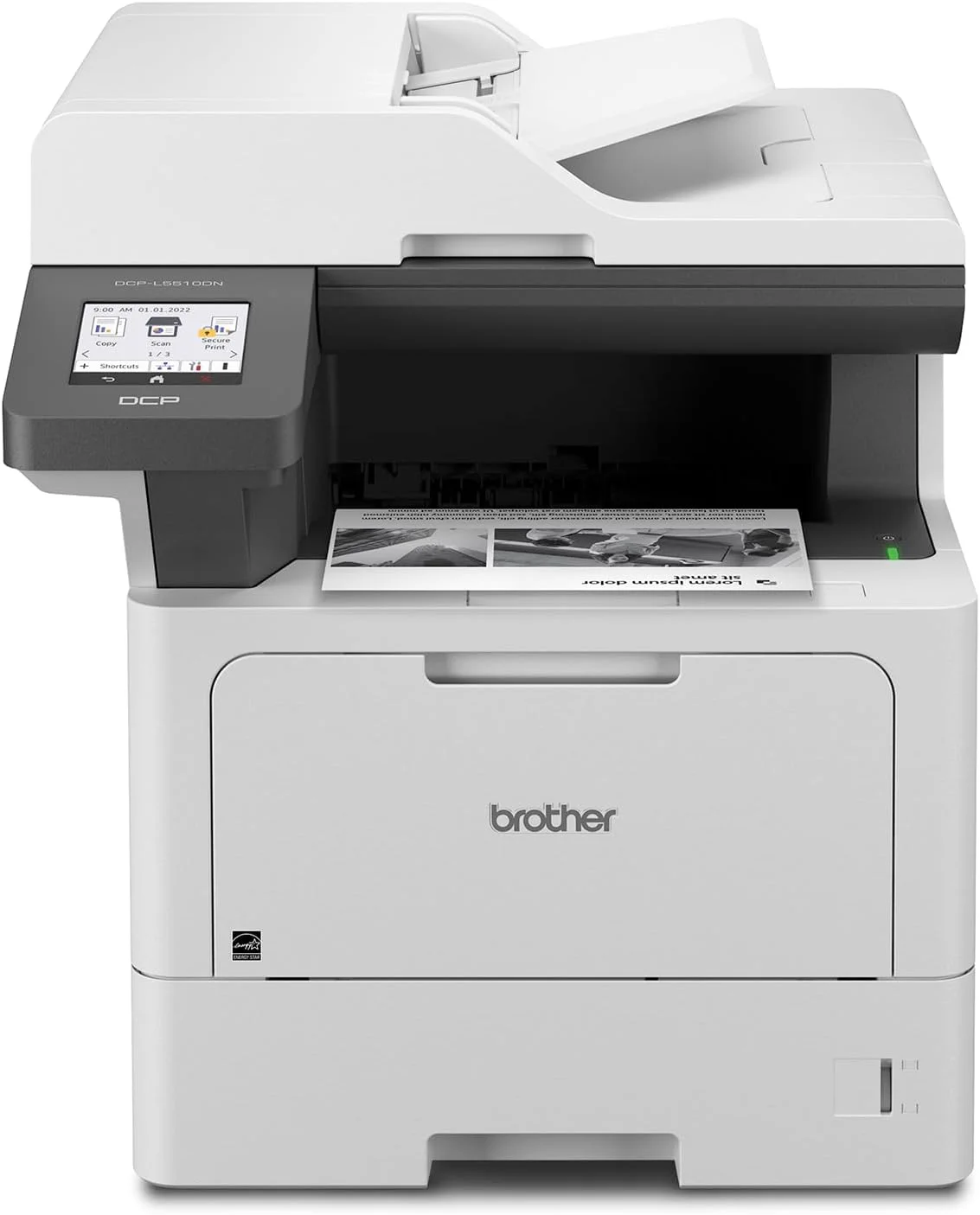
Brother DCP-L5510DN Mono Laser Printer – 48ppm Multifunction Printer with Duplex and Gigabit Ethernet
KSh 42,500.00
-
igh-speed monochrome printing up to 48 pages per minute
-
Print, scan and copy functionality
-
Automatic double-sided printing
-
50-sheet automatic document feeder
-
Expandable paper capacity up to 1,390 sheets
Brother DCP-L5510DN Mono Laser Printer – 48ppm Multifunction Printer with Duplex and Gigabit Ethernet
The Brother DCP-L5510DN mono laser printer is a high-performance black-and-white multifunction printer designed for busy offices, medium-sized businesses, educational institutions and organisations with demanding document workloads. Combining printing, scanning and copying in one device, it delivers fast document processing, flexible paper handling and features designed to support efficient office operations.
With print speeds of up to 48 pages per minute on A4 paper, automatic double-sided printing and a 50-sheet automatic document feeder, the Brother DCP-L5510DN helps businesses process large volumes of paperwork with less manual intervention. Its Gigabit Ethernet connection supports integration into wired office networks, while the large colour touchscreen simplifies access to everyday functions.
The printer also supports high-yield toner cartridges rated for approximately 18,000 pages in the Brother Gulf configuration, helping reduce the frequency of toner replacement for organisations with substantial monochrome printing requirements.
Whether you are producing invoices, contracts, reports, statements or administrative documents, the Brother DCP-L5510DN offers a professional solution for reliable, high-speed office printing.
What Is the Brother DCP-L5510DN Mono Laser Printer?
The Brother DCP-L5510DN is a monochrome laser multifunction printer that combines three core functions: printing, scanning and copying. It is designed for organisations that need a dependable central printing device for routine business documents and higher-volume workloads.
Laser printing uses toner powder rather than liquid ink, making it suitable for text-heavy documents and consistent black-and-white output. The DCP-L5510DN adds automatic duplex printing, allowing compatible documents to be printed on both sides of the paper without manually turning each sheet.
Its 50-sheet automatic document feeder helps process multipage documents, while the flatbed scanner accommodates individual pages and documents requiring careful placement. The printer also features Gigabit Ethernet for wired network integration, making it suitable for shared office environments.
Brother DCP-L5510DN Printer Specifications
- Model: Brother DCP-L5510DN
- Printer type: Monochrome laser multifunction printer
- Functions: Print, scan and copy
- Print speed: Up to 48 pages per minute (A4) and 50 pages per minute (Letter)
- First-page print time: Less than 6.7 seconds under specified conditions
- Print resolution: Up to 1200 × 1200 dpi
- Automatic duplex printing: Yes
- Automatic document feeder: Up to 50 sheets of 80 gsm plain paper
- Standard paper input: 250-sheet main tray plus 100-sheet multipurpose tray
- Standard combined paper capacity: Up to 350 sheets
- Optional paper expansion: Up to 1,390 sheets with compatible additional trays
- Connectivity: Gigabit Ethernet and Hi-Speed USB 2.0
- Display: 8.9 cm colour touchscreen
- Memory: 512 MB in the US specification; confirm regional configuration
- Dimensions: Approximately 417 × 461 × 448 mm
- Weight: Approximately 14.9 kg in the Brother Gulf specification
- High-yield toner: Replacement toner rated for approximately 18,000 pages in the Gulf configuration
- Output capacity: Up to 150 sheets face-down
Print speeds and toner yields are measured under specified test conditions. Actual performance varies with document complexity, settings, connectivity and usage. Regional specifications and supplied consumables may differ.
Why Choose the Brother DCP-L5510DN Mono Laser Printer?
1. High-Speed Printing for Demanding Workloads
With print speeds of up to 48 pages per minute on A4 paper, the Brother DCP-L5510DN is designed for offices that need to process substantial quantities of documents quickly.
It is suitable for invoices, reports, contracts, statements, internal memos and other text-based paperwork. Its short stated first-page print time also helps reduce waiting when producing individual documents throughout the workday.
For businesses with multiple employees or regular print batches, this speed can help streamline document workflows.
2. Print, Scan and Copy in One Device
The DCP-L5510DN combines three essential office functions, reducing the need for separate printing, scanning and copying equipment.
Users can print new documents, digitise paperwork and make copies from a single machine. This arrangement is particularly useful for administrative departments, accounting offices, schools and service businesses that handle a high volume of documents.
3. Automatic Double-Sided Printing
Automatic duplex printing allows the printer to produce documents on both sides of compatible paper without requiring manual intervention.
This can reduce paper consumption and make reports, proposals, contracts and multipage records more compact. It is especially useful in workplaces where documents are printed in large quantities and paper efficiency matters.
4. High-Yield Toner for Lower Interruption Frequency
The Brother DCP-L5510DN supports high-yield replacement toner cartridges rated for approximately 18,000 pages in the Gulf configuration. Higher-capacity toner can reduce how often users need to replace consumables compared with lower-yield cartridges.
Actual toner yield depends on page coverage, print settings and usage conditions. Businesses should also account for the separate drum unit and other maintenance requirements when calculating total operating costs.
5. 50-Sheet Automatic Document Feeder
The integrated ADF accommodates up to 50 sheets of standard plain paper, making it easier to scan or copy multipage documents without placing each sheet individually on the scanner glass.
This feature is useful for processing contracts, invoices, application forms, reports and business records. The flatbed scanner provides an alternative for single sheets and materials that need individual positioning.
6. Flexible Paper Handling and Expandable Capacity
The standard paper configuration combines a 250-sheet main tray with a 100-sheet multipurpose tray, providing up to 350 sheets of input capacity. The multipurpose tray also supports compatible media such as selected labels and envelopes.
For businesses with larger workloads, compatible optional trays can expand the total paper capacity to as much as 1,390 sheets. This can reduce paper-reloading interruptions and support more demanding office environments.
7. Gigabit Ethernet and Security Features
Gigabit Ethernet supports integration into compatible wired office networks, allowing the printer to serve multiple users without requiring a direct USB connection to each workstation.
Brother also lists security and access-management features such as Secure Function Lock and Secure Print+ for supported configurations. These can help organisations manage access to printer functions and protect sensitive print jobs, subject to the applicable setup and software requirements.
Ideal Applications for the Brother DCP-L5510DN
Corporate and administrative offices: Print contracts, reports, statements, internal correspondence and other high-volume monochrome documents.
Accounting and finance departments: Produce invoices, financial reports, transaction records and supporting paperwork.
Schools and educational institutions: Print worksheets, examination materials, administrative documents and large batches of learning resources.
Healthcare and professional service offices: Handle compatible forms, records and routine administrative documents while using scanning and copying for paperwork workflows.
Growing businesses: Use the standard paper capacity for everyday work and add compatible trays as printing demands increase.
Why Buy the Brother DCP-L5510DN from Avidik Ventures?
Choosing an office printer requires consideration of print volume, network requirements, paper capacity, consumable costs and maintenance needs. For businesses that primarily print black-and-white documents, a high-speed laser multifunction printer can be an effective option.
At Avidik Ventures, we provide technology products and computer accessories for businesses, offices and individual users. Visit avidikventures.co.ke to explore our product range and find equipment suited to your organisation’s requirements.
Before purchasing, confirm the exact regional model, included toner yield, warranty conditions and availability of compatible replacement toner and drum units. These details help you evaluate the printer’s total cost of ownership.
The Brother DCP-L5510DN is a strong option for offices seeking fast monochrome printing, scanning and copying, automatic duplex functionality, expandable paper capacity and reliable wired network connectivity.











Reviews
There are no reviews yet.