
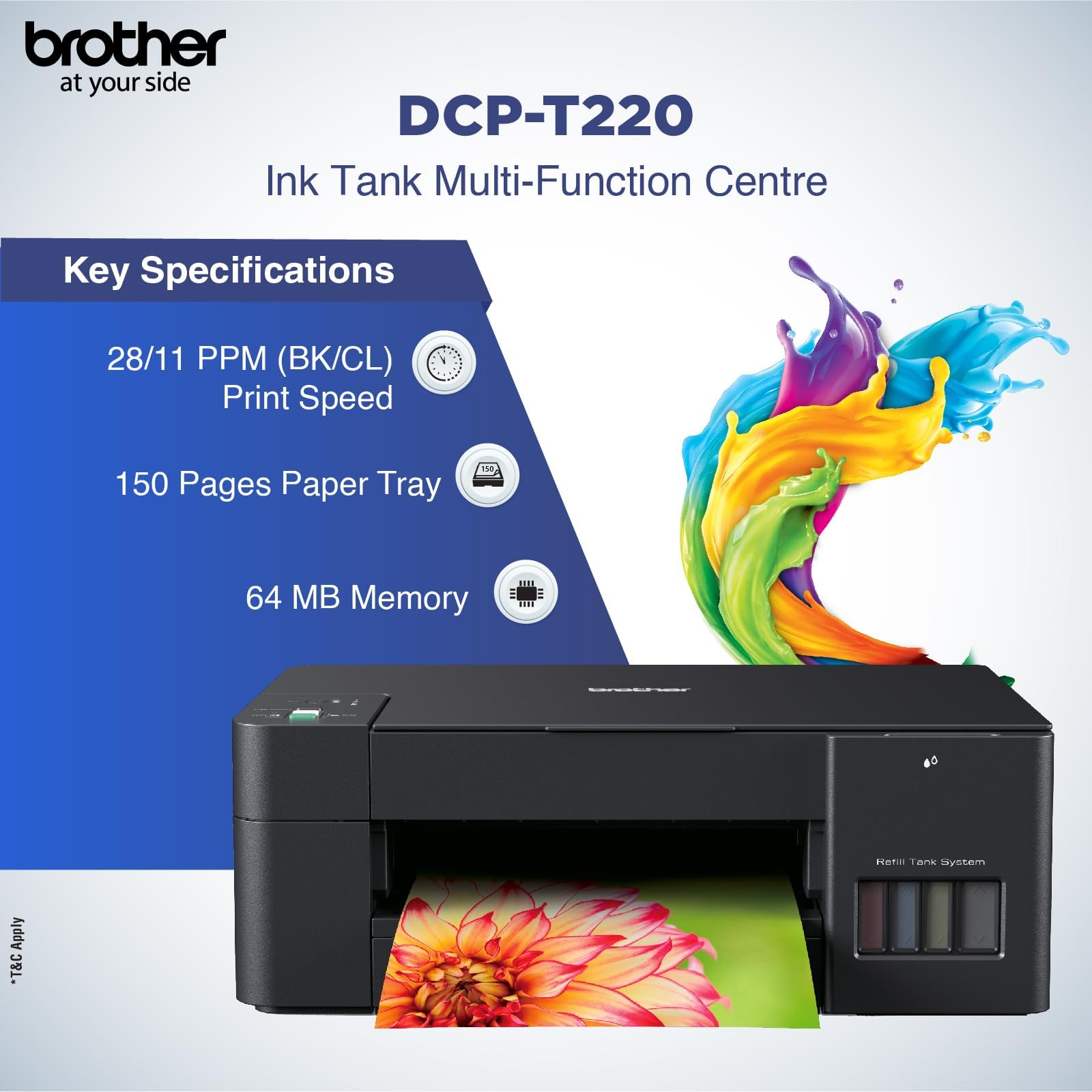
Brother DCP-T220 Printer – 3-in-1 Colour Ink Tank Printer
KSh 19,000.00
-
3-in-1 printing, scanning and copying
-
Refillable ink tank system
-
Print resolution up to 1,200 × 6,000 dpi on Windows
-
Paper tray capacity of up to 150 sheets
-
USB 2.0 connectivity for computer printing
Brother DCP-T220 Printer – 3-in-1 Colour Ink Tank Printer
The Brother DCP-T220 Printer is a compact, refillable ink tank printer designed for homes, students, small offices and businesses that need affordable everyday printing. Combining printing, scanning and copying in one device, it offers a practical solution for handling documents without requiring separate machines for each task.
With its integrated ink tank system, the Brother DCP-T220 helps reduce the inconvenience of frequently replacing traditional ink cartridges. Its refillable tanks are designed to support economical printing, making the printer suitable for users who regularly produce reports, assignments, invoices, business letters and other documents.
The printer also supports colour printing, allowing users to produce charts, graphics, presentations and selected photo prints alongside standard black-and-white documents. Its compact design makes it suitable for desks, home offices and small business workspaces where space is limited.
What Is the Brother DCP-T220 Printer?
The Brother DCP-T220 is a multifunction inkjet printer that combines three essential functions: printing, copying and scanning. It belongs to Brother’s DCP-T series of refillable ink tank printers, designed to provide a practical balance between print quality, operating costs and everyday productivity.
Unlike conventional cartridge-based printers, the DCP-T220 uses refillable ink tanks. Users can replenish the individual ink supplies when necessary, helping simplify ongoing printer maintenance and reduce the need to replace complete cartridges.
The printer connects to a computer through a USB interface. It does not have built-in Wi-Fi, so users who require wireless printing should consider a compatible wireless model, such as the Brother DCP-T420W, depending on regional availability.
Brother DCP-T220 Printer – Technical Specifications
- Brand: Brother
- Model: DCP-T220
- Printer type: Inkjet multifunction printer
- Functions: Print, scan and copy
- Print output: Colour and monochrome
- Ink system: Refillable ink tank system
- Print resolution: Up to 1,200 × 6,000 dpi on Windows
- Scanner optical resolution: Up to 1,200 × 2,400 dpi
- Copy resolution: Up to 1,200 × 1,800 dpi
- Paper input capacity: Up to 150 sheets of 80 gsm plain paper
- Manual feed: One sheet
- Connectivity: USB 2.0 Hi-Speed
- Wireless connectivity: No built-in Wi-Fi
- Memory: 64 MB
- Weight: Approximately 6.4 kg
- Power supply: 220–240 V AC, 50/60 Hz for the applicable regional version
Specifications may vary slightly by regional version. Check the product label and local manufacturer documentation before purchase.
Why Choose the Brother DCP-T220 Printer?
1. Economical Refillable Ink Tank System
One of the main advantages of the Brother DCP-T220 is its refillable ink tank design. Rather than relying on conventional disposable ink cartridges, the printer uses refillable tanks that can be replenished when the ink runs low.
This makes it a practical option for users who print regularly and want to manage their ongoing printing expenses. Actual cost per page depends on ink prices, document coverage, maintenance and printing conditions.
2. Three Essential Functions in One Device
The DCP-T220 combines printing, scanning and copying in a single machine. Users can print documents from a connected computer, scan paperwork for digital storage and copy physical documents when additional printed versions are required.
Having these functions in one device reduces the need for separate office equipment and helps make better use of limited workspace.
3. High-Resolution Printing
With a maximum print resolution of up to 1,200 × 6,000 dpi on Windows, the printer is designed to produce detailed text and colour graphics when used with appropriate paper and print settings.
It is suitable for everyday documents, school assignments, business forms, charts and selected photo printing applications. Results depend on the source file, paper quality and selected print mode.
4. Flexible Paper Handling
The printer’s main paper tray accommodates up to 150 sheets of 80 gsm plain paper, helping reduce the need for frequent paper replenishment during routine printing.
It supports a range of paper sizes and media types, including A4, A5, A6, envelopes and compatible photo paper. The manual feed slot accepts one sheet at a time for supported media that requires individual feeding.
5. Practical Scanning and Copying
The integrated flatbed scanner supports document digitisation, while the copier allows users to reproduce physical documents directly. Copy settings include enlargement and reduction from 25% to 400%, providing flexibility when preparing documents in different sizes.
These features are useful for schoolwork, administrative paperwork and everyday office tasks.
6. Compact Design for Everyday Workspaces
Weighing approximately 6.4 kg, the Brother DCP-T220 can fit into many home offices, study areas and small business environments. Its multifunction design provides essential document-handling capabilities without requiring several separate machines.
Where Can You Use the Brother DCP-T220 Printer?
Homes and home offices
Print personal documents, schoolwork, forms and colour graphics while using the scanner and copier for household administration.
Schools and students
The printer is suitable for assignments, revision materials, project reports and other educational documents. Its refillable ink system can be useful for students who print regularly.
Small businesses
Businesses can use the DCP-T220 for invoices, quotations, letters, internal forms and other routine paperwork. Its scanning and copying functions also support basic administrative tasks.
Shops and administrative offices
The printer can handle everyday documentation, including forms, records and simple colour materials. Businesses requiring frequent high-volume printing should compare its capacity with that of a higher-duty business printer.
Important Information Before Buying
The Brother DCP-T220 uses a USB connection and does not support built-in wireless printing. If Wi-Fi connectivity is essential, consider a wireless Brother model instead.
Print speed, ink consumption and print quality vary according to the document, paper type and selected settings. For the best results, use compatible Brother ink and follow the manufacturer’s instructions for refilling and maintenance.
Why Buy the Brother DCP-T220 Printer from Avidik Ventures?
At Avidik Ventures, customers can explore printers and technology accessories for home, school and business use. Choosing a printer that matches your printing volume, connectivity requirements and operating budget can help improve productivity and manage ongoing costs.
Whether you need a multifunction printer for assignments, office paperwork or everyday business documents, the Brother DCP-T220 offers printing, scanning and copying in one compact machine.
Get the Brother DCP-T220 Printer from Avidik Ventures and equip your workspace with a practical, refillable ink tank printing solution.











Reviews
There are no reviews yet.