
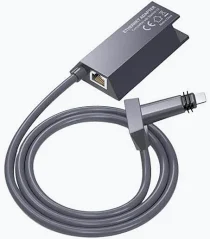

Starlink V2 Ethernet Adapter – Wired Network Connectivity for Starlink Gen 2
KSh 6,500.00
-
Designed for compatible Starlink Gen 2 routers
-
Enables wired Ethernet connectivity
-
Supports Ethernet link speeds up to 1 Gbps
-
Connects compatible third-party routers and network equipment
-
Helps expand existing Starlink networking options
Starlink V2 Ethernet Adapter – Wired Network Connectivity for Starlink Gen 2
The Starlink V2 Ethernet Adapter is an accessory designed for compatible Starlink Gen 2 satellite internet systems, allowing users to establish a wired Ethernet connection through the Gen 2 router. It is particularly useful for customers who want to connect a third-party router, networking equipment or other compatible wired devices to their Starlink network.
Unlike the Starlink Gen 3 router, which includes built-in Ethernet LAN ports, the Starlink Gen 2 router does not have a built-in Ethernet port for wired networking. The Ethernet adapter provides the additional connection needed for supported wired network configurations.
Whether you are setting up internet for a home, office or small business, the Starlink V2 Ethernet Adapter offers a practical way to extend your network’s connectivity options while retaining your existing Starlink Gen 2 hardware.
What Is the Starlink V2 Ethernet Adapter?
The Starlink V2 Ethernet Adapter is a dedicated accessory for the Starlink Standard Actuated system with its Gen 2 router. It provides an Ethernet connection that can be used to connect compatible wired networking equipment.
For example, users can connect a third-party router to the adapter when they want additional networking features, alternative Wi-Fi coverage or a different network configuration. It can also support connections to compatible network switches and other wired equipment.
The adapter is especially important because the Gen 2 router does not provide a conventional built-in Ethernet LAN port. Rather than replacing the entire Starlink kit, users can add the compatible adapter to enable wired networking.
Starlink V2 Ethernet Adapter – Technical Specifications
- Product name: Starlink Ethernet Adapter
- Product category: Wired networking accessory
- Primary compatibility: Starlink Standard Actuated system with Gen 2 router
- Connection type: Ethernet
- Maximum supported speed: Up to 1 Gbps, according to Starlink’s accessories documentation
- Primary function: Providing a wired Ethernet connection to the Starlink network
- Compatible applications: Third-party routers and other supported wired networking equipment
- Installation: Connects to the compatible Starlink Gen 2 system
- Official package dimensions: Approximately 16.5 × 11.4 × 3.6 cm
- Official package weight: Approximately 0.15 kg
Specifications are based on Starlink’s published Ethernet Adapter documentation. The maximum supported Ethernet link speed does not guarantee a particular internet speed; actual performance depends on the Starlink service, network conditions and connected equipment.
Why Choose the Starlink V2 Ethernet Adapter?
1. Enables Wired Ethernet Connectivity
The adapter adds an Ethernet connection to compatible Gen 2 Starlink installations. This is useful when a device or networking setup requires a wired connection rather than relying exclusively on the Starlink Wi-Fi network.
A wired connection can also help simplify network management in homes and business environments where multiple devices need reliable local connectivity.
2. Supports Third-Party Router Connections
One of the main uses of the Starlink Ethernet Adapter is connecting a compatible third-party router. This allows users to configure their own networking equipment according to their requirements.
Depending on the router, this can provide additional configuration options, parental controls, network monitoring, guest networks or other networking features.
For configurations where a third-party router is intended to manage the network, Starlink provides a Bypass Mode option in the app for compatible Gen 2 systems.
3. Supports Ethernet Networking at Up to 1 Gbps
Starlink’s published accessories guide specifies support for Ethernet speeds of up to 1 Gbps. This makes the adapter suitable for compatible gigabit Ethernet equipment.
Actual internet throughput depends on the Starlink service plan, satellite network conditions, connected devices and other network limitations. The adapter itself does not increase the speed of the satellite connection.
4. Extends Existing Starlink Equipment
The adapter provides an additional networking option without requiring users to replace their entire Gen 2 Starlink system simply to obtain an Ethernet connection.
This can be useful for customers who already have a working Starlink installation and want to connect additional networking equipment.
5. Useful for Home and Business Networks
Wired connectivity is valuable in environments where computers, routers and other compatible equipment need a physical network connection. Adding the adapter can help integrate Starlink into a more structured network setup.
Where Can You Use the Starlink V2 Ethernet Adapter?
Home internet networks
Connect compatible networking equipment to support wired connectivity for desktop computers, additional routers or other devices in your home network.
Offices and small businesses
Businesses can use the adapter to integrate compatible third-party networking equipment into an existing Starlink Gen 2 installation.
Extended Wi-Fi coverage
Connect a compatible third-party router or networking system to create a network arrangement suited to your property. Compatibility and configuration depend on the additional equipment being used.
Network switches and wired devices
Where the network configuration supports it, a compatible Ethernet switch can provide additional wired connections for computers and other Ethernet-enabled equipment.
Important Compatibility and Installation Information
The Starlink V2 Ethernet Adapter is intended for compatible Starlink Gen 2 router installations. It is not the same as the Starlink Mini USB-C-to-Ethernet accessory, and it is not generally required for the Starlink Gen 3 router because that router has built-in Ethernet LAN ports.
Before purchasing, confirm that your Starlink hardware is the Standard Actuated Gen 2 system. Follow the manufacturer’s connection instructions and configure any third-party router according to the intended network arrangement.
Why Buy the Starlink V2 Ethernet Adapter from Avidik Ventures?
At Avidik Ventures, customers can explore technology accessories for home, office and business networking. Choosing the correct Starlink adapter helps ensure compatibility with your existing equipment and provides the wired connection required for your network setup.
Whether you want to connect a third-party router, expand your wired network or improve the flexibility of your existing Starlink installation, confirm your router generation before ordering.
Get the Starlink V2 Ethernet Adapter from Avidik Ventures and add wired networking capability to your compatible Starlink Gen 2 system.


Related products
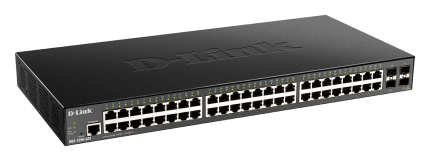
D-link DGS-1210-52MP -SFP METRO SMART 48PORT + 4SFP switch
- 48 Gigabit Ethernet Ports: Connect multiple computers, cameras and other network devices.
- 4 SFP Uplink Ports: Support fibre-optic network connections using compatible SFP transceivers.
- Smart Managed Functionality: Provides additional network configuration and monitoring capabilities.
- Gigabit Network Performance: Supports data transmission speeds of up to 1000 Mbps on compatible ports.
- Large Network Connectivity: Suitable for offices, institutions, commercial buildings and enterprise installations.
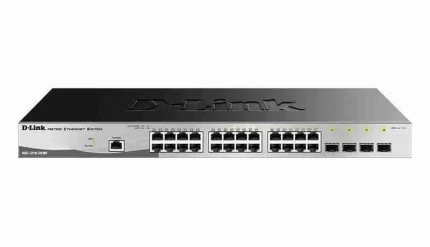
D-Link DGS-1210-52MP Metro Smart Managed Switch – 48 Gigabit Ports and 4 SFP Uplinks
- 48 Gigabit Ethernet Ports: Connect multiple computers, cameras and other network devices.
- 4 SFP Uplink Ports: Support fibre-optic network connections using compatible SFP transceivers.
- Smart Managed Functionality: Provides additional network configuration and monitoring capabilities.
- Gigabit Network Performance: Supports data transmission speeds of up to 1000 Mbps on compatible ports.
- Large Network Connectivity: Suitable for offices, institutions, commercial buildings and enterprise installations.
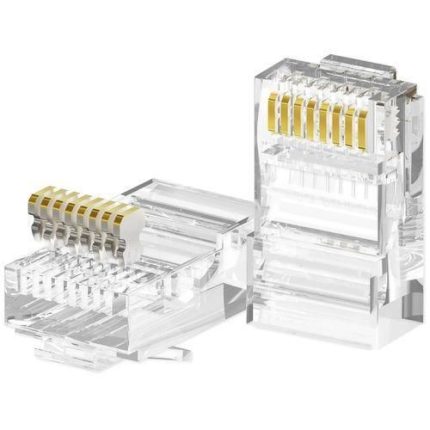
D-Link RJ45 Cat6 Connectors – Pack of 100 Network Cable Connectors
- Cat6 Compatibility: Designed for use with compatible Category 6 Ethernet cables.
- 100-Piece Pack: Convenient quantity for network installations and maintenance.
- RJ45 Connectivity: Provides the standard Ethernet plug interface for wired network connections.
- Professional Applications: Suitable for offices, CCTV installations, schools and home networks.
- Custom Cable Preparation: Allows technicians to create Ethernet cables in the required lengths.
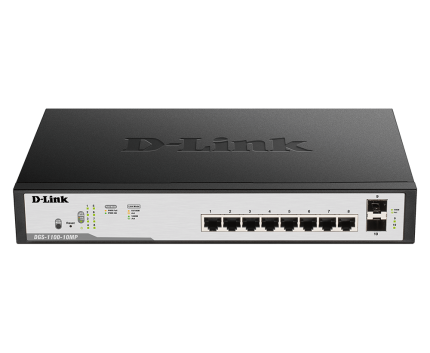
D-Link upto 250 Meter support 24-Port 1000Mbps PoE Switch with 2 SFP Ports – DGS-F1026P
- 24 Gigabit Ethernet Ports: Connect multiple network devices with speeds of up to 1000 Mbps.
- 250m Long-Range Support: Supports extended transmission distances in the appropriate operating mode.
- PoE Functionality: Delivers power and network connectivity through one Ethernet cable to compatible devices.
- 2 SFP Ports: Provides fibre-optic uplink options using compatible SFP transceivers.
- Versatile Networking Applications: Suitable for CCTV systems, offices, warehouses and commercial networks.
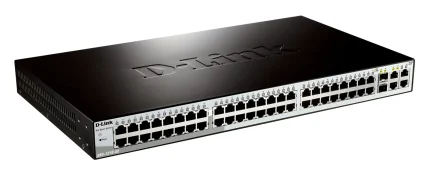
DLink DGS-1210-52 52-Port Gigabit Smart Managed Switch non-POE
- 52-Port Connectivity: 48 Gigabit Ethernet ports and 4 Gigabit SFP slots.
- Gigabit Performance: Supports 10/100/1000 Mbps wired Ethernet connections.
- Smart Management: Provides network management capabilities for better control.
- Fibre Connectivity: Four SFP slots support compatible Gigabit fibre transceivers.
- Non-PoE Design: Ideal for installations where connected devices use independent power supplies.









Reviews
There are no reviews yet.