
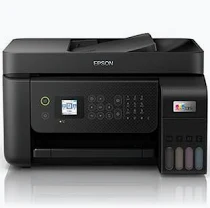
Epson L5290 Printer – EcoTank All-in-One with Wi-Fi, Ethernet, Fax and ADF
KSh 46,000.00
-
Print, scan, copy and fax functionality
-
Refillable EcoTank system for economical printing
-
Wi-Fi, Wi-Fi Direct and Ethernet connectivity
-
Automatic document feeder for multi-page documents
-
High-yield ink bottles for black and colour printing
Epson L5290 Printer – EcoTank All-in-One with Wi-Fi, Ethernet, Fax and ADF
The Epson L5290 Printer is a multifunction colour ink tank printer designed for small businesses, home offices and entrepreneurs who need affordable printing, scanning, copying and faxing in one device. With wireless connectivity, Ethernet networking and an automatic document feeder (ADF), it helps businesses handle everyday paperwork efficiently while keeping ink costs manageable.
Part of Epson’s EcoTank Business range, the L5290 combines refillable ink tanks with practical document-handling features. It is suitable for printing invoices, quotations, reports, business correspondence and colour documents without relying on conventional disposable ink cartridges.
For businesses that regularly process paperwork, the Epson L5290 offers a combination of economical printing, network connectivity and multifunction convenience.
What Is the Epson L5290 Printer?
The Epson L5290 is an A4 colour multifunction printer that supports four essential office tasks: printing, scanning, copying and faxing. Its EcoTank system uses refillable ink tanks, helping reduce the recurring expense associated with cartridge-based printing.
The printer features Epson Micro Piezo printhead technology and a four-colour dye ink system for producing black text, colour graphics and everyday business documents. Its automatic document feeder makes it easier to scan or copy multi-page documents without placing every sheet on the scanner glass individually.
For flexible office integration, the L5290 supports Wi-Fi, Wi-Fi Direct, USB and Ethernet connectivity. This allows users to connect compatible computers and mobile devices or integrate the printer into a wired office network. A colour LCD screen provides access to supported functions, while compatible Epson mobile printing services add convenience for users who work from smartphones and tablets.
Epson L5290 Printer Technical Specifications
- Brand: Epson
- Model: EcoTank Business L5290
- Product code: C11CJ65409
- Printer type: A4 colour multifunction ink tank printer
- Functions: Print, scan, copy and fax
- Printing technology: Epson Micro Piezo printhead
- Ink technology: Four-colour dye ink
- Maximum print resolution: 5760 × 1440 dpi
- ISO print speed: Up to 10 pages per minute in black and 5 pages per minute in colour
- Draft print speed: Up to 33 pages per minute in black and 15 pages per minute in colour under specified conditions
- Scanner type: Flatbed Contact Image Sensor (CIS)
- Optical scanning resolution: 1200 × 2400 dpi
- Automatic document feeder: Built-in ADF for multi-page document handling
- Connectivity: USB, Wi-Fi, Wi-Fi Direct and Ethernet
- Display: 3.7 cm colour LCD screen
- Mobile printing: Epson Smart Panel, Epson Connect services and Apple AirPrint, subject to compatibility
- Paper input capacity: 100 sheets
- Output tray capacity: 30 sheets
- Duplex printing: Manual
- Borderless printing: Supported for selected photo sizes
- Supported media: A4, A5, A6, B5, selected photo sizes, Letter, Legal and supported envelopes
- Included ink yield: Up to 8,100 black pages and 6,500 colour pages under Epson’s stated methodology
- Dimensions: 375 × 347 × 237 mm
- Warranty: 12-month carry-in warranty, subject to the applicable 30,000-page limit
Actual printing speeds and ink yields depend on document content, settings, paper type, print frequency and operating conditions.
Why Choose the Epson L5290 Printer?
1. Reduce Printing Costs with EcoTank Technology
The refillable ink tank system is designed to reduce ongoing printing expenses compared with many conventional cartridge-based printers. Epson states that the included ink can yield up to 8,100 black pages and 6,500 colour pages under its specified testing methodology. High yields can help reduce interruptions for businesses that print documents regularly.
2. Handle Multiple Office Tasks with One Device
The L5290 combines printing, scanning, copying and faxing in one machine. Businesses can manage routine paperwork without purchasing separate devices for each function. This helps save workspace and simplifies everyday administrative processes.
3. Process Multi-Page Documents More Conveniently
The automatic document feeder helps streamline the scanning and copying of multi-page paperwork. It is particularly useful for invoices, forms, contracts and business records that would otherwise need to be placed on the scanner glass one page at a time. The flatbed scanner remains useful for individual sheets and compatible items that need careful positioning.
4. Connect Through Wi-Fi or Ethernet
Wi-Fi and Wi-Fi Direct provide wireless printing options for compatible devices, while Ethernet supports integration into a wired office network. USB connectivity provides another direct connection option. This flexibility makes it easier to accommodate different office setups and printing requirements.
5. Print Clear Business Documents and Colour Graphics
With a maximum print resolution of 5760 × 1440 dpi, the L5290 supports detailed text and colour output for everyday documents. It is suitable for quotations, reports, tables, charts and basic business graphics, using appropriate paper and print settings.
Ideal Applications of the Epson L5290
Small businesses: Print invoices, quotations, reports, letters and internal records while keeping recurring ink expenditure under control.
Home offices: Manage printing, scanning, copying and faxing from one compact device, with flexible wired and wireless connectivity.
Administrative departments: Use the ADF to help process multi-page documents and support routine record management.
Entrepreneurs and service providers: Produce everyday business paperwork and colour materials without needing several separate machines.
Why Buy the Epson L5290 from Avidik Ventures?
Choosing a business printer involves considering print volume, running costs, connectivity, document handling and access to compatible ink supplies. Selecting equipment that matches your workload can help improve productivity and manage ongoing office expenses.
At Avidik Ventures, you can explore technology products and printing supplies for business and home use. The Epson L5290 is a practical option for customers seeking an economical multifunction printer with fax, an automatic document feeder and flexible network connectivity.
Before purchasing, confirm the exact model code, included ink bottles, warranty terms and compatibility of replacement ink with the specific unit supplied.
Improve your office document workflow with the Epson L5290. Visit Avidik Ventures to enquire about availability and find a printing solution suited to your business.











Reviews
There are no reviews yet.