
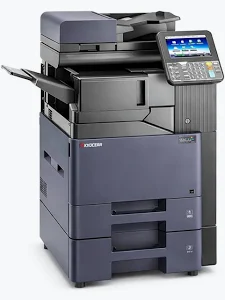
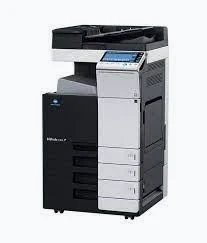
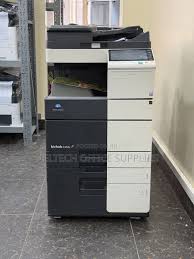
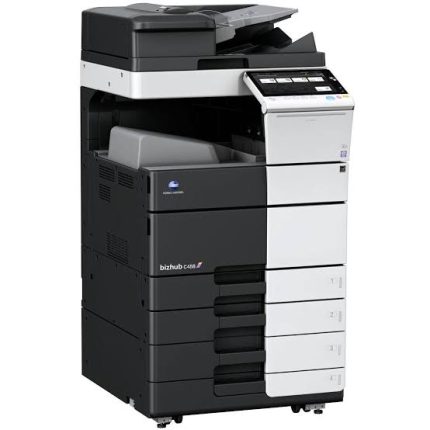
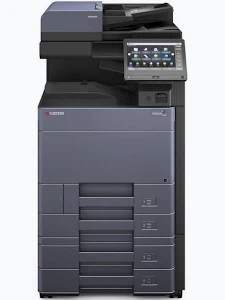
Kyocera TASKalfa 356ci Colour Multifunction Printer
KSh 55,000.00
- Up to 35 pages per minute in colour and monochrome on A4
- Integrated printing, copying, and scanning
- Automatic duplex printing
- 7-inch colour touchscreen interface
- Expandable paper capacity up to 3,100 sheets
Kyocera TASKalfa 356ci Colour Multifunction Printer
The Kyocera TASKalfa 356ci colour multifunction printer is designed for offices requiring dependable printing, copying, and scanning in one efficient device. It delivers print speeds of up to 35 pages per minute in colour and black and white on A4 paper. Its touchscreen interface, network connectivity, and expandable paper capacity support productive document workflows in busy workplaces.
Combining professional colour output with practical office features, this multifunction system suits businesses, schools, corporate departments, and document service environments. Optional fax functionality and document-processing accessories allow organisations to configure the machine around their operational needs.
What It Is
The Kyocera TASKalfa 356ci is an A4 colour laser multifunction system built on Kyocera’s HyPAS platform. It supports printing, copying, and scanning, with fax available as an option. Automatic duplex printing helps reduce manual handling when producing double-sided documents.
Its 7-inch colour touchscreen provides a central interface for everyday operations. Network connectivity supports shared access across compatible office computers, while optional document processors help streamline multi-page copying and scanning. The device also supports expandable paper handling for workplaces with different document volumes.
Technical Specifications
- Brand: Kyocera
- Model: TASKalfa 356ci
- Printer type: Colour laser multifunction system
- Core functions: Print, copy, scan
- Fax: Optional, depending on configuration
- Print speed: Up to 35 pages per minute in colour and monochrome on A4
- Print resolution: Up to 1,200 × 1,200 dpi at reduced speed
- Enhanced print quality: Up to 9,600 × 600 dpi using multibit technology
- Control panel: 7-inch colour touchscreen
- Processor: Freescale QorIQ P1022 dual-core, 800 MHz
- Memory: 2 GB RAM
- Internal storage: 8 GB SSD standard; optional 320 GB HDD on supported configurations
- Standard paper capacity: 600 sheets, comprising a 500-sheet cassette and 100-sheet multipurpose tray
- Maximum paper capacity: Up to 3,100 sheets with supported optional feeders
- Automatic duplex printing: Standard
- Network connectivity: Gigabit Ethernet
- USB connectivity: USB 2.0 and USB host interfaces
- Mobile printing: AirPrint and Kyocera Mobile Print; support may depend on setup
- Maximum monthly duty cycle: Up to 100,000 pages
- Warm-up time: Approximately 24 seconds or less
- Main unit dimensions: Approximately 550 × 507 × 612.8 mm, excluding document processor
- Main unit weight: Approximately 48 kg, excluding document processor
- Power supply: 220–240 V AC on applicable regional versions
Specifications may vary with regional versions and installed accessories. Confirm the exact configuration before ordering.
Why Choose the Kyocera TASKalfa 356ci Colour Multifunction Printer?
Professional Colour and Monochrome Printing
The machine prints up to 35 A4 pages per minute in both colour and black and white. This performance supports routine office correspondence, internal reports, presentations, and business documents. High-resolution output helps produce clear text, detailed graphics, and polished colour materials.
The combination of colour and monochrome printing gives teams flexibility without requiring separate devices for different document types. Automatic duplex printing also makes double-sided document production straightforward.
Convenient Copying and Scanning
The integrated copier handles everyday duplication tasks, including multi-copy jobs and document enlargement or reduction. Users can adjust magnification from 25% to 400% in one-percent increments. These controls are useful for resizing forms, reproducing handouts, and preparing documents for distribution.
Scanning brings paper-based information into digital workflows. Optional document processors can help handle multi-page originals, with one-path duplex scanning available through the compatible dual-scan processor. This is useful for archiving records, sharing documents, and reducing repetitive manual work.
Flexible Paper Handling
The standard 600-sheet input capacity accommodates regular office printing without frequent replenishment. Optional paper feeders can expand the capacity to as much as 3,100 sheets in supported configurations. This flexibility benefits departments handling larger print runs or several document types.
The multipurpose tray also supports different media, including compatible envelopes, labels, and heavier paper. Always check media specifications and tray compatibility before using specialist materials.
Practical Network and Mobile Printing
Gigabit Ethernet enables the printer to join a compatible office network for shared printing. Supported mobile-printing options can provide additional convenience for teams using compatible smartphones, tablets, and computers.
Network administration features help IT teams manage a shared device in an organised environment. Security capabilities include network authentication and encrypted communication protocols, subject to configuration and firmware support.
Designed for Regular Office Workloads
Kyocera’s TASKalfa range is intended for demanding business document environments. The 356ci combines core multifunction features, expandable paper capacity, and optional finishing accessories. These capabilities make it suitable for offices seeking to consolidate several document tasks into one platform.
The stated maximum monthly duty cycle is a manufacturer rating, not a recommendation to print that volume continuously. Actual performance depends on document complexity, operating conditions, maintenance, and consumable condition.
Suitable Applications and Users
The Kyocera TASKalfa 356ci fits medium-sized offices, educational institutions, professional service firms, administrative departments, and organisations producing frequent colour documents. It can support reports, proposals, training materials, forms, correspondence, and internal documentation.
Schools and training centres can use it for handouts and administrative records. Corporate teams can share printing and scanning across departments. Professional offices can digitise paperwork and prepare consistent document sets.
It may also suit businesses needing optional fax functionality or expandable paper handling. Before purchasing, assess expected monthly usage, required paper sizes, scan volume, and available finishing options.
Why Buy from Avidik Ventures?
Avidik Ventures helps businesses identify office equipment suited to their document workflows and operational requirements. When considering the Kyocera TASKalfa 356ci, confirm the machine’s condition, included accessories, consumables, and regional configuration before purchase. Contact the team through avidikventures.co.ke for product enquiries and assistance selecting suitable office printing equipment.











Reviews
There are no reviews yet.