
TP-Link 6 Port Hub – USB Type C to RJ 45, Two USB A, HDMI, PD and Type C – TL-UH6120C
KSh 5,300.00
- Six connection options in one compact hub
- HDMI output up to 4K at 60Hz
- Gigabit Ethernet up to 1Gbps
- USB-C and USB-A data ports up to 5Gbps
- USB-C Power Delivery input up to 100W
TP-Link USB-C 6-in-1 Hub – TL-UH6120C
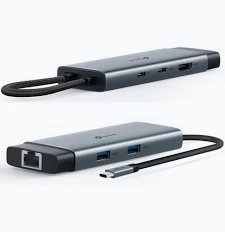
Expand your laptop’s connectivity with the TP-Link USB-C 6-in-1 Hub – TL-UH6120C, a versatile adapter designed for modern computers and compatible USB-C devices. It combines six useful connection options in one compact accessory, including Gigabit Ethernet, HDMI, USB-A, USB-C data, and USB Power Delivery.
This hub helps connect an external monitor, wired network, storage devices, and other peripherals through a single USB-C connection. With support for HDMI output up to 4K at 60Hz, data transfers up to 5Gbps, and up to 100W USB-C Power Delivery input, it is a practical choice for office work, studying, presentations, and travel.
What Is the TP-Link USB-C 6-in-1 Hub?
The TP-Link UH6120C is a multiport USB-C hub that expands the connectivity of compatible laptops, tablets, and other devices. It is useful for computers with limited built-in ports or devices that rely primarily on USB-C.
Its six interfaces combine display output, wired networking, data connectivity, and charging support. The integrated USB-C cable connects the hub to your device, while the aluminium alloy housing and braided cable support a compact, travel-friendly design.
Explore the official TP-Link UH6120C product information for additional manufacturer details.
Technical Specifications
- Brand: TP-Link
- Model: UH6120C
- Product Type: USB-C 6-in-1 Hub
- Host Connector: 1 × USB Type-C
- USB-C Data Port: 1 × USB-C, up to 5Gbps
- USB-A Ports: 2 × USB-A, up to 5Gbps each
- HDMI Output: 1 × HDMI, up to 4K at 60Hz
- Ethernet Port: 1 × RJ45 Gigabit Ethernet, up to 1Gbps
- Power Delivery: 1 × USB-C PD input, up to 100W
- PD Input Profiles: 5V/3A, 9V/3A, 12V/3A, 15V/3A, and 20V/5A
- Housing: Aluminium alloy
- Cable: 180mm braided cable
- Dimensions: 118.2 × 43 × 14.3 mm
- Supported Systems: Windows, macOS, Linux, iPadOS, iOS, Android, ChromeOS, and Nintendo OS, subject to device and version compatibility
- Package Contents: UH6120C hub and quick installation guide
The USB-C PD port accepts power from a compatible charger; the hub does not include a separate power adapter in the documented package. Actual performance depends on the host device, connected equipment, and supported standards.
Why Choose the TP-Link USB-C 6-in-1 Hub?
Connect Multiple Devices Through USB-C
The UH6120C combines six connection options in one accessory. Its two USB-A ports support compatible peripherals, while the additional USB-C port provides high-speed data connectivity.
Connect devices such as a keyboard, mouse, flash drive, or other compatible USB accessories. This helps reduce the need for multiple separate adapters and keeps your workspace organised.
Enjoy 4K HDMI Display Output
Connect a compatible external monitor or television through the HDMI port. The hub supports resolutions up to 4K at 60Hz when the host device, display, cable, and connection support the required capabilities.
This is useful for presentations, spreadsheets, multitasking, and viewing content on a larger screen. Check your computer’s USB-C video output support before purchasing, because not every USB-C port supports external displays.
Access Reliable Gigabit Ethernet
The built-in RJ45 Ethernet port provides wired network connectivity at up to 1Gbps. It offers an alternative to Wi-Fi when you need a wired connection for work, video meetings, file transfers, or network access.
Actual network speeds depend on the router or switch, Ethernet cable, internet service, and connected device. Some older operating systems may require a compatible driver, available through the TP-Link UH6120C support page.
Support Laptop Charging with 100W Power Delivery
The USB-C PD input supports compatible power delivery up to 100W. Connect a suitable USB-C PD charger to the hub’s dedicated PD port to pass power to a compatible host device while using the hub’s other functions.
The charger and laptop must support compatible USB Power Delivery profiles. The hub’s 100W input rating does not mean every laptop receives 100W; actual charging power can be lower because of device requirements and power allocation.
Transfer Files at High Speed
The USB-C data port and two USB-A ports support transfer rates of up to 5Gbps. This makes the hub suitable for connecting compatible flash drives, external storage devices, and other USB peripherals.
Actual transfer rates depend on the storage device, host interface, cable, and workload. The hub provides convenient expansion rather than guaranteeing maximum speed for every connected device.
Carry a Compact, Durable Accessory
The aluminium alloy housing provides a slim and lightweight design for everyday use. Its integrated 180mm braided cable helps keep the connection tidy when working at a desk or travelling with a laptop.
The compact dimensions make it easy to store in a laptop bag or workstation drawer. It is useful for people who move between home, office, classrooms, and meeting rooms.
Practical Uses for the TP-Link UH6120C
Office and Business Workstations
Connect a monitor, wired Ethernet, and USB peripherals through one compatible USB-C port. This setup helps simplify desk connections and supports common productivity tasks.
Remote Work and Home Offices
Use the HDMI port for an external display, Ethernet for wired networking, and USB ports for everyday accessories. Add a compatible PD charger to support laptop charging while the hub is connected.
Students and Presentations
Connect a compatible laptop or tablet to an external display for presentations and coursework. USB ports provide access to peripherals, while Gigabit Ethernet offers a wired networking option where available.
Travel and Mobile Productivity
Carry the hub to access common connection types without packing several individual adapters. Its compact housing is suitable for mobile workstations and compatible USB-C devices.
Compatibility and Setup
Connect the hub’s integrated USB-C cable to a compatible host device. Attach peripherals to the relevant ports, connect an HDMI display if needed, and plug a compatible USB-C PD charger into the dedicated PD input when charging is required.
For HDMI output, confirm that the host USB-C port supports video output. For charging, use a suitable USB-C Power Delivery charger and cable. Some older operating systems may require Ethernet drivers or updates; check the official TP-Link download centre for model-specific resources.
Why Buy the TP-Link UH6120C at Avidikventures?
Avidikventures offers practical technology accessories for home, office, education, and business use. The TP-Link UH6120C brings display output, wired networking, USB connectivity, and charging support together in one compact hub.
Simplify your connections with the TP-Link USB-C 6-in-1 Hub – TL-UH6120C. Visit Avidikventures to explore this accessory and other computer connectivity solutions.












Reviews
There are no reviews yet.