
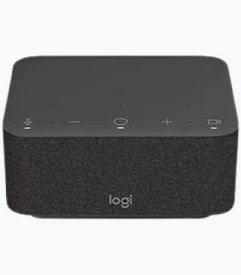


Logitech Logi Dock All-in-One Docking Station and Speakerphone
KSh 59,000.00
- Six Beamforming Microphones: Capture clear voices with advanced microphone technology and noise suppression.
- Powerful Stereo Speakers: Enjoy high-quality sound through two 55mm neodymium drivers and passive radiators.
- 100W USB-C Charging: Charge compatible laptops while connecting essential workstation accessories.
- Dual Display Connectivity: Connect two compatible external monitors through HDMI and DisplayPort.
- Integrated Meeting Controls: Manage supported video calls, microphone mute, volume and meeting access conveniently.
Logitech Logi Dock All-in-One Docking Station and Speakerphone
The Logitech Logi Dock is an innovative all-in-one docking station and video conferencing device designed to simplify modern office workspaces. Combining a high-quality speakerphone, advanced microphone technology, laptop charging, monitor connectivity and convenient meeting controls, Logi Dock helps professionals create a cleaner and more productive working environment.
Designed for hybrid workers, business professionals and remote teams, this intelligent docking station reduces desktop cable clutter while providing everything needed for effective virtual meetings. With six beamforming microphones, powerful stereo speakers, one-touch meeting controls and up to 100W laptop charging, Logitech Logi Dock is an excellent solution for modern workstations and home offices.
What Is the Logitech Logi Dock?
The Logitech Logi Dock is a USB-C docking station with an integrated speakerphone and video conferencing controls. It allows users to connect compatible laptops to multiple peripherals, external displays and audio devices through one central workstation hub.
Its built-in speakerphone features six beamforming microphones that capture voices while advanced audio processing helps reduce unwanted background noise. The integrated stereo speakers provide clear sound for meetings, music and everyday entertainment.
Logi Dock also supports one-touch meeting controls through compatible conferencing platforms, allowing users to join meetings and manage calls conveniently.
Technical Specifications
- Brand: Logitech
- Product Name: Logi Dock
- Product Type: USB-C Docking Station and Speakerphone
- Common Part Numbers: 986-000027 (UC Graphite), 986-000021 (Teams Graphite); regional versions vary
- Microphones: Six beamforming microphones
- Speaker Drivers: Two 55mm custom neodymium drivers
- Additional Audio Components: Two passive radiators
- Speaker Frequency Response: 60Hz–20kHz
- Microphone Frequency Response: 65Hz–8kHz
- Laptop Charging: Up to 100W through compatible USB-C Power Delivery
- Display Outputs: 1 × HDMI 2.0 and 1 × DisplayPort 1.4
- Display Resolution: Up to 4K at 60Hz, subject to host and display support
- USB-A Ports: 2 × USB 3.1 Gen 1
- USB-C Peripheral Ports: 3 × USB 3.1 Gen 1
- Upstream Connection: 1 × USB-C
- Wireless Connectivity: Bluetooth 5.1
- Meeting Controls: Call, mute, volume, video and one-touch meeting controls
- Software: Logitech Sync and Logi Tune
- Compatibility: Windows, macOS and supported Chrome-based computers
- Dimensions: 160 × 131.5 × 84.8mm
- Weight: Approximately 942g
- Warranty: 2-year limited hardware warranty
Why Choose the Logitech Logi Dock?
1. Integrated Professional Speakerphone
Logi Dock features two powerful 55mm neodymium speaker drivers and two passive radiators for rich stereo sound. Its six beamforming microphones use advanced algorithms to capture voices clearly while helping suppress unwanted background noise.
This makes it suitable for virtual meetings, conference calls, presentations and everyday audio entertainment without requiring a separate desktop speakerphone.
2. Simplified Video Conferencing Controls
The device features convenient meeting controls that allow users to manage calls, mute microphones, adjust volume and control supported video conferencing functions.
With compatible software and calendar integration through Logi Tune, users can join supported meetings with a single touch. This helps reduce the time spent navigating meeting applications.
3. Powerful USB-C Laptop Docking
The Logitech Logi Dock provides a central connection point for compatible laptops and desktop accessories. It supports up to five USB peripheral connections and two external displays.
Its USB-C connection also delivers up to 100W of laptop charging when the connected computer supports the required USB Power Delivery specifications.
4. Dual Monitor Support
With HDMI 2.0 and DisplayPort 1.4 outputs, Logi Dock supports compatible external monitors at resolutions up to 4K at 60Hz.
This makes it useful for professionals who work with multiple applications, spreadsheets, presentations and digital documents simultaneously.
5. Cleaner and More Organised Workspaces
Instead of connecting several separate accessories directly to a laptop, users can connect compatible devices through Logi Dock.
The integrated speakerphone, USB ports, display connections and laptop charging help reduce cable clutter and create a more organised workstation.
6. Flexible Wireless Audio Connectivity
Bluetooth 5.1 allows users to connect compatible smartphones and other Bluetooth-enabled devices for wireless audio playback.
The system also supports automatic audio switching with selected Logitech Zone headsets and earbuds, providing greater flexibility between speakerphone and private listening.
Where Can You Use the Logitech Logi Dock?
The Logitech Logi Dock is suitable for various professional and personal environments:
- Corporate Offices: Improve workstation organisation and simplify video conferencing.
- Home Offices: Create a productive remote working environment with integrated audio and docking features.
- Hybrid Workspaces: Support virtual collaboration between office-based and remote employees.
- Executive Workstations: Connect multiple displays and peripherals through one central device.
- Business Meetings: Join supported video conferences using convenient one-touch controls.
- Professional Presentations: Enjoy clear audio and flexible monitor connectivity.
- Creative Workstations: Connect compatible peripherals and external displays for multitasking.
Compatibility note: The connected computer must support USB-C DisplayPort Alt Mode and USB Power Delivery for the relevant video and charging functions. Meeting controls and one-touch joining depend on the operating system, software and conferencing platform.
Why Buy the Logitech Logi Dock from Avidik Ventures?
At Avidik Ventures, we provide technology products and solutions for businesses, professionals, institutions and individuals. Our product range includes video conferencing equipment, computer accessories, printers, networking products and printing supplies.
When purchasing the Logitech Logi Dock, you can explore professional workplace technology designed to improve communication, productivity and workstation organisation. We aim to help customers identify suitable technology solutions for their office and business requirements.
Visit Avidik Ventures to explore our available products and order the Logitech Logi Dock All-in-One Docking Station for your modern workspace.













Reviews
There are no reviews yet.