
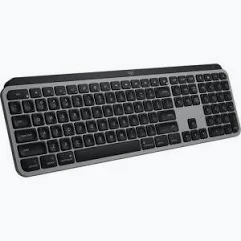
Logitech MX Keys Advanced for Mac – Wireless Illuminated Keyboard, Space Gray
KSh 17,000.00
- Dedicated Mac Layout: Designed with Apple-specific key markings and shortcuts for a seamless macOS typing experience.
- Perfect Stroke Keys: Spherically shaped keys provide comfortable, precise and responsive typing.
- Smart Backlighting: Automatically illuminates keys using hand proximity and ambient light sensors.
- Multi-Device Connectivity: Connect and switch between up to three compatible devices using Easy-Switch.
- USB-C Rechargeable Battery: Enjoy up to 10 days with backlighting or five months with backlighting disabled under specified usage conditions.
Logitech MX Keys Advanced for Mac – Wireless Illuminated Keyboard, Space Gray
The Logitech MX Keys Advanced for Mac Wireless Illuminated Keyboard is a premium full-size keyboard designed specifically for Apple users who value precision, comfort and productivity. Featuring a dedicated Mac keyboard layout, intelligent backlighting, wireless connectivity and Logitech’s innovative Perfect Stroke key technology, it provides a refined typing experience for MacBook, iMac and iPad users.
Finished in elegant Space Gray, the Logitech MX Keys for Mac complements Apple’s modern devices and workstation designs. Its carefully shaped keys match the natural shape of your fingertips, providing accurate and comfortable typing during extended working sessions. The intelligent illumination automatically adjusts to surrounding lighting conditions, making it easier to work in different environments.
With Bluetooth connectivity, multi-device support and USB-C charging, this keyboard is an excellent choice for professionals, designers, programmers, students and business users who rely on Apple devices for their daily activities.
What Is the Logitech MX Keys Advanced for Mac?
The Logitech MX Keys Advanced for Mac is a full-size wireless illuminated keyboard developed to work seamlessly with macOS and compatible Apple devices. Unlike the standard multi-OS MX Keys keyboard, this Mac edition features a dedicated Apple keyboard layout with Mac-specific key markings and shortcuts.
It uses Logitech Perfect Stroke technology, featuring spherical key indentations designed to match your fingertips. This helps provide precise keystrokes, comfortable typing and a stable feel.
The keyboard also features Smart Illumination technology, which detects when your hands approach and automatically adjusts the brightness of the backlit keys. Its rechargeable battery and wireless connectivity help maintain a clean, organised workstation without unnecessary cables.
Technical Specifications
- Brand: Logitech
- Product Name: MX Keys Advanced for Mac
- Model: MX Keys for Mac
- Product Type: Wireless illuminated keyboard
- Colour: Space Gray
- Keyboard Layout: Dedicated Mac layout
- Key Technology: Logitech Perfect Stroke scissor keys
- Connectivity: Bluetooth Low Energy
- Multi-Device Support: Up to three compatible devices
- Device Switching: Logitech Easy-Switch
- Backlighting: Smart adjustable illuminated keys
- Lighting Sensors: Hand proximity and ambient light sensors
- Battery: Rechargeable 1500mAh Li-Po battery
- Battery Life: Up to 10 days with backlighting or up to five months with backlighting switched off
- Charging Port: USB-C to USB-C
- Dimensions: 430.2 × 131.63 × 20.5 mm
- Weight: Approximately 810g
- Compatible Devices: MacBook, iMac, Mac mini and compatible iPad and iPhone devices
- Operating System Compatibility: macOS and supported Apple operating systems
- Software Support: Logitech Options on supported macOS versions
Why Choose the Logitech MX Keys Advanced for Mac?
1. Dedicated Mac Keyboard Layout
The MX Keys for Mac features a keyboard layout designed specifically for Apple users. Its Mac-specific key markings and shortcuts make it convenient to work with macOS applications and compatible Apple devices.
It is particularly useful for MacBook and iMac users who prefer a full-size external keyboard with familiar Apple keyboard functions.
2. Logitech Perfect Stroke Keys
The keyboard features Logitech Perfect Stroke technology, with spherical indentations that match the shape of your fingertips. This design supports accurate typing and provides a comfortable, responsive feel.
The stable scissor-switch keys are suitable for extended typing sessions, making the keyboard practical for professionals who regularly prepare documents, write emails or work with creative applications.
3. Smart Illumination and Adjustable Backlighting
The intelligent backlighting system detects when your hands approach the keyboard and illuminates the keys automatically. Its ambient light sensor adjusts brightness according to the surrounding lighting conditions.
This feature makes typing convenient in dimly lit offices, bedrooms and home workstations.
4. Connect and Switch Between Multiple Devices
With Logitech Easy-Switch technology, you can connect the keyboard to up to three compatible devices and switch between them using dedicated keys.
This is useful for users who work with a MacBook, iMac and iPad or manage multiple compatible computers.
5. Rechargeable Battery with USB-C
The built-in rechargeable battery provides up to 10 days of use with backlighting enabled or up to five months with backlighting turned off, depending on usage and operating conditions.
Its USB-C to USB-C charging cable makes recharging convenient and allows direct connection to compatible USB-C ports for charging.
6. Premium Space Gray Design
The Space Gray finish complements Apple’s premium computer range, creating a coordinated and professional workstation.
Its slim profile, stable construction and minimalist appearance make it suitable for modern offices, creative studios and home workspaces.
Where Can You Use the Logitech MX Keys Advanced for Mac?
The Logitech MX Keys Advanced for Mac is suitable for various professional and personal environments, including:
- MacBook workstations: Enjoy comfortable external typing while using your MacBook.
- Creative studios: Work on graphic design, photography, video editing and content creation projects.
- Corporate offices: Prepare reports, emails, presentations and business documents.
- Programming environments: Type code and manage development projects comfortably.
- Home offices: Create a clean and organised Apple-compatible workstation.
- Educational institutions: Complete assignments, research and online learning activities.
- Professional workstations: Switch between compatible devices while maintaining an efficient workflow.
Why Buy the Logitech MX Keys Advanced for Mac from Avidik Ventures?
At Avidik Ventures, we provide computer accessories and technology products designed to support individuals, professionals and businesses. Our product range includes Logitech keyboards, wireless mice, printers, toner cartridges, networking equipment and other essential computing supplies.
When purchasing the Logitech MX Keys Advanced for Mac from Avidik Ventures, you can enjoy a convenient online shopping experience while exploring practical technology solutions for your workstation.
Whether you are upgrading your MacBook setup, improving your office productivity or looking for a premium wireless keyboard for creative work, the MX Keys for Mac offers an excellent combination of precision, comfort and elegant design.
Visit Avidik Ventures to explore our available computer accessories and technology products. Choose the Logitech MX Keys Advanced for Mac and enjoy a more comfortable and productive Apple computing experience.












Reviews
There are no reviews yet.