
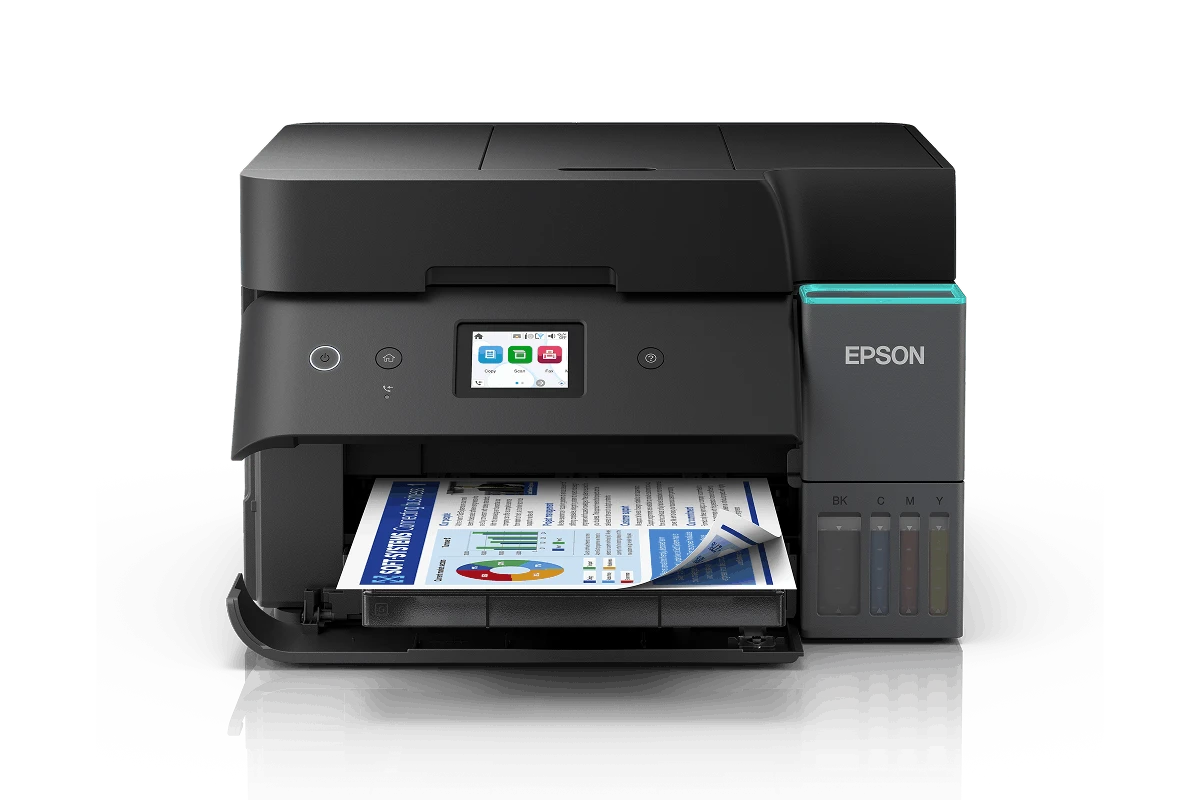
Epson L6390 Printer – EcoTank Multifunction Printer with Wi-Fi, Fax and Automatic Duplex Printing
KSh 59,000.00
-
Print, scan, copy and fax in one device
-
Refillable EcoTank system for lower ink costs
-
Automatic double-sided printing
-
Automatic document feeder for multi-page workflows
-
Wi-Fi, Wi-Fi Direct and Ethernet on supported configurations
Epson L6390 Printer – EcoTank Multifunction Printer with Wi-Fi, Fax and Automatic Duplex Printing
The Epson L6390 Printer is a business-focused EcoTank multifunction printer designed for small and medium-sized businesses, offices, entrepreneurs and professional workspaces that need reliable, cost-effective document management. Combining printing, scanning, copying and faxing in one compact device, it helps streamline everyday office operations while reducing the ongoing cost of ink.
Powered by Epson PrecisionCore printhead technology, the L6390 delivers sharp text, clear graphics and professional-quality colour documents. Its refillable ink tank system, automatic double-sided printing, automatic document feeder (ADF) and wireless connectivity make it a practical choice for businesses that want to improve productivity without relying on expensive replacement cartridges.
What Is the Epson L6390 Printer?
The Epson L6390 is an A4 colour ink tank all-in-one printer that integrates four essential office functions into a single machine: print, scan, copy and fax. Instead of conventional disposable cartridges, it uses high-capacity refillable ink tanks designed to support high-volume printing at a lower ongoing ink cost.
The printer is particularly useful for offices that regularly handle invoices, quotations, reports, contracts, business correspondence and other administrative documents. Its automatic document feeder simplifies processing multi-page documents, while automatic duplex printing reduces paper consumption by printing on both sides of compatible sheets.
With Wi-Fi, Wi-Fi Direct and Ethernet connectivity available on supported regional versions, the L6390 can also integrate into different office environments, allowing users to select a suitable connection method for their workflow.
Epson L6390 Technical Specifications
- Brand: Epson
- Product series: EcoTank Business
- Model: L6390
- Product code: Regional codes vary; the Epson Africa listing uses C11CL40407
- Printer type: Colour ink tank multifunction printer
- Functions: Print, scan, copy and fax
- Print technology: Epson PrecisionCore printhead
- Maximum print resolution: 4800 × 1200 dpi
- ISO print speed: Up to 18 pages per minute in monochrome and 9 pages per minute in colour
- Draft print speed: Up to 35 pages per minute in black and 23 pages per minute in colour
- Automatic duplex printing: Yes
- Scanning: Flatbed scanner with automatic document feeder
- Duplex scanning: Supported on compatible configurations
- Paper input capacity: Up to 250 sheets
- Output tray capacity: Up to 30 sheets
- Ink technology: Pigment black and dye colour inks
- Included ink yield: Up to 15,100 black pages and 5,500 colour pages, according to the Epson Africa listing
- Connectivity: USB, Wi-Fi, Wi-Fi Direct and Ethernet, depending on regional configuration
- Display: 6.1 cm colour touchscreen on the listed configuration
- Dimensions: Approximately 375 × 347 × 240 mm
Actual printing speeds and ink yields vary according to document content, print settings, usage patterns and regional product configuration.
Why Choose the Epson L6390 Printer?
1. Reduce Printing Costs with Refillable EcoTank Technology
One of the biggest advantages of the L6390 is its high-capacity refillable ink tank system. Rather than frequently replacing small cartridges, users refill the printer using compatible ink bottles. This can reduce the cost per printed page, particularly in workplaces that produce large volumes of paperwork.
The included ink supply is rated for up to 15,100 black-and-white pages and 5,500 colour pages on the listed Epson Africa model. These are manufacturer-estimated yields, not guaranteed results for every user.
2. Improve Productivity with Fast Document Printing
The L6390 offers ISO print speeds of up to 18 pages per minute for monochrome documents and 9 pages per minute for colour documents. These speeds help offices process routine administrative printing more efficiently.
Whether preparing customer quotations, internal reports, invoices or presentation materials, the printer provides a practical balance of speed, document quality and operating cost.
3. Print on Both Sides Automatically
Automatic duplex printing enables the L6390 to print on both sides of compatible paper without requiring users to turn each sheet manually. This feature helps reduce paper usage, keeps reports more compact and simplifies the production of multi-page business documents.
For businesses that print regularly, these savings can contribute to more efficient document management.
4. Handle Multi-Page Documents with the ADF
The automatic document feeder helps users process multiple pages for scanning, copying and supported document workflows without placing every sheet individually on the flatbed scanner.
This is useful when digitising contracts, scanning customer records, copying reports or handling routine office paperwork. The feeder’s capacity and supported duplex-scanning functions should be checked against the exact regional configuration.
5. Connect to Your Office Network
Wireless connectivity gives compatible devices the flexibility to print without a direct USB connection. Wi-Fi Direct can support connections from compatible devices without requiring a conventional wireless router, while Ethernet is useful for integrating a printer into a wired office network.
These options can make document access more convenient for employees working from different desks or using supported mobile devices.
6. Produce Clear Business Documents
With a maximum print resolution of 4800 × 1200 dpi and Epson PrecisionCore technology, the L6390 is designed to produce crisp text, detailed graphics and professional-looking colour documents.
Its pigment black and dye colour ink system supports everyday business printing, including text-heavy paperwork, coloured charts, forms and general office materials.
7. Manage Office Tasks from One Device
Combining printing, scanning, copying and faxing reduces the need for separate machines. This helps businesses conserve workspace, simplify equipment management and keep routine document processes within one device.
Ideal Applications for the Epson L6390
Small and Medium-Sized Businesses
Suitable for businesses that regularly print invoices, quotations, reports, purchase orders, customer documents and internal records.
Corporate and Administrative Offices
Useful for processing multi-page documents, copying paperwork, scanning records and producing double-sided reports.
Retail Shops and Service Businesses
Supports everyday administrative tasks such as receipts, stock reports, forms, supplier correspondence and customer documentation.
Home Offices and Entrepreneurs
A practical option for professionals who need business-grade multifunction features without maintaining several separate devices.
Schools and Training Centres
Can support administrative printing, worksheets, notices, forms and general office documentation, subject to the institution’s workload and printing requirements.
Why Buy the Epson L6390 from Avidik Ventures?
At Avidik Ventures, businesses and individuals can explore printing solutions designed to support everyday office productivity. The product range includes printers, toner, cartridges, computer accessories and related technology supplies.
Choosing the right printer involves more than comparing purchase prices. It also means considering expected print volume, ink costs, connectivity requirements, scanning needs and the availability of compatible consumables.
The Epson L6390 is worth considering if your business needs an integrated print, scan, copy and fax solution with refillable ink tanks, automatic duplex printing and document-feeding capabilities.
Upgrade your office printing workflow with the Epson L6390. Visit Avidik Ventures to explore available printing solutions and find equipment suited to your business requirements.











Reviews
There are no reviews yet.