
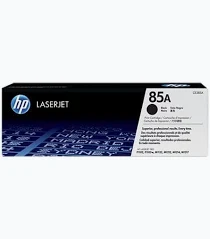
HP CE285A 85A Toner Cartridge – HP 85A Black Original LaserJet Toner Cartridge
KSh 2,300.00
- Original HP black laser toner cartridge
- Approximate yield of 1,600 pages
- Bold text and sharp monochrome graphics
- Compatible with selected HP LaserJet printers
- Standard-capacity design for everyday printing
HP CE285A 85A Toner Cartridge – HP 85A Black Original LaserJet Toner Cartridge
The HP CE285A 85A Toner cartridge delivers crisp black text and sharp graphics for professional monochrome printing. Designed for compatible HP LaserJet printers, this original toner supports consistent document quality. It suits offices, small businesses, schools, and home workspaces requiring dependable printing. With an approximate yield of 1,600 pages, it supports everyday administrative and professional workloads. Its reliable performance helps users produce clear reports, correspondence, invoices, and essential business records.
Product Details
The HP 85A Black Original LaserJet Toner Cartridge is a standard-capacity printing supply designed for selected HP LaserJet printers. It uses laser printing technology to produce defined characters and clear black graphics. Its compact cartridge design supports routine document production across different working environments.
Original HP toner cartridges are engineered for compatible printing systems. Their integrated design supports consistent output and convenient cartridge replacement. This makes the cartridge suitable for workplaces that depend on reliable monochrome printing.
HP CE285A 85A Toner: Technical Specifications
- Brand: HP
- Official product name: HP 85A Black Original LaserJet Toner Cartridge
- Official model number: CE285A
- Cartridge series: HP 85A
- Product type: Original black laser toner cartridge
- Print technology: Laser
- Print colour: Black
- Cartridge capacity: Standard capacity
- Approximate page yield: 1,600 pages
- Yield testing standard: ISO/IEC 19752
- Cartridge dimensions: Approximately 375 × 113 × 125 mm
- Cartridge weight: Approximately 0.62 kg
- Package weight: Approximately 0.83 kg
- Package contents: One toner cartridge
- Compatible printer families: Selected HP LaserJet Pro P1100 and M1130 series, and HP LaserJet Pro M1210 series
- Primary applications: Business documents, reports, invoices, and correspondence
The stated yield represents an approximate average under standard testing conditions. Actual results vary according to page coverage, document complexity, printer settings, and usage patterns. View official HP product specifications.
Why Choose This Original HP Toner?
HP CE285A 85A Toner: Professional Print Quality
Professional documents require readable text, consistent black density, and clean graphics. This cartridge supports bold lettering and sharp monochrome output for everyday business printing. Its toner formulation helps maintain clear documents across recurring print jobs.
Consistent output can reduce unnecessary reprints caused by poor print quality. Businesses benefit from professional-looking invoices, reports, and customer correspondence. These characteristics make the cartridge suitable for routine administrative work.
Reliable Performance for Everyday Printing
Original HP toner cartridges are designed to deliver dependable results with compatible printers. Their integrated design supports consistent output across different document types. This helps businesses maintain predictable printing performance during regular operations.
The cartridge suits users who prioritise clear text and reliable monochrome printing. It supports everyday office tasks without requiring colour printing capabilities. Explore HP original toner supplies.
Convenient Installation and Cartridge Replacement
The all-in-one cartridge design makes replacement straightforward for compatible printers. Following the manufacturer’s installation instructions helps ensure correct positioning. Proper handling also helps prevent avoidable installation problems.
Its approximate 1,600-page yield provides a useful reference for supply planning. Actual cartridge life depends on printing frequency and page coverage. Monitoring usage helps users prepare replacement supplies before toner depletion interrupts important work.
Printer Compatibility and Professional Applications
HP CE285A 85A Toner: Compatible Printer Models
The HP 85A cartridge supports selected printers within several HP LaserJet families. Compatible models include:
- HP LaserJet Pro P1102
- HP LaserJet Pro P1102w
- HP LaserJet Pro P1109
- HP LaserJet Pro P1109w
- HP LaserJet Pro M1132 MFP
- HP LaserJet Pro M1212nf MFP
- HP LaserJet Pro M1217nfw MFP
Compatibility may vary by printer configuration and regional cartridge requirements. Check your printer’s documentation before ordering replacement supplies. Check HP cartridge compatibility.
Suitable for Offices and Small Businesses
Small businesses can use this cartridge for invoices, quotations, delivery notes, and correspondence. Administrative departments can print reports, internal records, forms, and meeting documents. Its black-only output suits workflows centred on monochrome printing.
Schools and training institutions can produce worksheets, assignments, and administrative paperwork. Consultants can print proposals, contracts, and client reports. Home users can also handle personal paperwork using compatible printers.
Supporting Daily Business Operations
Reliable printing helps organisations maintain records and coordinate routine activities. This cartridge supports everyday document production for compatible HP LaserJet equipment. Its standard yield helps users estimate replacement intervals based on their printing habits.
Documents with extensive black graphics typically consume more toner than ordinary text pages. Printer settings and document complexity also influence cartridge life. Monitoring toner levels helps prevent unexpected interruptions during important printing tasks.
Installation, Maintenance, and Responsible Use
HP CE285A 85A Toner: Maintaining Consistent Output
Keep replacement cartridges sealed until installation. Store them in a dry environment away from excessive heat and direct sunlight. Follow the printer manufacturer’s instructions when removing or installing cartridges.
Avoid touching sensitive cartridge components during handling. Ensure the cartridge is positioned correctly before resuming printing. Consult the printer manual if installation errors or print-quality problems occur.
Faded text, streaks, or uneven output may indicate toner depletion or another printer issue. Check cartridge status and follow the manufacturer’s troubleshooting guidance. Suitable paper and regular printer maintenance also support dependable performance.
HP provides a recycling programme for original cartridges in participating regions. Responsible recycling helps recover materials and reduce waste. Learn about HP Planet Partners recycling.
Why Buy from Avidik Ventures?
Avidik Ventures supplies computer accessories, printers, toner cartridges, and office printing essentials. Our product listings help customers identify supplies suited to their equipment. Confirm your printer model before ordering to ensure compatibility. Visit Avidik Ventures for product enquiries and assistance selecting suitable printing supplies. Choose the correct cartridge to support clear documents and dependable office printing.











Reviews
There are no reviews yet.