
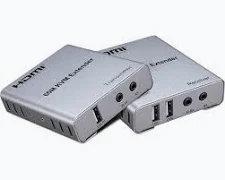

HDMI 60m KVM Extender with Audio
KSh 6,000.00
- Extends compatible HDMI signals up to 60 metres
- Supports Full HD video on compatible models
- Transmits audio alongside HDMI video
- Enables remote USB keyboard and mouse control
- Simplifies long-distance AV installations
HDMI 60m KVM Extender with Audio
The HDMI 60m KVM Extender is a practical solution for transmitting high-definition video, audio, and keyboard-and-mouse control over longer distances. It uses a compatible Cat5e or Cat6 network cable to connect a computer or HDMI source to a remotely positioned display. This helps maintain convenient device control when equipment is located away from the user. It is suitable for offices, classrooms, CCTV control rooms, conference facilities, and digital signage installations.
What It Is
An HDMI KVM extender consists of a transmitter (TX) and a receiver (RX). The transmitter connects to the computer or HDMI source, while the receiver connects to the remote display and USB peripherals. A network cable carries the signals between the two units over distances of up to 60 metres, depending on the model and cable quality.
The audio functionality allows compatible models to transmit sound alongside video. Some versions also provide 3.5mm audio outputs, USB keyboard and mouse support, and infrared remote control. For a locally available product option, explore the HDMI 60M KVM Extender with Audio from ANS Kenya.
Technical Specifications
- Product Name: HDMI 60m KVM Extender with Audio
- Product Type: HDMI Video, Audio, and USB KVM Extender
- Transmission Distance: Up to 60 metres
- Transmission Cable: Compatible Cat5e or Cat6 Ethernet cable
- Video Resolution: Up to 1920 × 1080 at 60Hz on typical Full HD models
- Video Transmission: HDMI digital video
- Audio Support: HDMI audio; separate stereo output on compatible versions
- KVM Function: Remote keyboard and mouse control
- Transmitter Connections: HDMI input, RJ45 output, and USB host connection, depending on model
- Receiver Connections: HDMI output, RJ45 input, and USB ports for peripherals, depending on model
- Additional Features: Plug-and-play operation; infrared control or local HDMI loop-out on selected versions
- Power Supply: External DC adapters or supported power-sharing arrangements, depending on model
- Compatibility: Compatible HDMI sources, displays, and USB input devices
- Installation: Point-to-point connection between transmitter and receiver
Specifications vary between manufacturers and versions. Confirm the exact maximum resolution, audio output type, USB connection layout, power requirements, and included accessories before purchase.
Why Choose HDMI 60m KVM Extender with Audio
Long-Distance HDMI Transmission
The extender helps overcome the practical distance limitations of conventional HDMI cabling. It sends video signals across a compatible network cable, allowing displays to be positioned up to 60 metres from the source. This is useful when computers or video equipment must remain in a separate room. For best results, follow the manufacturer’s recommended cable type and maximum distance.
Convenient Remote Keyboard and Mouse Control
KVM functionality lets users operate a connected computer from the receiver location. A compatible keyboard and mouse can control the source without requiring the user to sit beside the computer. This arrangement is useful for server rooms, monitoring stations, and shared workspaces. USB compatibility and supported peripheral functions depend on the specific extender model.
Integrated Audio Support
Compatible models transmit audio together with HDMI video, helping preserve sound during long-distance connections. Some versions include separate 3.5mm audio outputs for connecting speakers or headphones. This is beneficial for presentations, training sessions, video playback, and monitoring applications. Check whether the selected model supports embedded HDMI audio, separate analogue output, or both.
Simple Installation
Many HDMI KVM extenders use a transmitter-and-receiver arrangement with straightforward cable connections. Compatible plug-and-play models operate without additional computer software or drivers. This can simplify installation in offices, classrooms, and existing AV systems. Always connect the transmitter and receiver according to the supplied instructions and use the specified power adapters.
Flexible Display and AV Integration
The extender supports installations where the source and display need to be separated physically. Selected versions offer additional features such as infrared control or local HDMI loop-out. These options can help suit different presentation and monitoring layouts. Review the manufacturer’s 60-metre HDMI KVM extender specifications to understand how a particular configuration handles video and remote control.
Ideal Uses and Everyday Applications
CCTV and Security Monitoring
Security teams can position a display and keyboard away from a computer or compatible monitoring system. This helps create a convenient monitoring station without moving the original equipment. Confirm compatibility with the specific DVR, NVR, computer, and display before installation.
Offices and Server Rooms
Businesses can keep computers in a designated equipment area while providing remote access to a monitor, keyboard, and mouse. This can reduce desk clutter and help organise shared workspaces. The extender is particularly useful where direct cable routing would otherwise be inconvenient.
Classrooms and Conference Rooms
Teachers and presenters can connect a computer to a remotely located screen or projector. Audio support helps transmit compatible presentation sound, while remote keyboard control allows convenient operation. Check the projector’s resolution and the extender’s audio features before deployment.
Digital Signage and Commercial Displays
Retailers and businesses can separate media equipment from displays used for announcements, information, and promotional content. A compatible extender can simplify installations across larger rooms or commercial spaces. Actual performance depends on the cable, source, display, and supported resolution.
Buy Networking and AV Accessories from Avidikventures
Avidikventures provides technology and connectivity products for business and everyday use. Explore available products through the Avidikventures website. Before purchasing, confirm the 60-metre transmission capability, supported resolution, audio connections, USB functionality, and package contents. Choosing the correct version helps ensure compatibility with your computer, display, and installation requirements.











Reviews
There are no reviews yet.