
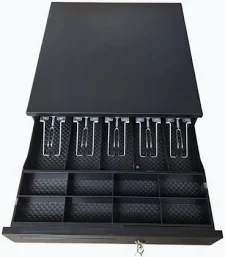

OCM Automatic Cash Drawer for POS Systems
KSh 5,500.00
- Automatic electronic opening with compatible POS equipment
- Organized banknote and coin compartments
- Durable metal construction on supported models
- Key-operated locking system
- RJ11/RJ12 connectivity on compatible configurations
Automatic Cash Drawer for POS Systems
An automatic cash drawer for POS systems provides secure cash storage and convenient access during everyday business transactions. Designed for retail shops, supermarkets, restaurants, and hospitality businesses, it helps organize banknotes, coins, and transaction documents. When connected to a compatible receipt printer or point-of-sale system, the drawer opens automatically after an authorized transaction.
This electronic cash drawer combines a durable housing, organized cash compartments, and a key-operated locking mechanism. It supports efficient checkout operations while helping businesses maintain better control over cash handling. Its practical design makes it suitable for busy counters where speed, organization, and security matter.
What Is an Automatic POS Cash Drawer?
An automatic cash drawer is a lockable storage unit designed to work with compatible POS equipment. It typically connects to a receipt printer through an RJ11 or RJ12 interface. When the POS software sends an appropriate command through a compatible printer, the drawer releases electronically.
The OCOM electronic POS cash drawer range illustrates common features, including removable cash trays, adjustable banknote compartments, coin holders, and three-position locks. Exact features depend on the selected model.
Technical Specifications
- Product Type: Automatic Electronic Cash Drawer
- Primary Application: Retail and point-of-sale transactions
- Housing Material: Metal construction, commonly steel
- Colour: Commonly black; availability varies by model
- Cash Tray: Removable tray on many models
- Banknote Compartments: Typically four or five adjustable sections
- Coin Compartments: Commonly eight sections
- Locking System: Three-position key lock on many models
- Interface: RJ11/RJ12 on compatible configurations
- Operating Voltage: Model-dependent, commonly 12V or 24V DC
- Activation Method: Electronic release through a compatible POS printer or interface
- Manual Access: Key-operated opening on supported models
- Media Slots: Available on selected models for checks or documents
- Typical Full-Size Dimensions: Approximately 410 × 415 × 100mm, depending on model
- Typical Weight: Approximately 4–6.5kg, depending on construction
- Compatibility: POS systems and receipt printers with matching interface, voltage, and pin configuration
These are typical specifications for this product category, not a guaranteed specification sheet for one exact model. Confirm the actual model and included accessories before ordering.
Why Choose an Automatic Cash Drawer?
Faster Checkout Operations
Automatic opening helps cashiers access the cash tray without manually unlocking the drawer for every transaction. When correctly configured, the POS system triggers the opening mechanism through the connected receipt printer. This can make checkout workflows more convenient during busy trading periods.
Organized Cash Management
Separate banknote and coin compartments help cashiers arrange different denominations. Adjustable dividers on supported models allow the tray to accommodate business requirements. A removable tray also makes cash counting and end-of-shift reconciliation more convenient.
Secure Cash Storage
A metal housing and key-operated lock help protect cash between transactions. Three-position locks on many models support locked, manual-open, and electronically controlled modes. Some drawers also include emergency manual-release mechanisms, depending on the design.
Durable Construction for Daily Use
Cash drawers are designed to withstand repeated opening and closing. Metal housings and reinforced sliding mechanisms help support routine commercial use. For businesses with high transaction volumes, check the manufacturer’s durability rating for the exact model.
Practical POS Integration
Compatible drawers can connect to receipt printers, allowing the printer to control electronic opening. Before installation, verify the printer’s cash-drawer port, voltage, connector wiring, and software configuration. An RJ11/RJ12 plug alone does not guarantee compatibility across every POS system.
Common Applications
An automatic cash drawer suits a range of commercial environments:
- Retail shops: Organizes cash received from daily customer purchases.
- Supermarkets and minimarts: Supports frequent checkout transactions.
- Restaurants and cafés: Keeps cash accessible at billing counters.
- Hotels and hospitality businesses: Supports front-desk payment operations.
- Pharmacies: Helps organize cash transactions at service counters.
- Offices and service centres: Provides controlled cash storage for customer payments.
Compatibility and Installation
Place the drawer on a stable counter or install it using suitable mounting accessories where supported. Connect the interface cable to a compatible receipt printer or approved cash-drawer controller. Configure the POS software to issue the correct drawer-opening command.
Check the operating voltage and pinout before connecting the unit. Never assume that every printer supports the same electrical configuration. For reference, Elo’s official cash drawer specifications explain how RJ-12 interfaces and 12V/24V operation can vary between configurations.
Why Buy from Avidik Ventures?
Avidik Ventures helps businesses source POS equipment and IT accessories for retail, hospitality, and office environments. Our goal is to help customers select equipment suited to their existing checkout setup. Contact our team to confirm the available cash drawer model, interface, voltage, dimensions, and included accessories before purchase.











Reviews
There are no reviews yet.