
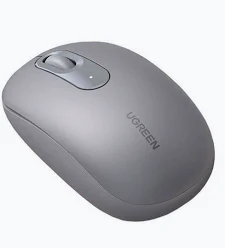
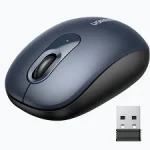
UGREEN 2.4G Wireless Mouse Moonlight Gray – MU105
KSh 1,200.00
- 2.4GHz wireless connectivity with USB receiver
- Four adjustable DPI settings up to 2400 DPI
- Quiet-click buttons for shared workspaces
- Up to 10-metre wireless range
- Moonlight Gray finish with AA battery operation
UGREEN MU105 Wireless Mouse – Moonlight Gray
The UGREEN MU105 Wireless Mouse offers convenient wireless control for everyday computing, office productivity, and home use. Its 2.4GHz connection eliminates the need for a wired mouse, helping maintain a tidy workspace. The elegant Moonlight Gray finish complements modern laptops and desktop accessories. With adjustable sensitivity, quiet-click buttons, and efficient battery operation, this mouse suits professionals, students, remote workers, and home computer users.
What It Is
The UGREEN MU105 is a wireless optical mouse that connects to compatible computers through a compact USB nano receiver. It uses 2.4GHz wireless technology rather than Bluetooth, making it suitable for devices with an available USB-A port.
Its ergonomic shape supports everyday handling, while the three-button layout simplifies common computer tasks. A dedicated DPI switch lets users adjust cursor sensitivity. The mouse operates on one AA battery, avoiding the need for regular charging.
Technical Specifications
- Brand: UGREEN
- Model: MU105
- Product Code: 90669, associated with the Moonlight Gray variant
- Product Type: Wireless optical mouse
- Colour: Moonlight Gray
- Connectivity: 2.4GHz wireless through USB receiver
- Wireless Range: Up to 10 metres under suitable conditions
- Sensor Type: Optical
- DPI Settings: 800, 1200, 1600, and 2400 DPI
- Polling Rate: Up to 250Hz, according to product listings
- Buttons: Left-click, right-click, scroll-wheel click, and DPI adjustment
- Click Technology: Quiet-click design
- Power Source: One AA battery
- Battery Life: Up to 18 months under suitable usage conditions
- Material: ABS plastic construction
- Approximate Weight: 85 g, depending on battery configuration
- Compatibility: Supported Windows, macOS, Linux, Android, and iPadOS devices with suitable USB connectivity
Specifications may vary between regional versions. Confirm the model code and packaging before ordering. See the Moonlight Gray product listing for additional details.
Why Choose the UGREEN MU105 Wireless Mouse?
Convenient Wireless Connectivity
The 2.4GHz wireless connection allows users to navigate their computers without a mouse cable crossing the desk. Its USB nano receiver offers straightforward setup on compatible devices with USB-A connectivity.
The advertised wireless range reaches up to 10 metres under suitable conditions. Actual performance depends on interference, receiver placement, and surrounding obstacles. Keep the receiver within a practical distance for consistent cursor response.
This connection method is particularly convenient for laptop users, desktop workstations, and shared office environments. Devices with USB-C-only ports require a compatible adapter or hub.
Adjustable DPI for Different Tasks
Four DPI settings provide flexibility for different cursor-control preferences. The 800 DPI setting supports slower movements, while higher settings allow faster navigation across larger displays.
The available levels are 800, 1200, 1600, and 2400 DPI. Users can select a suitable setting for spreadsheets, document editing, browsing, and presentations. Sensitivity adjustments help accommodate personal preferences without requiring dedicated software.
For additional manufacturer product information, visit the UGREEN 90550 product page.
Quiet Clicking for Shared Workspaces
Quiet-click technology reduces the sound produced by regular button presses. This feature is useful in libraries, offices, classrooms, meeting rooms, and shared home workspaces.
The familiar button layout makes everyday navigation straightforward. Left-click selects items, right-click opens contextual menus, and the scroll wheel supports browsing long documents and webpages. Users can complete routine tasks without unnecessary clicking noise.
Efficient Battery Operation
The mouse uses one AA battery and does not require a charging cable. Its automatic power-saving features help conserve energy during periods of inactivity.
Battery life can reach up to 18 months under suitable conditions. Actual duration depends on usage frequency, battery quality, and operating environment. Switching the mouse off when it is not needed can also help conserve power.
Compact Design and Modern Appearance
The Moonlight Gray finish offers a clean, understated appearance for contemporary workstations. Its compact construction makes the mouse convenient to carry alongside a laptop or store in a computer bag.
The contoured shape supports everyday handling, although comfort varies with hand size and grip style. Users who work for extended periods should choose a mouse that feels comfortable during repeated movements.
Recommended Applications and Regular Users
This mouse suits office professionals, students, teachers, administrators, and remote workers. It supports daily activities such as email, online research, document preparation, spreadsheet management, and web browsing.
Businesses can deploy it at reception counters, employee desks, and shared workstations. Students can use it for assignments and online learning. Home users can reduce cable clutter while maintaining convenient computer control.
It also supports casual gaming and basic creative tasks. However, competitive gamers may prefer specialised mice with additional buttons and advanced customisation.
Setup and Care
Insert a suitable AA battery and connect the USB receiver to a compatible USB-A port. Switch on the mouse and test cursor movement. Adjust the DPI setting until the pointer speed feels comfortable.
Keep the optical sensor clean and use a suitable surface for consistent tracking. Avoid exposing the mouse to liquids, and store the receiver safely during travel. Disconnecting the receiver carefully helps prevent damage to the USB port.
Why Buy from Avidikventures?
Avidikventures helps Kenyan customers source computer accessories for offices, schools, and home workstations. We provide practical product information to support informed purchasing decisions. Contact our team if you need help confirming model compatibility or selecting suitable computer accessories.











Reviews
There are no reviews yet.