
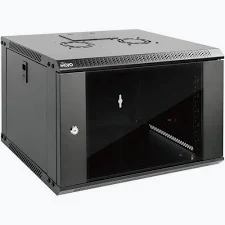
R & M 19″ 15U 600×600 FGD WM Cabinet
KSh 18,500.00
- 15U capacity for compatible 19-inch rack equipment
- 600 × 600 mm cabinet footprint
- Flat glass front door with locking provision
- Wall-mounted design for space-efficient installations
- Cable entry provisions for organized network connections
R&M 15U Wall Cabinet – 19″ 15U 600×600 FGD WM Cabinet
Organize and protect essential networking equipment with the R&M 15U Wall Cabinet. This professional wall-mounted enclosure provides structured rack space for network switches, patch panels, routers, and communication accessories. Its 19-inch mounting format and 15U capacity support organized installations in offices and technical rooms. The 600 × 600 mm footprint provides practical equipment space while helping preserve valuable floor area. A flat glass door offers visibility while keeping installed equipment behind a lockable enclosure.
What It Is
The R&M 19″ 15U 600×600 FGD WM Cabinet is a wall-mounted network enclosure designed for structured cabling and IT equipment. The product reference is R860050. Its 15U rack capacity accommodates compatible 19-inch equipment in a centralized installation.
The FGD designation identifies the flat glass door configuration, while WM indicates wall mounting. The glass door allows technicians to inspect equipment visually without opening the cabinet. Locking features help restrict access to installed hardware.
The cabinet’s steel construction provides a structured housing for network components. Cable entry openings help route network connections into the enclosure. Ventilation provisions support airflow planning around installed equipment. Before installation, confirm wall strength, equipment depth, cable routing, and the cabinet’s mounting requirements.
Review the R&M product catalogue for information about the manufacturer’s rack and enclosure solutions.
R&M 15U Wall Cabinet Technical Specifications
The following specifications describe the R860050 model. Confirm package details and revision-specific dimensions with your supplier before installation.
- Brand: R&M, Reichle & De-Massari
- Product name: 19″ 15U 600×600 FGD WM Cabinet
- Model number: R860050
- Product type: Wall-mounted network cabinet
- Rack format: Standard 19-inch equipment mounting
- Rack capacity: 15U
- Nominal width: 600 mm
- Nominal depth: 600 mm
- Approximate external dimensions: 600 × 600 × 774 mm, width × depth × height
- Construction: Steel enclosure
- Front door: Flat glass door with locking provision
- Mounting type: Wall-mounted
- Cable access: Cable entry provisions at the cabinet’s designated entry points
- Ventilation: Ventilation openings and provision for compatible cooling accessories, depending on configuration
- Typical environment: Indoor network and communications installations
- Primary applications: Structured cabling, LAN infrastructure, and equipment housing
A 15U cabinet provides approximately 667.5 mm of nominal vertical rack space. Actual usable equipment depth depends on rail positioning and cabinet construction. Verify the dimensions of switches, patch panels, power accessories, and other devices before installation.
For related technical information, consult the R&M wall enclosure catalogue.
Why Choose R&M 15U Wall Cabinet
Efficient Use of Available Space
Wall mounting helps keep network equipment off desks and floors. This is particularly useful in offices, retail premises, and communications rooms with limited floor space. The 15U capacity accommodates several compatible rack-mounted components in one location. A centralized enclosure also creates a defined point for managing network infrastructure.
Visibility and Controlled Access
The flat glass door allows users to inspect equipment status indicators without opening the cabinet. Its locking provision helps restrict casual access to installed devices. This can be useful in shared workplaces and rooms used by multiple staff members. Administrators should control keys and maintain suitable access procedures.
Organized Equipment and Cabling
The cabinet provides a defined mounting structure for compatible switches, patch panels, routers, and network accessories. Cable entry provisions help guide connections into the enclosure. Organized routing can simplify troubleshooting and equipment replacement. Suitable cable management accessories further improve accessibility and reduce clutter.
Practical Network Infrastructure Protection
A cabinet creates a physical enclosure around installed networking equipment. It helps organize hardware and reduce accidental contact during routine activities. Ventilation planning is important because switches and other devices generate heat. Use compatible cooling accessories where required, and follow each device manufacturer’s operating recommendations.
R&M 15U Wall Cabinet Use Cases
Offices and Business Networks
Businesses can install compatible switches, patch panels, routers, and network accessories in a central location. This arrangement supports organized connections between workstations, printers, and wireless access points. The wall-mounted design helps preserve floor space in small communications rooms. Clear port labelling and structured cabling make routine support easier.
Retail Shops and Commercial Premises
Retail businesses can use the cabinet to organize network equipment serving tills, computers, wireless access points, and compatible security systems. A lockable enclosure helps limit casual access to network hardware. Careful equipment placement also makes maintenance more manageable. Ensure the installation allows appropriate airflow and access for technicians.
Schools and Multi-User Facilities
Educational facilities often need centralized network equipment to connect offices, classrooms, laboratories, and shared spaces. A rack enclosure helps group compatible equipment together. Technicians can organize patch panels and switches while keeping connections accessible. Installation should account for wall construction, equipment weight, and safe maintenance access.
Network Installers and IT Technicians
Professional installers can use the cabinet for structured cabling projects and network upgrades. Before mounting, confirm the equipment’s rack width, required depth, power connections, and ventilation needs. Use suitable wall fixings and follow the manufacturer’s mounting instructions. Verify the complete installed load against the cabinet and mounting system’s documented limits.
Why Buy R&M Network Cabinets at Avidikventures
Avidikventures helps customers source networking equipment for offices, commercial installations, and IT infrastructure projects. Our product descriptions highlight practical applications and essential compatibility considerations. Contact our team if you need assistance planning a rack installation or selecting compatible accessories. Visit Avidik Ventures to explore networking and structured cabling products for your setup.













Reviews
There are no reviews yet.